
Essential Guide to Managing Multiple WordPress Sites
What you'll learn
 Centralized WordPress ManagementKey Dashboard FeaturesTypes of Management SolutionsBenefits of Dashboards
The Challenge of Multi-Site Management
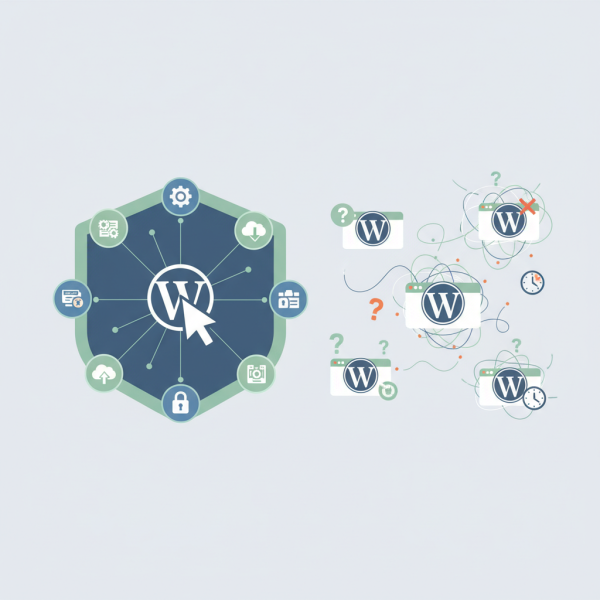
As your digital footprint expands and you find yourself overseeing more than one WordPress website, the daily tasks of updating, securing, backing up, and monitoring can quickly become overwhelming. Each site demands attention, and manually logging into multiple dashboards consumes valuable time and introduces potential for oversight. This is where WordPress management dashboards become indispensable tools, offering a centralized approach to handle the diverse needs of your entire WordPress portfolio efficiently and effectively.
Imagine logging into ten or twenty separate WordPress admin areas every week to check for updates, verify backups, or respond to security alerts. This scenario is a reality for many agencies, freelancers, and businesses managing an array of client sites or their own suite of projects. Without a centralized system, consistent maintenance becomes a significant burden.
- Time Consumption: Manually performing updates, backups, and security checks on individual sites is extremely time-consuming.
- Security Risks: Overlooking updates or security vulnerabilities on one site can compromise your entire network if not managed carefully.
- Inconsistent Maintenance: It's easy to miss crucial tasks or apply inconsistent practices across different sites.
- Troubleshooting Complexity: Diagnosing issues across multiple disparate sites without a unified view is challenging.
What are WordPress Management Dashboards?
WordPress management dashboards are third-party applications or services designed to provide a single interface for managing multiple WordPress installations. They act as a control hub, allowing you to perform administrative tasks, monitor site health, and implement changes across all connected sites from one central location. These tools are built to streamline workflow, enhance security, and ensure consistency in site maintenance.
Key Features to Look For
When evaluating different management dashboards, several core features stand out as essential for efficient multi-site management. Understanding these features will help you choose a solution that best fits your needs.
- Centralized Updates: This is arguably the most critical feature. It allows you to update WordPress core, plugins, and themes across all your connected sites simultaneously or in batches. This saves immense time and ensures your sites are always running the latest, most secure versions.
- Security Monitoring and Hardening: Dashboards often include tools for real-time security scanning, firewall management, and vulnerability detection. Some offer one-click hardening options or integration with popular security plugins.
- Backup and Restore Solutions: Automated, scheduled backups to various cloud storage providers are standard. The ability to easily restore a site to a previous state in case of a problem is invaluable.
- Uptime Monitoring: Get instant notifications if any of your sites go offline, allowing for quick response and minimal downtime.
- Performance Monitoring: Track site speed, identify bottlenecks, and sometimes even integrate with caching solutions to improve overall performance.
- Client & User Management: For agencies, managing client access, reporting, and even billing directly from the dashboard can be a significant advantage. User role management across multiple sites can also be simplified.
- Content Management (Limited): While not full-fledged content editors, some dashboards allow for basic post/page creation or modification across sites, or provide an overview of content updates.
Types of Management Solutions
Broadly, WordPress management dashboards can be categorized into two main types based on their hosting model.
- Self-Hosted Solutions: These are applications you install on your own server, often within a dedicated WordPress installation. MainWP is a prominent example in the open-source space. You maintain full control over your data and the software itself. This model is often preferred by those with a strong open-source ethos, as it avoids reliance on third-party cloud services for sensitive site data.
- Cloud-Based Solutions: These are services hosted by a provider, where you log into their web application to manage your sites. Examples include ManageWP and InfiniteWP (though InfiniteWP also has a self-hosted component). While convenient, you are entrusting your site data and access to a third party. They often come with subscription fees based on the number of sites.
For users interested in open-source software training, self-hosted solutions like MainWP offer an excellent opportunity to dive deeper into how such systems function and to maintain full control over their management environment.
Benefits of Using a Centralized Dashboard
Adopting a management dashboard brings a wealth of advantages, fundamentally transforming how you interact with your WordPress ecosystem.
- Enhanced Efficiency: Automate repetitive tasks, perform bulk actions, and drastically reduce the time spent on routine maintenance.
- Improved Security Posture: Consistent updates and proactive security monitoring minimize vulnerabilities across all sites.
- Greater Consistency: Ensure all sites adhere to the same standards for updates, backups, and security configurations.
- Reduced Risk of Errors: Centralized control minimizes the chances of human error that can occur when managing sites individually.
- Better Client Satisfaction (for agencies): Provide reliable uptime, faster updates, and quick issue resolution, leading to happier clients.
- Time and Cost Savings: While some solutions have a cost, the time saved often translates into significant financial benefits, freeing up resources for more strategic work.
Choosing the Right Dashboard for You
Selecting the best management dashboard depends on your specific needs, budget, and technical comfort level.
- Consider your budget: Are you looking for a free, open-source solution or willing to invest in a premium service?
- Evaluate necessary features: Make a list of your absolute must-have features (e.g., backups, security, updates) and desired additional functionalities.
- Hosting preference: Do you prefer a self-hosted solution for maximum control or a cloud-based service for ease of use?
- Scalability: How many sites do you manage now, and how many do you anticipate managing in the future? Ensure the solution can grow with you.
- Support and Community: Good support resources and an active community can be invaluable, especially for open-source options.
Getting Started
Once you've chosen a dashboard, the initial setup typically involves installing a lightweight "connector" or "client" plugin on each WordPress site you wish to manage. This plugin acts as a secure bridge, allowing your central dashboard to communicate with and control the individual sites. Follow the specific instructions provided by your chosen dashboard solution to connect your sites securely.
Conclusion
Managing multiple WordPress sites manually is a relic of the past, fraught with inefficiencies and security risks. WordPress management dashboards offer a powerful, centralized solution to streamline these complex tasks. By providing features like bulk updates, comprehensive security monitoring, and automated backups, these tools empower users to maintain a robust, secure, and high-performing portfolio of websites with significantly less effort. Embracing a management dashboard is a strategic move that enhances efficiency, strengthens security, and ultimately frees up valuable time for more creative and impactful work within the WordPress ecosystem.
Comprehension questions
 What are the primary challenges faced when managing multiple WordPress sites without a centralized dashboard?Name three essential features to consider when choosing a WordPress management dashboard.Explain the difference between self-hosted and cloud-based WordPress management solutions, and which might be preferred by open-source users.How do management dashboards contribute to improved security and efficiency for a portfolio of WordPress websites?