
Website Speed Performance Optimization
Course Details
In today's fast-paced digital world, website performance is not just a luxury; it's a fundamental requirement for success, especially for projects built with open source web software. Developers often focus heavily on features and functionality, but overlook the critical impact of slow load times on user experience, search engine rankings, and ultimately, user retention. A sluggish website can lead to higher bounce rates, frustrated users, and missed opportunities. Understanding and implementing effective speed optimization techniques is paramount to delivering a superior online experience.
One of the most powerful tools in a developer's arsenal for boosting speed is caching. Caching involves storing frequently accessed data so that future requests can be served more quickly, reducing the need to regenerate content or fetch it from its original source. This course will demystify various caching mechanisms, from browser-level caching to server-side strategies and the strategic use of Content Delivery Networks (CDNs), providing you with the knowledge to significantly reduce server load and page load times.
Images are frequently the largest contributors to slow page loads. Without proper optimization, high-resolution images can consume excessive bandwidth and delay the rendering of web pages. This course dives deep into image compression techniques, exploring both lossless and lossy methods, and introduces modern formats like WebP and AVIF. You'll learn how to implement responsive images, lazy loading, and other best practices to ensure your visuals enhance rather than hinder your site's performance.
Beyond on-page optimizations, the foundation of your website's speed often lies with your hosting provider. Choosing a fast, reliable, and appropriately scaled hosting solution is crucial. We will explore different types of hosting, discuss criteria for selecting a high-performance provider, and highlight how integrating a CDN can further enhance content delivery and global reach, ensuring your open source projects are accessible and snappy for users worldwide.
Join us to transform your understanding of web performance. This course offers practical, actionable strategies and insights into caching, image optimization, and smart hosting choices, empowering open source web software developers to build lightning-fast, highly responsive websites that delight users and drive engagement.
Course Contents (26 lessons)
- 1.
 Web performance is critical for digital success, directly enhancing user engagement, improving search engine rankings, and boosting conversion rates significantly.
 - 2.
 Master website performance optimization using Lighthouse, PageSpeed Insights, and GTmetrix to identify and resolve critical bottlenecks for enhanced user experience and SEO.
 - 3.
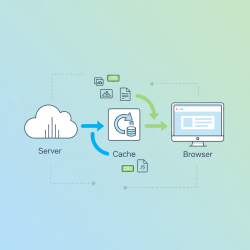 Implement effective browser-side caching rules using Cache-Control, Expires, Last-Modified, and ETag to minimize redundant data transfers and boost web performance significantly.
 - 4.
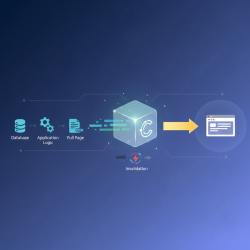 This article explores essential server-side caching techniques—database, object, and full-page caching—to significantly enhance the performance and scalability of dynamic web applications.
 - 5.
 Content Delivery Networks optimize web performance by globally distributing content, significantly reducing latency and improving load times for a superior user experience.
 - 6.
 Explore the crucial differences between lossless and lossy image compression techniques, understanding their mechanisms, benefits, drawbacks, and optimal applications for achieving reduced file sizes without sacrificing quality.
 - 7.
 Achieving optimal web performance involves strategically implementing responsive image techniques alongside modern formats like WebP and AVIF to ensure fast, high-quality visual delivery across all devices.
 - 8.
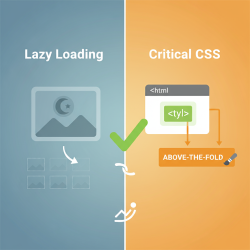 Learn how to significantly enhance website load times and user experience by implementing lazy loading for off-screen media and optimizing critical CSS delivery for faster initial rendering.
 - 9.
 Selecting the optimal hosting provider necessitates evaluating diverse hosting types and providers based on performance, scalability, and specific project requirements.
 - 10.
 This article details effective database optimization strategies, encompassing schema design, query tuning, and continuous monitoring, to achieve rapid data retrieval and bolster application performance.
 - 11.
 Minification and bundling are web performance techniques that reduce file sizes and HTTP requests, thereby improving website load times and user experience.
 - 12.
 This article outlines the critical steps for setting up comprehensive performance monitoring and establishing an iterative workflow for ongoing optimization efforts to enhance system efficiency and user experience.
 - 13.
 Discover how to significantly enhance your administrative workflow by customizing the Admin Toolbar and Dashboard Widgets, transforming your backend interface into a tailored, efficient, and user-friendly control center.
 - 14.
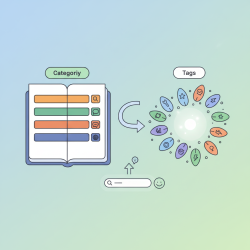 Effectively managing blog categories and tags organizes content, enhances user navigation, improves discoverability, and optimizes SEO for a superior user experience.
 - 15.
 This article thoroughly dissects a WordPress post, explaining how publication dates, author information, and featured images collectively optimize user experience and enhance SEO.
 - 16.
 Static website pages (About Us, Contact, Privacy Policy) are fundamental for fostering trust, credibility, legal compliance, and clear communication with an online audience.
 - 17.
 The WordPress Block Directory revolutionizes content creation by allowing users to seamlessly search, discover, and integrate new functional blocks directly within the editor, enhancing site functionality and user experience.
 - 18.
 Uncover how structural blocks like columns and groups enable the creation of sophisticated, multi-column web designs that are both responsive and visually compelling.
 - 19.
 Harnessing reusable blocks and patterns revolutionizes website development by enabling content creators to consistently deploy custom-designed sections across numerous pages and posts, dramatically enhancing efficiency and maintaining design uniformity.
 - 20.
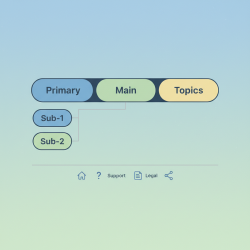 This guide covers building and managing primary, secondary, and footer navigation menus, emphasizing strategic development for optimal user experience and site usability.
 - 21.
 Harness the WordPress Customizer to instantly refine your site's visual appeal, making real-time changes to colors, typography, and core identity elements with immediate live previews.
 - 22.
 Proactive plugin updates and compatibility checks are paramount for website security, performance, and stability, requiring strategic planning, staging, and robust backups.
 - 23.
 Contact form plugins simplify building interactive forms for lead data and inquiries, offering advanced features, spam protection, and seamless integrations.
 - 24.
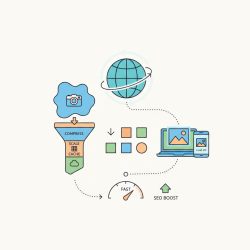 Mastering image optimization and scaling is crucial for achieving fast web loading times, crisp visual display, and an enhanced user experience across all devices.
 - 25.
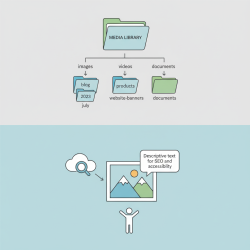 Using structured folders and descriptive alt-text is vital for transforming digital asset libraries into efficient, accessible, and SEO-friendly resources.
 - 26.
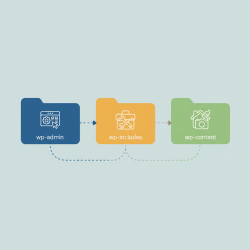 Grasping the WordPress file hierarchy, encompassing wp-admin, wp-content, and wp-includes, is fundamental for seamless site management, robust customization, and efficient troubleshooting.