
A Deep Dive into WordPress Core, Themes, and Plugins
What you'll learn
 WordPress Core FunctionalityThe Role of WordPress ThemesExtending with WordPress PluginsWordPress Architecture and Interplay
WordPress has evolved into the world's most popular content management system, powering a significant portion of the internet. For open-source enthusiasts and software trainers, understanding its fundamental architecture is crucial. This article breaks down the essential components that make WordPress function, exploring the interplay between its core system, the aesthetic layer of themes, and the functional extensions provided by plugins, giving you a solid foundation for development and administration.
Understanding WordPress: The Core System
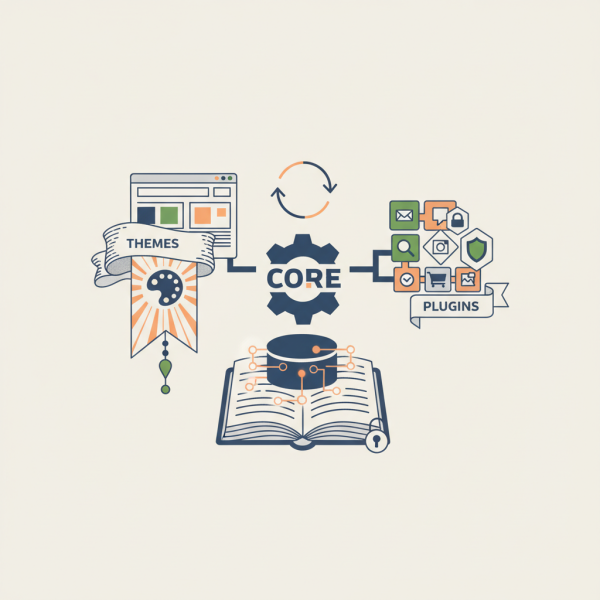
At its heart, WordPress is a collection of PHP scripts and database tables that provide the foundational functionalities for managing content. This "core" system handles the basic operations of a website, such as user management, content creation and editing (posts and pages), media uploading, and comment moderation. It's the engine that drives the entire platform, providing the application programming interfaces (APIs) that themes and plugins utilize to integrate seamlessly. The core is designed for stability and security, with regular updates providing bug fixes, performance enhancements, and new features. Modifying the core files directly is strongly discouraged, as these changes would be overwritten during subsequent updates. Instead, developers are encouraged to extend functionality through themes and plugins.
The Power of Appearance: Themes
A WordPress theme dictates the visual presentation and layout of your website. It controls everything from color schemes and typography to widget areas and header/footer designs. Essentially, the theme transforms the raw content provided by the WordPress core into a visually appealing and user-friendly experience for visitors. Themes are built using a combination of PHP, HTML, CSS, and JavaScript. They offer a vast range of customization options, from simple adjustments within the WordPress Customizer to extensive modifications of theme files for advanced users. Choosing the right theme is critical, as it impacts not only the site's aesthetics but also its performance, search engine optimization (SEO), and overall user experience.
Extending Functionality: Plugins
Plugins are perhaps the most powerful aspect of the WordPress ecosystem, allowing users to extend the platform's capabilities far beyond its out-of-the-box features without writing a single line of code. From contact forms and e-commerce stores to security enhancements and SEO tools, there's a plugin for almost every conceivable function. Plugins integrate with the WordPress core using action hooks and filters, injecting their code at specific points in the WordPress execution flow. While plugins offer incredible flexibility, it's important to choose them wisely.
- Quality and Compatibility: Opt for well-maintained plugins from reputable developers that are regularly updated and compatible with the latest WordPress versions.
- Performance Impact: Too many plugins, or poorly coded ones, can significantly slow down your website.
- Security Concerns: Malicious or vulnerable plugins can pose a significant security risk. Always download plugins from trusted sources like the official WordPress Plugin Directory.
The Database: The Unseen Foundation
While not directly part of the "core, themes, and plugins" trio, the MySQL or MariaDB database is an indispensable component of any WordPress site. This database stores all your website's dynamic content, including:
- Posts, pages, and comments
- User information and settings
- Plugin and theme configurations
- Media library metadata
Without the database, WordPress would have no content to display or settings to apply. Understanding its role emphasizes the importance of regular database backups and optimization for site performance and data integrity.
Interplay: How Core, Themes, and Plugins Work Together
Imagine WordPress core as the operating system, providing the basic framework and processing power. The theme then acts as the graphical user interface, defining how that information is presented to the user. Plugins are like applications, adding specific functionalities that the operating system doesn't inherently possess.
When a visitor accesses a WordPress site, the process unfolds like this:
- The WordPress core loads, initializes, and connects to the database.
- It retrieves the requested content and settings from the database.
- Plugins are activated, modifying or extending the core's behavior and the retrieved data as necessary.
- Finally, the active theme takes all this processed content and data, applies its design rules, and renders the complete webpage for the user's browser.
This modular architecture ensures that each component can be updated, replaced, or disabled independently, offering immense flexibility without disrupting the entire site, provided best practices are followed.
Best Practices for a Healthy WordPress Site
Maintaining a robust and secure WordPress site involves several key practices:
- Regular Updates: Keep WordPress core, themes, and plugins updated to their latest versions. This ensures security patches and performance improvements are applied.
- Reliable Hosting: Choose a hosting provider optimized for WordPress.
- Strong Security: Implement security plugins, strong passwords, and regular backups.
- Performance Optimization: Utilize caching plugins, optimize images, and review plugin usage to maintain site speed.
- Backup Strategy: Regularly back up your entire site (files and database) to an offsite location.
Summary
Understanding the anatomy of a WordPress site, comprising its robust core system, customizable themes, and extensible plugins, is fundamental for anyone working with this versatile platform. The core provides the foundational management capabilities, themes control the visual presentation, and plugins empower users to add virtually any desired functionality. All these components depend on a database for content storage and work in harmony through a modular architecture, enabling flexible and powerful website development. Adhering to best practices for updates, security, and performance ensures a healthy and efficient WordPress environment.
Comprehension questions
 What is the primary function of the WordPress core system, and why is direct modification discouraged?How do WordPress themes influence a website, beyond just its visual appearance?List three important considerations when choosing and using WordPress plugins.Explain the modular interplay between WordPress core, themes, and plugins when a user accesses a website.