
How to Build High-Converting Landing Pages with WordPress Core Blocks
What you'll learn
 Core Block UtilizationLanding Page Design PrinciplesConversion Optimization StrategiesOpen Source Efficiency
Creating a high-converting landing page is paramount for any online initiative, whether you're collecting leads, selling a product, or promoting an event. While many assume that building effective landing pages requires complex page builders or premium plugins, the truth is that WordPress's native core blocks offer a powerful, flexible, and often overlooked solution. For users immersed in the open-source ethos of WordPress, leveraging these built-in tools provides a lean, performant, and maintainable approach to achieving conversion goals without relying on third-party dependencies.
Understanding the Power of WordPress Core Blocks
WordPress core blocks are the fundamental building blocks of content in the Block Editor (Gutenberg). They are built directly into WordPress itself, meaning they are optimized for performance, security, and compatibility. Unlike heavy page builders that can introduce significant code bloat and potential conflicts, core blocks provide a lightweight foundation for design. This approach aligns perfectly with the open-source philosophy, offering transparency and control without hidden complexities.
Using core blocks exclusively simplifies your site architecture. You avoid the learning curve of new interfaces, reduce plugin dependencies, and ensure better long-term stability and faster load times for your landing pages. These benefits are critical for conversion, as slow pages deter visitors and impact search engine rankings.
Essential Core Blocks for High-Converting Landing Pages
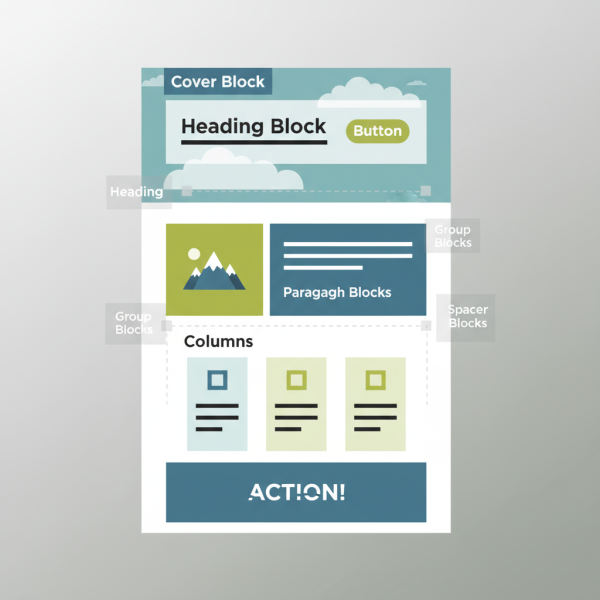
To construct an effective landing page, you'll primarily use a combination of these core blocks. Each serves a specific purpose in guiding your visitor towards your desired action.
- Heading Blocks (H1, H2, H3): These are crucial for establishing your page's hierarchy and clearly communicating your value proposition. Your H1 should be your main headline, immediately grabbing attention. Subsequent H2s and H3s break down information into digestible sections.
- Paragraph Blocks: The workhorse for your descriptive text, benefits, features, and testimonials. Keep paragraphs concise and easy to read, focusing on clarity and persuasive language.
- Image Blocks: Visuals are powerful. Use high-quality, relevant images to reinforce your message, build trust, and showcase your product or service. Ensure images are optimized for web performance.
- Button Blocks: The most critical element for your Call to Action (CTA). Buttons should stand out visually and use action-oriented text (e.g., "Get Started," "Download Now," "Learn More").
- Columns Block: This block allows you to create multi-column layouts, which are essential for organizing content effectively and creating visual balance. You can use it to display features side-by-side or create a layout for a form next to explanatory text.
- Cover Block: Ideal for creating impactful hero sections at the top of your landing page. You can place text (like your H1 and a call to action button) over a background image or video, making a strong first impression.
- Spacer Block: Often overlooked, the spacer block is vital for adding white space and improving readability. Strategic use of space prevents your page from looking cluttered and helps guide the user's eye.
- List Block: Perfect for outlining benefits, features, or steps in an easy-to-digest bulleted or numbered format.
- Group Block: This powerful block allows you to combine multiple blocks into a single unit. This is incredibly useful for applying consistent styling, managing layout, or moving entire sections of content together, streamlining your design process.
Designing for Conversion with Core Blocks
Effective design is about more than just aesthetics; it's about guiding the user. Here’s how core blocks facilitate a conversion-focused design:
- Clear Value Proposition: Utilize the Cover block for your hero section, featuring a bold Heading block for your primary message and a concise Paragraph block explaining your offering. Follow this with a prominent Button block for your main CTA.
- Compelling Visuals: Integrate Image blocks strategically to break up text and illustrate key points. Consider using the Media & Text block for a visually engaging layout of an image next to descriptive text.
- Strong Call to Action: Ensure your Button blocks are clearly visible, use contrasting colors, and feature compelling, action-oriented text. Place CTAs at logical points throughout the page, especially above the fold and near relevant information.
- Layout and Flow: Leverage the Columns block to create structured content sections, such as a feature list with icons (using Image blocks for icons) or testimonials. The Group block can help you segment different logical parts of your landing page, making it easier to manage and style.
- Mobile Responsiveness: One of the inherent strengths of core blocks is their built-in responsiveness. Content created with core blocks naturally adapts to different screen sizes, ensuring your landing page looks great and functions perfectly on desktops, tablets, and mobile phones without additional effort.
Tips for Optimizing Your Landing Page with Core Blocks
Beyond the selection of blocks, consider these best practices to maximize your conversion rates:
Keep it Focused: Every element on your landing page should serve a single conversion goal. Remove distractions like navigation menus (if applicable to your page template) or excessive links that pull users away from the CTA.
Use Clear, Concise Language: Write directly to your audience, highlighting benefits over features. Use simple vocabulary and short sentences to convey your message quickly and effectively.
Prioritize Above-the-Fold Content: Your most important information and primary CTA should be immediately visible when the page loads, without requiring the user to scroll.
Test and Iterate: Even with core blocks, you can conduct A/B tests (with tools like Google Optimize, if integrated) or simply make small changes and monitor your analytics. Experiment with different headlines, button texts, image choices, and layouts to see what resonates best with your audience.
Accessibility Considerations: Ensure your heading structures are logical, image alt text is descriptive, and color contrasts are sufficient. Core blocks inherently support many accessibility standards, but conscious content creation is key.
Summary
Building high-converting landing pages with only WordPress core blocks is not only feasible but often advantageous for performance and maintainability. By strategically employing blocks like Headings, Paragraphs, Images, Buttons, Columns, and the Cover block, you can construct professional, engaging, and conversion-focused pages. Understanding the purpose of each block and applying design principles like clear value propositions, strong CTAs, and optimized layouts will empower you to create effective landing pages that drive results, all within the robust and open-source framework of WordPress.
Comprehension questions
 What are the primary benefits of using only WordPress core blocks for building landing pages instead of third-party page builders?Name at least three essential core blocks and explain how each contributes to a high-converting landing page.How does the Group block enhance the design and management of content sections on a landing page?Besides block selection, what are two key best practices for optimizing a landing page for conversion?