
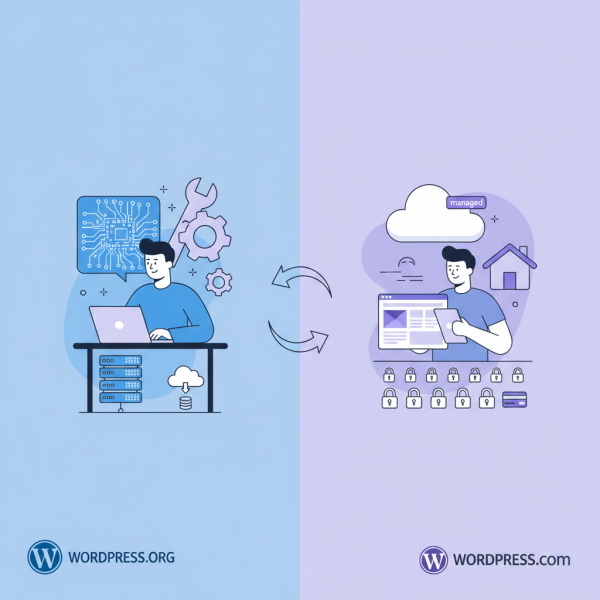
Choosing Between WordPress.org and WordPress.com for your Project
What you'll learn
 WordPress.org vs. WordPress.com DifferencesSelf-Hosted WordPress AdvantagesManaged WordPress LimitationsDeveloper Decision-Making Factors
For web software developers navigating the vast landscape of content management systems, WordPress often emerges as a dominant force. However, the presence of two distinct entities—WordPress.org and WordPress.com—can introduce a layer of complexity when choosing the ideal foundation for a project. While both are built upon the same open-source core, their operational models, flexibility, and target users diverge significantly. Understanding these distinctions is paramount for developers aiming to leverage WordPress effectively, whether for client projects, custom applications, or personal ventures, ensuring the chosen platform aligns precisely with technical requirements, scalability needs, and long-term project goals.
Understanding the Core Differences
At its heart, WordPress is an open-source CMS. This core software is freely available for anyone to download, modify, and use. The critical differentiator lies in how that software is hosted and managed.
WordPress.org represents the self-hosted version, often referred to simply as 'WordPress.' Developers download the software, procure their own web hosting, and manage every aspect of the installation. This grants unparalleled control and customization capabilities.
Conversely, WordPress.com is a commercial, managed hosting service provided by Automattic, the company co-founded by WordPress creator Matt Mullenweg. It offers various plans, from free to enterprise-grade, abstracting away much of the underlying server management and software maintenance.
WordPress.org: The Self-Hosted Powerhouse
For open-source developers, WordPress.org is often the platform of choice due to its inherent flexibility and control. It provides a blank canvas where virtually any customization is possible.
Key advantages include:
- Complete control over server environment, database, and file system.
- Unrestricted use of themes and plugins, including custom-built solutions and those from third-party marketplaces.
- Full access to the underlying code, enabling deep modifications, API integrations, and advanced debugging.
- No platform-imposed limitations on monetization, advertising, or content types.
- Freedom to choose any hosting provider, allowing for optimized performance, security, and scalability configurations tailored to specific project demands.
This level of control, however, comes with responsibilities. Developers are accountable for security updates, backups, performance optimization, and server maintenance. While this might seem daunting to a novice, for a seasoned developer, it represents an opportunity for precise engineering and a fully optimized stack.
WordPress.com: The Managed Solution
WordPress.com simplifies the WordPress experience by handling hosting, security, backups, and software updates. It's an attractive option for users who prioritize ease of use and minimal maintenance.
For developers, WordPress.com might be considered for projects where:
- Rapid prototyping or minimal viable products (MVPs) are needed without significant infrastructure setup.
- The client explicitly requires a hands-off, managed service with guaranteed uptime and support, and the project scope does not demand extensive custom coding or third-party plugin integration beyond what the platform allows.
- Budget constraints dictate a free or very low-cost hosting solution for a basic blog or portfolio, provided the limitations are acceptable.
While convenient, WordPress.com imposes certain restrictions, particularly on its free and lower-tier plans. Custom themes and plugins are often limited to higher-tier business plans, and direct server access is non-existent. The platform dictates the environment, potentially hindering highly specialized development needs or complex integrations requiring server-side adjustments.
Key Considerations for Developers
When making a decision, open-source web developers should evaluate several critical factors:
Project Scope and Customization Needs
If the project requires extensive custom functionality, unique integrations, specific server configurations, or relies heavily on a wide array of third-party plugins and themes, WordPress.org is almost always the superior choice. Its open nature allows for virtually unlimited modification and extension.
Budget and Resources
WordPress.org itself is free, but you'll need to pay for hosting, domain registration, and potentially premium themes/plugins. Factor in developer time for setup, maintenance, and security. WordPress.com offers tiered pricing, with free options and progressively more features at higher costs. While the initial investment might seem lower for WordPress.com, complex projects might quickly hit its limitations, forcing an upgrade or migration that could be more costly in the long run.
Scalability and Performance
With WordPress.org, scalability is largely in your hands. You can choose high-performance hosting, implement advanced caching, use CDNs, and optimize databases and code directly. WordPress.com handles scalability internally, which is convenient but offers less granular control for performance tuning specific to niche applications.
Security and Maintenance
On WordPress.org, you are responsible for maintaining security through updates, strong passwords, firewalls, and regular backups. This demands diligence. WordPress.com handles all core security and maintenance, providing peace of mind but removing the ability for bespoke security measures or rapid patching of zero-day vulnerabilities in a highly customized environment.
Ownership and Data Portability
With WordPress.org, you own your data and have complete control over its migration. Moving your site to a different host is straightforward. While WordPress.com allows data export, the ease and completeness of migration to a self-hosted environment can vary, particularly for complex sites built within its ecosystem.
Making the Right Choice
Ultimately, the choice hinges on the project's specific requirements and the developer's desired level of control and responsibility. For developers seeking maximum flexibility, unfettered access to the codebase, and the ability to tailor every aspect of their site, WordPress.org stands as the undisputed champion. It embodies the true spirit of open source, empowering developers to build, innovate, and scale without proprietary constraints.
Conversely, for simpler projects, personal blogs, or clients who explicitly need a fully managed, hands-off solution and are comfortable with the inherent platform limitations, WordPress.com offers a streamlined, low-maintenance alternative. It's a pragmatic choice when development complexity is minimal and speed to deployment is critical.
Conclusion
Distinguishing between WordPress.org and WordPress.com is crucial for developers. WordPress.org offers unparalleled control, flexibility, and customization for complex projects, demanding developer responsibility for hosting, security, and maintenance. WordPress.com provides a managed, simplified experience, ideal for less complex needs, sacrificing deep customization for ease of use. Developers must weigh project scope, budget, scalability, security, and data ownership to align the platform choice with specific project goals and technical demands, leveraging the strengths of each platform appropriately.
Comprehension questions
 What is the fundamental difference in how WordPress.org and WordPress.com are hosted and managed?List three key advantages of choosing WordPress.org for a web development project.In what scenarios might WordPress.com be a more suitable choice for a developer's project?Beyond control and flexibility, what other critical factors should developers consider when choosing between the two platforms?