
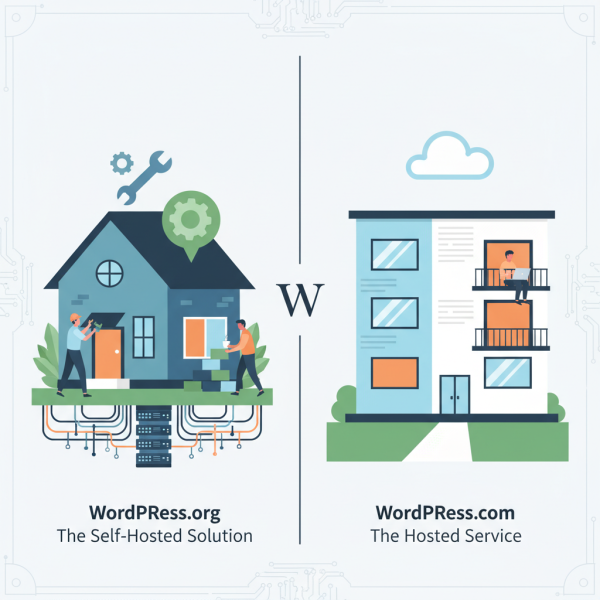
Comparison of WordPress.org vs. WordPress.com
What you'll learn
 WordPress.org FeaturesWordPress.com FeaturesSelf-Hosting vs. Managed ServiceControl and Flexibility Trade-offs
WordPress, a dominant force in content management systems, often presents a point of confusion for newcomers due to its two distinct entities: WordPress.org and WordPress.com. While both share the same foundational software, their operational models, levels of control, and target audiences differ significantly. This article aims to demystify these differences, providing a clear comparison essential for making informed decisions whether you're developing, deploying, or managing web presences.
At its core, WordPress is a powerful, open-source content management system (CMS) used by millions globally. It powers everything from simple blogs to complex e-commerce sites and corporate portals. Its extensibility through themes and plugins makes it incredibly versatile. However, the path you take to utilize WordPress—either through its self-hosted variant or its commercial hosted service—will dictate your experience, responsibilities, and the ultimate capabilities of your website.
WordPress.org: The Self-Hosted Solution
WordPress.org refers to the free, open-source software that you download and install on your own web hosting account. This is the true essence of open-source freedom, giving users complete command over their website's environment. This approach is highly favored by developers, businesses requiring extensive customization, and those with a strong understanding of web hosting and server management.
Control and Flexibility
The primary advantage of WordPress.org is the unparalleled control it offers. You have unrestricted access to the source code, allowing for deep customization. This means you can install any theme or plugin, regardless of its origin, including custom-developed solutions. There are no limitations imposed by a third party on functionalities, design elements, or database access. This level of flexibility is critical for intricate projects or applications that require unique integrations and specific server configurations.
Cost Implications
While the WordPress.org software itself is free, there are associated costs. You will need to purchase a domain name and web hosting from a provider of your choice. Hosting costs vary widely based on performance, storage, and support levels, ranging from a few dollars a month for shared hosting to hundreds for dedicated servers. Additionally, premium themes and plugins, while optional, often offer advanced features and professional support, adding to the overall investment. The financial commitment directly correlates with your site's traffic, complexity, and performance requirements.
Maintenance and Responsibility
With great control comes great responsibility. Managing a self-hosted WordPress site means you are responsible for all aspects of maintenance. This includes installing software updates for WordPress core, themes, and plugins, performing regular backups, managing security, and optimizing performance. While many hosting providers offer managed WordPress hosting plans that take care of some of these tasks, the ultimate oversight often remains with the user. This demands a certain level of technical proficiency or the willingness to invest in a skilled administrator.
WordPress.com: The Hosted Service
WordPress.com is a commercial service that utilizes the WordPress software but provides a fully managed hosting environment. It's akin to renting an apartment where the landlord handles most maintenance, but you have less freedom to renovate. Operated by Automattic, the company co-founded by WordPress creator Matt Mullenweg, WordPress.com offers various plans, from a free tier with basic functionality to premium business-level subscriptions.
Ease of Use and Managed Hosting
The main draw of WordPress.com is its simplicity and ease of getting started. Users can create a website in minutes without needing to worry about purchasing hosting, installing software, or managing server configurations. Automattic handles all the technical aspects: security, backups, updates, and performance optimization. This "hands-off" approach is ideal for beginners, hobbyists, or small businesses that prioritize convenience and don't require extensive customization or technical oversight.
Limitations and Scalability
While convenient, WordPress.com comes with inherent limitations, especially on its free and lower-tier paid plans. Users typically cannot install custom themes or plugins, limiting design flexibility and functionality. Advertising may be displayed on free sites, and the ability to monetize or integrate advanced analytics can be restricted. Scalability, while managed by Automattic, might involve upgrading to higher-priced plans to unlock features like custom CSS, SEO tools, or e-commerce capabilities. For advanced open-source enthusiasts, these limitations can feel restrictive.
Cost Structures
WordPress.com offers a range of pricing tiers. The free plan is excellent for personal blogs but comes with branding and functionality restrictions. Paid plans remove these limitations incrementally, offering custom domain names, more storage, access to premium themes, and the ability to install plugins (typically on Business and eCommerce plans). The cost can become comparable to, or even exceed, self-hosted solutions, especially for plans that offer plugin installation and advanced features, but it bundles hosting, maintenance, and support into a single fee.
Key Differences Summarized
To crystallize the distinctions for those in open-source software training, here's a concise overview:
- Ownership & Control: WordPress.org grants full ownership and control over your site and data. WordPress.com retains more control, managing the underlying infrastructure.
- Software & Hosting: .org is free software, requiring separate hosting. .com is a hosted service that uses the software.
- Customization: .org allows unlimited themes, plugins, and code modifications. .com has restrictions, especially on lower tiers, limiting plugin and theme choices.
- Maintenance: .org requires the user to manage updates, security, and backups. .com handles all technical maintenance.
- Monetization: .org offers unrestricted monetization options. .com may have restrictions on advertising or e-commerce unless on higher-tier plans.
- Technical Skill: .org requires more technical proficiency or dedicated IT resources. .com is designed for users with minimal technical skills.
When to Choose Which?
Making the right choice depends heavily on your specific needs, technical expertise, and project scope. Consider these scenarios:
- Choose WordPress.org if:
- You need full control over your website, including code-level customization.
- You plan to use specific plugins or themes not available or permitted on WordPress.com.
- You want to monetize your site without restrictions.
- You have the technical skills (or can hire them) to manage hosting, security, and updates.
- You require extensive database access or server configuration changes.
- Your open-source training emphasizes deep understanding and practical application of web technologies.
- Choose WordPress.com if:
- You're a beginner or prefer a hands-off approach to website management.
- You need a website quickly and with minimal setup hassle.
- You're primarily blogging and don't require extensive custom functionality.
- You want built-in security, backups, and updates handled for you.
- Your budget is tight for a basic blog (free plan) or you prefer a predictable all-inclusive monthly fee.
- Your focus is on content creation rather than technical implementation.
Summary
In summary, while both WordPress.org and WordPress.com leverage the same powerful open-source software, they cater to fundamentally different user requirements. WordPress.org offers unmatched flexibility, control, and customization, making it the preferred choice for developers, businesses with unique needs, and those committed to a deep dive into open-source web development. However, it demands technical responsibility for hosting, maintenance, and security. Conversely, WordPress.com provides a streamlined, managed experience, ideal for beginners, hobbyists, or content creators who prioritize ease of use and convenience over complete control and extensive customization. The choice ultimately hinges on balancing freedom and responsibility against simplicity and convenience, a core consideration for any aspiring open-source software professional.
Comprehension questions
 What are the primary responsibilities a user takes on when opting for a self-hosted WordPress.org website?How does the customization potential differ between WordPress.org and WordPress.com, particularly concerning themes and plugins?For which type of user or project is WordPress.com typically more suitable, and why?Beyond the initial software, what are the main cost considerations for setting up and maintaining a WordPress.org site?