
What you'll learn
 WordPress Database FundamentalsKey Database TablesDatabase Interaction and Best PracticesPerformance and Security
For any open source web software developer working with WordPress, a deep understanding of its underlying database structure is not just beneficial, it's essential. WordPress relies heavily on a MySQL (or MariaDB) database to store virtually every piece of information that makes up a website, from posts and pages to user data, settings, and plugin configurations. Grasping how this data is organized and interconnected allows for more efficient debugging, robust plugin and theme development, and critical performance optimization. This article provides a high-level overview, dissecting the core tables and their relationships, offering insights into best practices for interacting with this foundational component of any WordPress site.
The Core of WordPress Data Storage
At its heart, WordPress treats its content and settings as structured data within a relational database. MySQL, being the most common choice, organizes this data into numerous tables. Each table serves a specific purpose, storing a particular type of information. A fundamental aspect to note is the use of a table prefix (defaulting to wp_) for all core WordPress tables. This prefix is crucial for security, allowing multiple WordPress installations to share a single database, and preventing naming conflicts.
When you install WordPress, it automatically creates a set of tables. While the exact number can vary slightly with different versions or specific plugins, the core set remains consistent, forming the backbone of your site's data.
Key WordPress Database Tables
Understanding the primary tables is paramount. Here's a breakdown of the most frequently interacted-with tables:
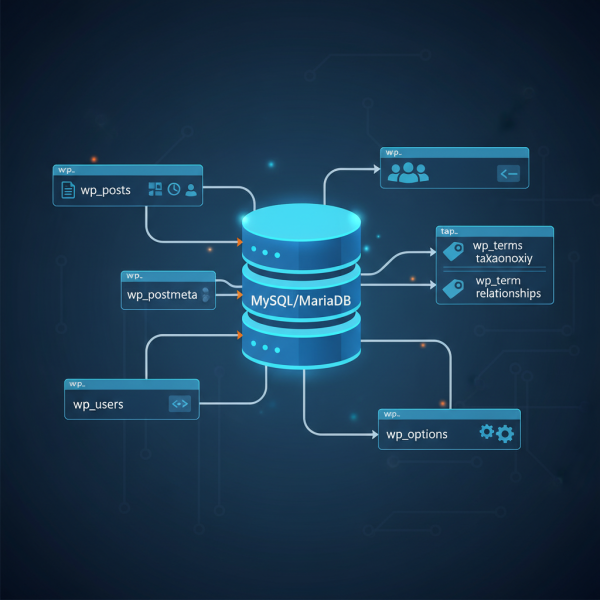
wp_posts: This is arguably the most critical table, storing all content types. This includes posts, pages, custom post types (like products in an e-commerce site or portfolio items), menu items, and even post revisions. Key columns includeID,post_author,post_date,post_content,post_title,post_status, andpost_type.wp_postmeta: This table stores custom fields (meta data) associated with entries in thewp_poststable. It uses a key-value pair system, linking to a specific post viapost_id. Plugins frequently leverage this table to store additional data related to posts or pages.wp_comments: As the name suggests, this table houses all comments submitted to your site. Columns includecomment_ID,comment_post_ID(linking to the post),comment_author,comment_date, andcomment_content.wp_commentmeta: Similar towp_postmeta, this table stores custom fields for comments, linking viacomment_id.wp_users: This table contains information about all registered users on your WordPress site, including their username, password (hashed), email address, and registration date.wp_usermeta: Stores additional metadata for users, such as their first name, last name, capabilities, assigned roles, and any custom user profile fields added by plugins. It links towp_usersviauser_id.wp_options: This is a crucial table for site-wide settings. It stores a vast array of information including general site settings (site title, URL), active theme, active plugins, plugin settings, and transient data. Many settings in the WordPress admin panel are stored here.- Taxonomy Tables (
wp_terms,wp_term_taxonomy,wp_term_relationships): These three tables work in conjunction to manage categories, tags, and custom taxonomies.wp_terms: Stores the actual names of terms (e.g., "Technology," "WordPress").wp_term_taxonomy: Defines the taxonomy type for each term (e.g., "category," "post_tag") and links to the term.wp_term_relationships: Links posts (fromwp_posts) to terms (fromwp_terms) through their taxonomy.
wp_links: This table, less used in modern WordPress, was historically for managing the "Blogroll" links.
Relationships and Data Integrity
While MySQL itself doesn't always enforce explicit foreign key constraints in WordPress's default schema, the relationships between tables are conceptually vital. For instance, wp_postmeta entries are inextricably linked to wp_posts via the post_id column. Similarly, wp_usermeta entries relate to wp_users via user_id. Understanding these relationships is key to writing effective database queries and ensuring data integrity when developing custom solutions or performing manual database operations.
WordPress's API functions abstract many of these relationships, but knowing the underlying structure helps in debugging issues where data might seem disconnected or corrupted.
Working with the Database: Developer Best Practices
For developers, direct interaction with the WordPress database should generally be mediated through WordPress's robust API functions. The WPDB class provides a powerful interface for executing custom SQL queries, but using higher-level functions like get_post_meta(), update_post_meta(), get_option(), update_option(), wp_insert_post(), or wp_delete_post() is always preferred.
Why use the API over direct SQL?
- Security: API functions handle escaping and sanitization, greatly reducing SQL injection vulnerabilities.
- Caching: Many API functions leverage WordPress's internal object cache, improving performance.
- Data Integrity: They ensure all related data (e.g., post meta when deleting a post) is handled correctly.
- Future Compatibility: The API provides an abstraction layer, making your code more resilient to potential changes in the underlying database schema in future WordPress versions.
When developing plugins or themes that require custom tables, remember to manage their creation and removal properly during activation and deactivation, often using dbDelta() for schema updates. Always adhere to WordPress coding standards for database interactions.
Performance and Security Considerations
Database performance is critical for a fast WordPress site. Developers should consider:
- Indexing: Ensure custom tables have appropriate indexes on frequently queried columns to speed up data retrieval. WordPress core tables are already well-indexed.
- Caching: Implement object caching and persistent caching solutions to reduce database load.
- Transients: Use the Transients API (
set_transient,get_transient) to temporarily cache complex query results or API responses, storing them inwp_optionswith an expiration. - Revisions: Manage post revisions to prevent the
wp_poststable from growing excessively large, impacting backup times and query performance.
From a security standpoint, always use a unique table prefix that is not wp_. This minor change significantly reduces the risk of automated SQL injection attacks targeting default WordPress tables. Always sanitize user input and escape output when interacting with the database, regardless of whether you're using the API or direct queries via WPDB.
Summary
The WordPress database, primarily powered by MySQL, is a meticulously structured system that underpins every aspect of a WordPress site. By familiarizing ourselves with key tables like wp_posts, wp_postmeta, wp_users, wp_usermeta, and especially wp_options, developers gain the power to build more robust, secure, and performant solutions. While direct database interaction is possible via the WPDB class, leveraging WordPress's API functions is the recommended best practice for security, performance, and maintainability. A deep understanding of this foundational element is indispensable for any serious WordPress developer looking to master the platform.
Comprehension questions
 What is the primary role of the wp_options table in a WordPress installation?Explain the conceptual relationship between wp_posts and wp_postmeta.Why is it generally recommended to use WordPress API functions instead of direct SQL queries when developing for WordPress?What is the significance of the table prefix in a WordPress database, and how does it contribute to security?