User-Friendly Content, Categories, and Navigation
- -->> 4. User-Friendly Content, Categories, and Navigation
What you'll learn
 Engaging Content CreationContent Categorization StrategiesIntuitive Navigation DesignUser Experience Principles
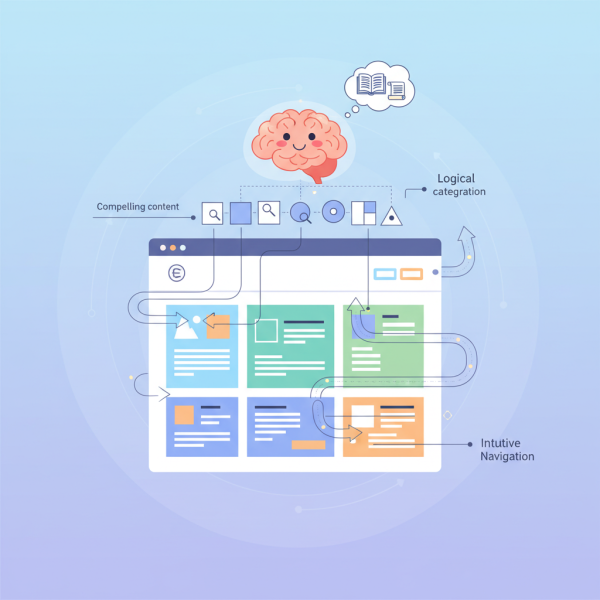
At the heart of a successful website lies a powerful triad: compelling content, logical categorization, and intuitive navigation. These three elements, when meticulously crafted and harmonized, work together to create an exceptional user experience that keeps visitors engaged, helps them find what they need effortlessly, and ultimately drives the desired actions, whether it's making a purchase, subscribing to a newsletter, or simply absorbing information. Understanding how to create, manage, and integrate these components is fundamental for any digital presence aiming for efficacy and longevity.
The Foundation of Engagement: Crafting Compelling Content
Content is the magnetic force that draws users to your site and keeps them coming back. It's not enough to simply fill pages with text; the content must be relevant, valuable, and presented in an engaging manner. High-quality content establishes authority, builds trust, and solves user problems or answers their questions.
Begin by thoroughly understanding your target audience. Who are they? What are their pain points, interests, and motivations? Tailoring your content to resonate with their specific needs ensures its relevance and increases its impact. Conduct keyword research to understand the language your audience uses and what they are searching for.
Vary your content formats to cater to different learning styles and preferences. This can include well-researched articles, informative blog posts, captivating images, illustrative infographics, engaging videos, and concise FAQs. A mix of media keeps the experience dynamic and visually appealing, preventing monotony and encouraging deeper interaction.
Crucially, all content should be clear, concise, and easy to read. Break up large blocks of text with headings, subheadings, short paragraphs, and bulleted lists. Use simple language, avoid jargon where possible, and proofread meticulously for errors. A strong call to action (CTA) should naturally follow valuable content, guiding users on their next step without being overly pushy.
Structuring Information: Effective Content Categorization
Once you have a wealth of engaging content, the next challenge is organizing it in a way that makes sense to your users. Effective content categorization is paramount for discoverability and a seamless user journey. Without a logical structure, even the most brilliant content can get lost in a digital maze, frustrating visitors and leading to high bounce rates.
The primary goal of categorization is to group related pieces of content together. This allows users to quickly grasp the scope of information available and navigate directly to topics of interest. Think of categories as signposts guiding users through your website's knowledge base.
When developing your categories, strive for intuition and consistency. Categories should be mutually exclusive where possible, ensuring that a piece of content doesn't ambiguously fit into multiple top-level categories. Use clear, descriptive labels that are easily understood by your audience, avoiding internal jargon.
Consider a hierarchical structure where broad categories branch out into more specific subcategories. This mimics how users often think about information, moving from general interests to niche topics. Tags, on the other hand, offer a more flexible, non-hierarchical way to associate content with multiple keywords or themes, enhancing searchability without dictating a primary organizational path.
Tips for Effective Categorization:
- Keep it Logical: Group related content together based on common themes, topics, or user intent.
- Be Consistent: Apply categories uniformly across your website. Once a category is defined, stick to its purpose.
- Use Clear Labels: Category names should be self-explanatory and descriptive. Avoid ambiguity.
- Don't Overdo It: Too many categories can be overwhelming. Aim for a manageable number of main categories, then use subcategories or tags for greater detail.
- User-Centric Design: Always consider how your users would naturally look for information.
Guiding Users: Building Intuitive Navigation Menus
Navigation is the user's roadmap through your website. An intuitive navigation menu is not just a convenience; it's a critical component of user experience, directly impacting how easily users can find information, understand your site's structure, and accomplish their goals. Poor navigation is a common reason visitors abandon a site.
The main navigation menu, often positioned at the top of the page, should provide clear access to your site's most important sections. Its design should be clean, uncluttered, and highly visible. Crucial elements often include a readily clickable logo linking back to the homepage, prominent primary menu items, and perhaps a search bar for specific queries.
Consistency is key in navigation design. Once users learn how to navigate one section of your site, they should be able to apply that knowledge to other areas. This applies to the placement of menus, the labeling of links, and the overall interaction patterns. Don't surprise users with radically different navigation schemes on different pages.
Ensure your navigation is fully responsive, adapting seamlessly to various screen sizes and devices, especially mobile phones. A well-implemented "hamburger" menu for smaller screens, for instance, provides a clean solution without sacrificing functionality. Beyond the main menu, consider other navigational aids like a clear footer menu, breadcrumbs for indicating location, and a sitemap for comprehensive overview.
Best Practices for Navigation Menus:
- Clear and Concise Labels: Use simple, understandable words for menu items. Avoid jargon or clever but ambiguous terms.
- Logical Grouping: Organize menu items hierarchically, putting related pages under a main category.
- Consistent Placement: Place your main navigation in a predictable location (e.g., top of the page).
- Visual Hierarchy: Use design elements (font size, color, spacing) to indicate the importance of different menu items.
- Responsive Design: Ensure the navigation works flawlessly on desktops, tablets, and mobile devices.
- Testing: Regularly test your navigation with real users to identify pain points and areas for improvement.
The Synergy of UX: Content, Categories, and Navigation Working Together
Individually, engaging content, effective categorization, and intuitive navigation are powerful. However, their true potential is unlocked when they are harmoniously integrated. They form a robust ecosystem where content gives meaning to categories, categories organize content for navigation, and navigation provides the pathways for users to discover that content.
Imagine a user landing on your site. Engaging content immediately captures their attention. Logical categories allow them to quickly filter and explore related topics. Intuitive navigation then effortlessly guides them through those categories to find exactly what they're looking for. This seamless journey minimizes cognitive load, fosters satisfaction, and encourages deeper exploration and interaction.
Regularly review and update your content, categories, and navigation based on user feedback, analytics data, and evolving business goals. A website is a living entity, and continuous refinement ensures it remains user-friendly and effective over time. Embrace A/B testing for different navigation layouts or category names to optimize performance.
Conclusion
Creating and managing an engaging, user-friendly website is an ongoing endeavor built upon a tripartite foundation: compelling content, strategic categorization, and intuitive navigation. By prioritizing high-quality, relevant content that speaks to your audience, organizing that content into logical and easily discoverable categories, and crafting navigation menus that effortlessly guide users, you establish a powerful online presence. This holistic approach ensures visitors not only find what they need but also enjoy the process, leading to increased satisfaction, longer visits, and successful conversions, making your website a truly effective tool for communication and engagement.
Comprehension questions
 What are the three main pillars of a user-friendly website experience discussed in the article?Why is understanding your target audience crucial when creating website content?What is the primary benefit of effectively categorizing website content?Name two key characteristics of an intuitive navigation menu.
Review Quiz
Next Lesson

Course Contents : Joomla Website QuickStart Guide
- >> 4.
 User-Friendly Content, Categories, and Navigation