Fast, SEO-Friendly, and Accessible Layouts
- -->> 9. Fast, SEO-Friendly, and Accessible Layouts
What you'll learn
 Gutenberg PerformanceSEO Best PracticesWeb Accessibility StandardsEfficient WordPress Development
Building beautiful and functional websites with WordPress's Gutenberg editor opens up a world of creative possibilities. However, true success extends beyond aesthetics. To deliver an exceptional user experience and achieve strong online visibility, it is crucial to optimize your Gutenberg-built layouts for performance, search engine optimization (SEO), and accessibility. This comprehensive guide will walk you through the essential best practices, ensuring your digital content loads quickly, ranks well in search results, and is usable by everyone, regardless of their abilities or browsing methods.
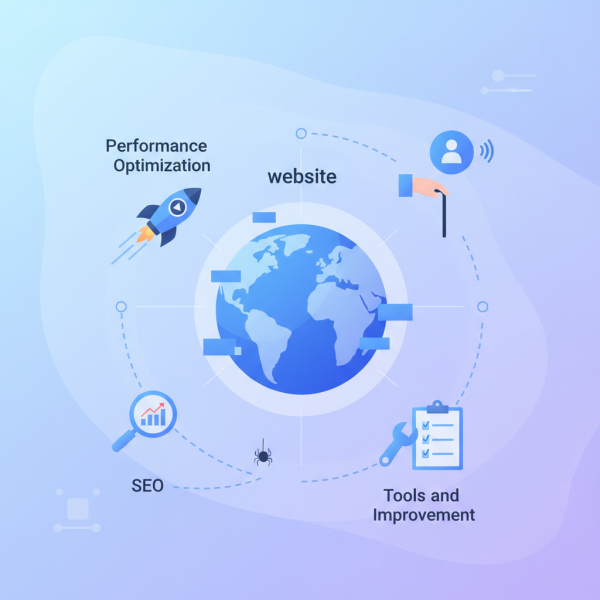
Performance Optimization for Blazing Fast Layouts
Website speed is paramount. Slow-loading pages frustrate users, increase bounce rates, and negatively impact your search rankings. Optimizing Gutenberg layouts for performance involves several key strategies.
- Minimize Block Bloat: Only use the blocks absolutely necessary for your content. Every block, especially complex third-party ones, can add to the page's HTML, CSS, and JavaScript footprint. Audit your block usage and deactivate plugins that provide unused blocks.
- Optimize Images: Images are often the largest contributors to page size. Compress images before uploading them, use modern formats like WebP, and implement lazy loading. Ensure images are appropriately sized for their display context, avoiding oversized files that browsers must resize.
- Efficient CSS and JavaScript: Gutenberg generates its own styles. To enhance performance, minimize additional CSS and JavaScript. Defer non-critical JavaScript and consider using plugins that can generate critical CSS to speed up initial page renders. Consolidate and minify your code whenever possible.
- Leverage Caching Strategies: Implement robust caching at both the server level and through WordPress plugins. Caching stores static versions of your pages, significantly reducing server load and speeding up delivery for repeat visitors.
Boosting SEO Through Structured and Semantic Content
Search engine optimization is vital for discovery. Gutenberg provides a powerful framework for creating SEO-friendly content if best practices are followed. A well-structured layout signals relevance and quality to search engines.
- Semantic HTML: Use headings (H1, H2, H3, etc.) correctly to structure your content hierarchically. An H1 should be unique to the page title, with subsequent headings used logically to break down sections. Utilize lists and paragraphs appropriately. This not only improves readability for humans but also for search engine crawlers.
- Effective Meta Descriptions and Titles: While not directly part of Gutenberg blocks, SEO plugins integrate seamlessly to allow you to control your page titles and meta descriptions. Craft compelling titles and descriptions that include relevant keywords and accurately summarize your content to entice clicks from search results.
- Descriptive Image Alt Text: Every image should have descriptive alt text. This provides context for search engines and, more importantly, for screen readers, explaining the image to visually impaired users.
- Structured Data Implementation: Use structured data (Schema Markup) to give search engines more context about your content. Many Gutenberg blocks and plugins offer options to easily add schema for articles, recipes, products, and more, leading to rich snippets in search results.
Ensuring Universal Accessibility for All Users
Accessibility is not just a compliance requirement; it is about inclusivity and ensuring everyone can access and interact with your content. Gutenberg offers a solid foundation, but mindful design and development are key.
- Keyboard Navigability: All interactive elements, such as links, buttons, and form fields, must be fully navigable and operable using only a keyboard. Ensure a logical tab order and visible focus indicators.
- Adequate Color Contrast: Text and important graphical elements must have sufficient contrast against their background. Tools are available to check contrast ratios against WCAG (Web Content Accessibility Guidelines) standards. Poor contrast makes content unreadable for users with visual impairments.
- Clear and Descriptive Link Text: Avoid generic link texts like "click here" or "read more." Instead, use descriptive phrases that indicate the link's destination or purpose, providing context for all users, especially those using screen readers.
- Semantic Structure Revisited: Beyond SEO, correct use of headings, paragraphs, and lists is fundamental for accessibility. Screen readers rely on this structure to help users understand the page layout and navigate content efficiently.
- Consider ARIA Attributes: For more complex interactive components built with custom blocks, ARIA (Accessible Rich Internet Applications) attributes can provide additional semantic information to assistive technologies, enhancing the user experience.
Tools and Continuous Improvement
Optimizing for performance and accessibility is an ongoing process. Leverage available tools and adopt a mindset of continuous improvement.
- Utilize Core Blocks: Whenever possible, favor WordPress core blocks. They are generally well-optimized for performance, SEO, and accessibility, benefiting from extensive testing and development by the WordPress community.
- Regular Testing: Routinely test your site's performance and accessibility. Tools like Google Lighthouse, PageSpeed Insights, and accessibility checkers (e.g., WAVE, Axe DevTools) provide invaluable insights and actionable recommendations.
- Choose Quality Themes and Plugins: Select themes and plugins that are known for their performance, clean code, and accessibility standards. Bloated or poorly coded add-ons can quickly undo your optimization efforts.
- Stay Updated: Keep your WordPress core, theme, and all plugins regularly updated. Updates often include performance enhancements, security fixes, and accessibility improvements that can benefit your site.
Summary
Optimizing your Gutenberg-built layouts for performance, SEO, and accessibility is a critical endeavor that enhances user experience, improves search engine visibility, and ensures inclusivity for all. By focusing on minimizing block bloat, optimizing media, leveraging semantic HTML, crafting descriptive alt text, ensuring keyboard navigability, and maintaining adequate color contrast, you can create a robust and user-friendly website. Regular testing with developer tools and a commitment to using quality, updated components will further solidify your site's foundation, leading to a faster, more discoverable, and universally accessible online presence.
Comprehension questions
 What are three key strategies for optimizing Gutenberg layouts for performance?How does semantic HTML contribute to both SEO and accessibility in Gutenberg?Name two specific best practices for ensuring keyboard navigability in Gutenberg layouts.Why is descriptive alt text important for images, covering both SEO and accessibility benefits?
Review Quiz
Next Lesson
Course Contents : WordPress Gutenberg: Advanced Block Editor Techniques
- >> 9.
 Fast, SEO-Friendly, and Accessible Layouts