WordPress Posts: Chronology and Categorization
- -->> 2. WordPress Posts: Chronology and Categorization
What you'll learn
 WordPress Post CharacteristicsChronological Content OrderingHierarchical Content CategorizationGranular Tagging for Discoverability
WordPress posts are the bedrock of any dynamic website built on the platform, serving as the primary vehicle for delivering timely and engaging content. Unlike static pages, posts are inherently designed for regular updates, discussions, and the continuous flow of information. Understanding the distinct characteristics of WordPress posts, particularly their chronological nature and robust categorization capabilities, is crucial for anyone looking to effectively manage a blog, news portal, or any content-rich website.
The Foundational Role of WordPress Posts
At its core, a WordPress post is a single entry in a series of entries, typically displayed in reverse chronological order. This fundamental design makes posts ideal for content that is time-sensitive or that benefits from a serial presentation. Think of blog articles, news updates, press releases, or even personal journals – all perfect candidates for posts.
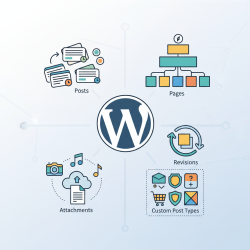
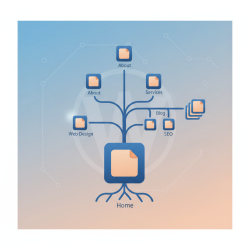
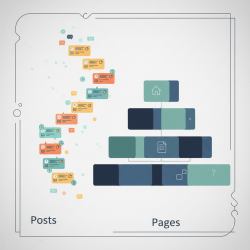
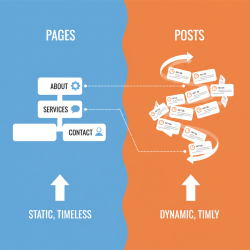
Posts are distinct from pages in several key ways. While pages are static, hierarchical, and often used for evergreen content like "About Us" or "Contact," posts are dynamic, non-hierarchical by default (though organized by categories), and time-stamped. This distinction is vital for structuring a website effectively and guiding both search engines and human visitors to the right information.
Each post in WordPress comes with built-in features that enhance its dynamic nature. These include the ability to easily add a publish date, author information, comments sections, and connections to various taxonomies like categories and tags. These elements combine to create a rich, interactive content experience.
The Chronological Nature of Posts
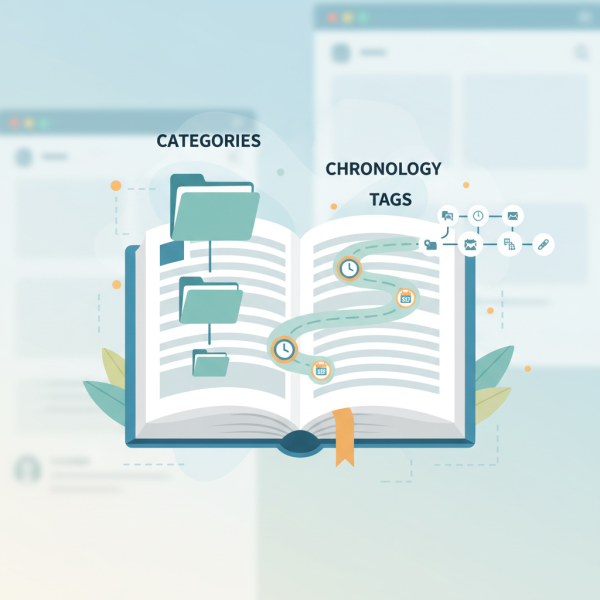
One of the most defining characteristics of WordPress posts is their inherent chronological order. By default, when you publish a new post, it appears at the top of your blog feed or archives, pushing older content down. This "newest first" arrangement is what gives blogs their dynamic, ever-updating feel.
This chronological order isn't just a display preference; it's a core functional aspect. It allows users to quickly see the latest updates and follow the progression of content over time. This is particularly beneficial for news websites, personal blogs, or any site where timeliness is a factor. Readers can easily identify new content and distinguish it from older, archived material.
WordPress leverages this chronological order through its powerful archive system. Posts are automatically archived by year, month, and sometimes even day. This means visitors can browse content from specific periods, making it simple to revisit past articles or explore the historical context of a topic. This structured archiving enhances content discoverability and user experience.
Mastering Categorization for Organization
While chronology dictates the display order, categories are fundamental for organizing posts into logical, broad topics. Categories are hierarchical, meaning you can have parent categories and child categories, creating a structured taxonomy. For example, a parent category "Technology" might have child categories like "Software," "Hardware," and "Artificial Intelligence."
The primary purpose of categories is to group related posts, making it easier for users to navigate your site and find content that interests them. A well-thought-out category structure is like a table of contents for your blog, providing a clear roadmap through your content. It helps users understand the general subject matter of a post before even clicking on it.
Effective categorization also plays a significant role in search engine optimization (SEO). Search engines use categories to understand the overarching themes of your website, which can improve your site's visibility for relevant queries. Consistency in category usage across your posts is key to leveraging this benefit.
The Role of Tags for Specificity
Complementing categories are tags, which offer a more granular, non-hierarchical way to describe specific details within your posts. Think of tags as index keywords that highlight particular points of interest or micro-topics covered in an article. Unlike categories, tags do not have a parent-child relationship; each tag stands alone.
For instance, a post categorized under "Technology" and "Software" might have tags like "cloud computing," "data privacy," "open source," or "web development." These tags provide precise descriptors that can span multiple categories, creating connections between seemingly disparate posts based on shared specific elements.
Tags are invaluable for enhancing content discovery. They allow users to explore highly specific topics and find related content across your site that might not fit neatly into a single category. From an SEO perspective, tags help search engines understand the niche aspects of your content, potentially leading to better rankings for long-tail keywords.
Practical Applications and Best Practices
To maximize the utility of WordPress posts and their organizational tools, consider these best practices:
- Plan Your Taxonomies: Before you start publishing extensively, define a clear category structure that aligns with your website's purpose and content themes. Avoid creating too many categories or making them overly broad or narrow.
- Be Consistent: Use categories and tags consistently across all your posts. Inconsistent tagging or categorization can confuse users and dilute SEO benefits.
- Use Both Categories and Tags Strategically: Categories for broad topics, tags for specific details. A good rule of thumb is to assign one or two categories per post and multiple relevant tags.
- Consider User Experience: Think about how a visitor would navigate your content. Do your categories and tags make it easy for them to find what they're looking for?
- Review and Refine: Periodically review your categories and tags. As your content evolves, you might need to adjust or merge taxonomies to maintain optimal organization.
By thoughtfully applying these principles, you can transform a collection of individual posts into a highly organized, easily navigable, and SEO-friendly content hub.
Summary
WordPress posts are foundational for dynamic websites, characterized primarily by their chronological display and powerful organizational tools. The inherent time-based ordering ensures that fresh content is always at the forefront, supported by automatic archiving for historical context. Complementing this, categories provide a hierarchical system for broad topic grouping, enhancing site navigation and SEO, while tags offer granular, non-hierarchical descriptors for specific content details, boosting discoverability. Mastering the strategic use of both chronology and these taxonomies is essential for creating an engaging, user-friendly, and searchable online presence.
Comprehension questions
 What is the primary difference between a WordPress post and a WordPress page?How does the chronological nature of WordPress posts benefit website visitors and content management?Explain the main distinction between WordPress categories and tags, and how they complement each other.List three best practices for effectively using categories and tags to organize WordPress posts.
Community Poll
Next Lesson
Course Contents : WordPress Posts vs. Pages for Developers
- >> 2.
 WordPress Posts: Chronology and Categorization