Examples of Posts for Dynamic Content
- -->> 5. Examples of Posts for Dynamic Content
What you'll learn
 Content OrganizationDynamic DisplayScalabilityUser Engagement
WordPress Posts are often synonymous with blog articles, a chronological feed of information. However, limiting their utility to just blogging overlooks their profound potential as a powerful tool for managing a vast array of dynamic content types across a website. Beyond traditional news or articles, strategically employing WordPress Posts can transform how you organize, display, and scale various interactive and frequently updated sections of your site, offering flexibility and efficiency that static pages simply cannot match. Understanding when and how to leverage this core WordPress feature for dynamic content is crucial for building robust, maintainable, and highly functional websites.
Understanding WordPress Posts Beyond Blogs
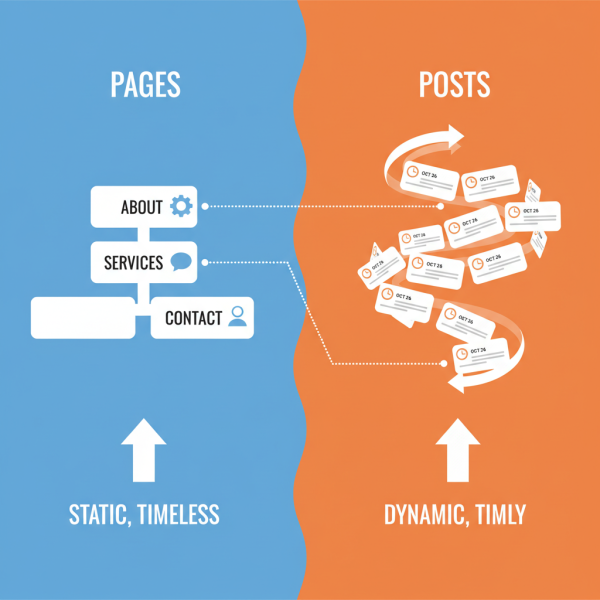
At its core, a WordPress Post is a content type designed for timely and frequently updated information. It comes with built-in features like categories, tags, author attribution, and date stamps. While these are perfect for a blog, they also make Posts inherently suitable for any content that needs to be grouped, filtered, sorted, or displayed in a list format, and potentially expires or is updated regularly. This flexibility allows developers and content managers to create structured content that can be queried and displayed dynamically throughout the site, rather than being hard-coded into static pages.
Practical Use Cases for Dynamic Content
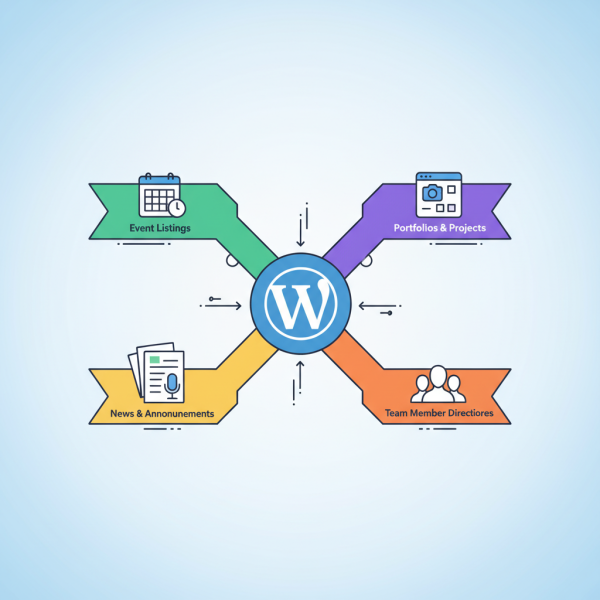
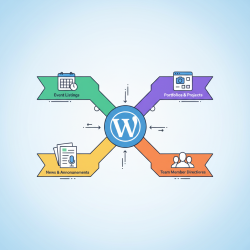
News and Announcements
The most obvious use case, but worth reiterating, is for a dedicated news section. Each news item or announcement is a separate Post, allowing for easy chronological display, categorization by topic, and archiving. Users can subscribe to feeds, search past announcements, and filter content, all powered by the Post structure. This keeps your site fresh and informative without manually updating a single "News" page.
Event Listings
For organizations hosting regular events, each event can be a WordPress Post. You can categorize events by type (workshop, webinar, conference), tag them with keywords (e.g., "free," "online," "registration required"), and use custom fields to store event-specific details like date, time, location, and registration links. A custom loop can then display upcoming events on a dedicated page, past events in an archive, or featured events on the homepage.
Product Showcases (Simple)
While complex e-commerce often uses dedicated plugins, for a simple portfolio or showcase of services or products that don't require shopping cart functionality, Posts are excellent. Each product or service can be a Post, complete with a featured image, description, and categorized by type. This allows for easy creation of product galleries, filtering by service type, and dynamic display of featured items on various pages.
Team Member Directories
Displaying your team members with their photos, bios, and roles is another prime example. Each team member gets their own Post. Categories can represent departments, and tags can denote skills. This allows for dynamic team pages that are easily updated as members join or leave, without needing to manually rearrange content on a static page.
Testimonials and Reviews
Collecting and displaying customer testimonials dynamically is straightforward with Posts. Each testimonial can be a Post, including the quote, customer name, and a rating. Categorize them by product or service, and display them randomly on different pages, or feature the latest ones in a dedicated section. This adds social proof and credibility to your site without constant manual updates.
Portfolios and Projects
Artists, designers, and agencies frequently need a portfolio section. Each project can be a Post, showcasing images, project descriptions, client information, and relevant skills used. Projects can be categorized by client, industry, or type of work, allowing visitors to easily browse your body of work and filter according to their interests.
Why Choose Posts Over Pages for Dynamic Content?
When deciding between Posts and Pages, consider these advantages for dynamic content:
- Structure and Organization: Posts come with built-in taxonomies (categories and tags) that are ideal for organizing and filtering content. Pages are hierarchical but lack the same flexible classification system for arbitrary content types.
- Querying and Display: Posts are inherently designed to be queried and displayed in lists, feeds, and archives. This makes it simple to create dynamic sections like "Latest News" or "Upcoming Events" using WordPress loops.
- Scalability: As your content grows, managing hundreds of individual Posts is far more efficient than maintaining a sprawling collection of static pages, especially when content needs to be consistently formatted and displayed.
- Content Management Workflow: The Post interface is intuitive for content creators, allowing them to add new items without needing to understand complex page builders or HTML.
- RSS Feeds: Posts automatically generate RSS feeds, which can be useful for subscribing to updates for news, events, or specific content types.
Implementing Dynamic Content with Posts
Implementing dynamic content with Posts often involves a few key steps. First, define the content structure. What information does each "item" need? This might involve using custom fields (either through a plugin like Advanced Custom Fields or manually) to add specific data points beyond the standard title and content. Second, utilize categories and tags effectively for grouping and filtering. Third, write custom WordPress loops in your theme files (or use a page builder's dynamic content features) to query and display these Posts on relevant pages. For example, a loop might fetch all Posts from the "Events" category, sorted by a custom date field.
Best Practices for Managing Post-Based Dynamic Content
To ensure your dynamic content setup is effective and maintainable:
- Consistent Naming Conventions: Establish clear categories and tags with consistent naming to avoid confusion and make content easy to find.
- Utilize Custom Fields Wisely: Don't overload Posts with too many custom fields. Only include essential data points that truly need to be stored separately from the main content.
- Educate Content Creators: Ensure anyone adding new dynamic content understands how to use categories, tags, and custom fields correctly to maintain data integrity.
- Performance Optimization: As the number of Posts grows, ensure your database queries are optimized to prevent slow loading times. Caching plugins are essential.
- Accessibility: Design your dynamic content displays to be accessible to all users, ensuring proper semantic HTML and keyboard navigation.
Summary
WordPress Posts are far more versatile than just blog entries; they serve as a powerful foundation for managing diverse dynamic content across your website. By understanding their inherent structure and capabilities, you can strategically employ them for use cases like news, events, portfolios, team directories, and testimonials. This approach offers superior content organization, simplified dynamic display, better scalability, and a more streamlined content management workflow compared to relying solely on static pages. Effective implementation involves careful planning of content structure, smart use of taxonomies and custom fields, and optimized display loops, all while adhering to best practices for maintainability and performance.
Comprehension questions
 Beyond blogging, what are two key characteristics of WordPress Posts that make them suitable for dynamic content?List three distinct practical use cases for WordPress Posts to manage dynamic content as described in the article.According to the article, what are two main advantages of using Posts over Pages for dynamic content?What are some best practices mentioned for managing Post-based dynamic content effectively?
Community Poll
Next Lesson
Course Contents : WordPress Posts vs. Pages for Developers
- >> 5.
 Examples of Posts for Dynamic Content