Diving into the Managed WordPress.com Hosting Service Platform
- -->> 2. Diving into the Managed WordPress.com Hosting Service Platform
What you'll learn
 Managed Hosting BenefitsWordPress.com FeaturesPlatform vs. Software DistinctionWordPress.com Plans
WordPress.com often conjures images of simple blogging platforms, but beneath that user-friendly exterior lies a robust managed hosting service designed to empower individuals and businesses alike to establish their online presence without the complexities of server management. Unlike its self-hosted counterpart, WordPress.org, WordPress.com provides an all-inclusive ecosystem where everything from hosting and security to updates and backups is expertly handled. This allows users to focus entirely on content creation, design, and engaging their audience, making it an incredibly attractive option for anyone seeking a streamlined and reliable website experience.
What Exactly is WordPress.com?
At its core, WordPress.com is a commercial service built upon the open-source WordPress software. It's owned by Automattic, the company co-founded by WordPress creator Matt Mullenweg. The crucial distinction is that with WordPress.com, you are renting space on their servers, and they manage all the technical infrastructure. This includes keeping the servers running, ensuring security against threats, performing regular software updates, and offering dedicated support. It democratizes website ownership, removing significant technical barriers that often deter aspiring site administrators.
It caters to a wide spectrum of users, from hobby bloggers and personal portfolios to small businesses, creative professionals, and even large enterprises. The platform scales with your needs, offering various plans that unlock increasing levels of functionality, storage, and customization options. For those who want a website that "just works" out of the box, WordPress.com is a compelling solution, providing peace of mind and freeing up valuable time.
The Managed Hosting Advantage: Key Features Explained
The "managed" aspect of WordPress.com is its defining characteristic, delivering a suite of benefits that simplify website administration. These features are designed to offload the technical burden from the user:
- Automatic Hosting and Infrastructure: You don't need to find a separate hosting provider. WordPress.com handles all server management, uptime monitoring, and resource allocation. This means faster loading times and greater reliability without you needing to configure anything.
- Enhanced Security: Robust security measures are built into the platform. This includes firewalls, malware scanning, DDoS protection, and automatic SSL certificates, protecting your site and your visitors' data without requiring external security solutions or complex configurations.
- Seamless Updates and Maintenance: The core WordPress software, along with themes, and plugins are kept up-to-date automatically by WordPress.com. This eliminates the need for manual updates, which can sometimes break a site if not handled carefully, ensuring your site always runs on the latest, most secure version.
- Automatic Backups: Regular, automatic backups of your entire site are performed, providing a safety net. Should anything go wrong, restoring your site to a previous state is straightforward, minimizing potential downtime and data loss.
- Dedicated Support: Depending on your plan, you gain access to a knowledgeable support team via email, live chat, or forums. This expert assistance is invaluable for troubleshooting issues, getting design advice, or navigating the platform's features.
Unlocking Potential: Features and Customization
Beyond the core managed hosting benefits, WordPress.com offers a rich set of features designed to help users build and grow their websites effectively. The block editor, known as Gutenberg, provides an intuitive drag-and-drop interface for creating content and designing page layouts, making it accessible even for those without coding knowledge.
Customization options are plentiful. Users can choose from a vast library of professionally designed themes, many of which offer extensive customization panels to adjust colors, fonts, layouts, and more. For those on higher-tier plans, the ability to install third-party plugins and themes from the broader WordPress ecosystem opens up an almost limitless range of functionalities, from advanced SEO tools to e-commerce capabilities.
Performance optimization is also a key focus. WordPress.com utilizes a global content delivery network (CDN) to ensure fast loading speeds for visitors worldwide, improving user experience and potentially aiding in search engine rankings. Integrated analytics tools provide insights into site traffic and visitor behavior, helping users make data-driven decisions to enhance their online presence.
Understanding WordPress.com Plans and Their Capabilities
WordPress.com offers a tiered pricing structure, each plan designed to meet different needs and budgets:
- Free Plan: Ideal for personal blogs or testing the waters, offering basic features and a WordPress.com subdomain.
- Personal Plan: Adds a custom domain, removes WordPress.com branding, and provides email support.
- Premium Plan: Expands on the Personal plan with advanced design customization, more storage, and monetization tools.
- Business Plan: A significant leap, allowing plugin and theme uploads, advanced SEO tools, Google Analytics integration, and priority support. This plan offers considerable flexibility.
- eCommerce Plan: Tailored specifically for online stores, including payment gateways, shipping options, and inventory management.
- VIP Plan: An enterprise-grade solution for high-traffic sites, offering unparalleled performance, security, and dedicated support.
Each upgrade unlocks more control, features, and resources, ensuring that the platform can accommodate a site's growth from a simple blog to a full-fledged professional or e-commerce website.
WordPress.com vs. WordPress.org: Making the Right Choice
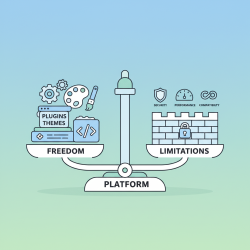
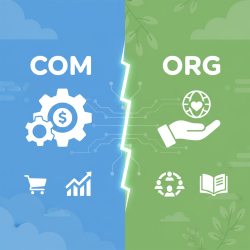
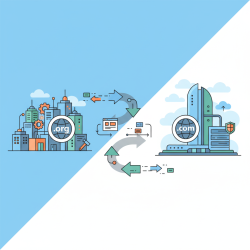
It's crucial to distinguish between WordPress.com and WordPress.org, as they serve different purposes. WordPress.org is the open-source software that you download and install on your own web host. This gives you complete control over every aspect of your website, including server configuration, plugin choices, and code modifications. However, this also means you are responsible for hosting, security, backups, and all technical maintenance.
Conversely, WordPress.com is a hosted service where Automattic handles all the technical heavy lifting. While this provides unparalleled ease of use and peace of mind, it comes with certain limitations, especially on lower-tier plans, regarding custom code, plugin freedom, and server access. The choice between the two largely depends on your technical expertise, desired level of control, and budget.
If you're looking for simplicity, reliability, and don't want to worry about the technical backend of your site, WordPress.com is an excellent choice. If you're a developer or have specific, highly customized needs and are comfortable with server management, WordPress.org might be more suitable.
Summary
In essence, WordPress.com stands as a powerful and user-friendly managed hosting service, abstracting away the complexities of website infrastructure to allow users to concentrate on their content and audience. By providing robust hosting, stringent security, automatic updates, dedicated support, and scalable plans, it offers a comprehensive solution for individuals and businesses seeking a reliable and hassle-free online presence. It represents an ideal platform for those who value convenience and support over deep technical control, ensuring their website remains secure, fast, and always accessible.
Comprehension questions
 What is the primary difference between WordPress.com and WordPress.org?List three key advantages of choosing a managed hosting service like WordPress.com.How does WordPress.com address website security and maintenance for its users?Describe the main capabilities unlocked by upgrading from a free WordPress.com plan to a Business plan.
Review Quiz
Next Lesson
Course Contents : WordPress.org vs. WordPress.com
- >> 2.
 Diving into the Managed WordPress.com Hosting Service Platform