Understanding the Self-Hosted WordPress.org
- -->> 1. Understanding the Self-Hosted WordPress.org
What you'll learn
 Open Source Nature of WordPress.orgBenefits of Self-HostingWordPress Ecosystem (Themes and Plugins)Costs and Maintenance for Self-Hosted Sites
WordPress.org often gets confused with its commercial counterpart, WordPress.com, but understanding the distinction is crucial for anyone looking to build a robust and highly customizable website. WordPress.org refers to the free, open-source software that you can download and install on your own web hosting account. This self-hosted version of WordPress provides unparalleled flexibility, control, and ownership over your website, making it the preferred choice for professionals, businesses, and developers who require complete command over their online presence. It empowers users to create virtually any type of website, from simple blogs and portfolios to complex e-commerce stores and membership sites, all without being locked into a proprietary platform.
What is WordPress.org? The Core Concept
At its heart, WordPress.org is a Content Management System (CMS). A CMS is software that helps users create, manage, and modify content on a website without needing specialized technical knowledge or programming skills. Think of it as a user-friendly interface that sits between you and the complex code of your website. It handles the backend database, file management, and many other technical aspects, allowing you to focus on publishing your content, designing your site, and interacting with your audience. The "dot org" signifies its open-source nature, meaning its source code is freely available for anyone to use, modify, and distribute. This transparency fosters a massive global community of developers who contribute to its continuous improvement, security, and innovation.
The Power of Open Source
The open-source model is a cornerstone of WordPress.org's success. It means the software is developed collaboratively and maintained by a community of thousands of individuals worldwide. This collective effort ensures that WordPress is constantly evolving, benefiting from diverse perspectives and expertise. When you use WordPress.org, you're not just getting software; you're gaining access to a vibrant ecosystem. This collaborative spirit manifests in several key advantages:
- Transparency and Security: The open code allows security researchers to identify and patch vulnerabilities quickly, often before they can be exploited.
- Flexibility and Customization: Developers can create custom themes and plugins, tailoring the software to specific needs.
- Cost-Effectiveness: The core software is free, reducing initial investment costs for website development.
- Innovation: A large community constantly develops new features, improvements, and integrations, keeping WordPress at the forefront of web technology.
This community support also extends to a vast amount of documentation, tutorials, and forums, ensuring that help is always available, whether you're a beginner or an experienced developer.
Understanding Self-Hosting: Your Website, Your Rules
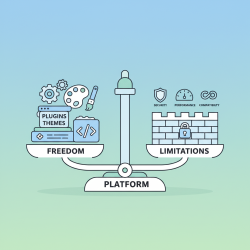
The "self-hosted" aspect is perhaps the most significant differentiator for WordPress.org. Unlike hosted solutions where your site lives on a provider's servers and is subject to their rules and limitations, with WordPress.org, you are responsible for choosing your own web hosting provider and domain name. This means:
- Full Ownership and Control: You own your website files, database, and all content. You are not tied to any single platform and can migrate your site to a different host whenever you wish.
- Unlimited Customization: You have complete access to the website's underlying files, allowing for deep customization of themes, plugins, and core functionality.
- Monetization Freedom: You are free to implement any advertising, e-commerce, or monetization strategies without revenue sharing requirements from the platform.
- Scalability: You can choose a hosting plan that perfectly matches your website's traffic and resource needs, upgrading as your site grows without platform-imposed limitations.
While self-hosting provides immense freedom, it also implies a degree of responsibility. You are in charge of maintaining your server environment, installing updates, and managing backups.
Key Features and Ecosystem
WordPress.org boasts an impressive array of features and a vast ecosystem that extends its capabilities far beyond basic blogging:
Themes: These are pre-designed templates that control the visual appearance and layout of your website. Thousands of free and premium themes are available, ranging from minimalist designs to complex corporate layouts, allowing you to quickly change your site's look without coding.
Plugins: These are small pieces of software that add new functionalities to your WordPress site. There are over 50,000 free plugins in the official WordPress plugin directory, covering everything from SEO optimization, contact forms, security, e-commerce, social media integration, and much more. This extensibility is one of WordPress's greatest strengths, allowing you to build highly specialized websites with minimal effort.
Gutenberg Editor: The default block editor, Gutenberg, provides a modern and intuitive way to create content using "blocks" for paragraphs, images, headings, and more. This visual editing experience makes content creation accessible to users of all technical levels.
Costs Associated with WordPress.org
While the WordPress.org software itself is free, there are necessary costs associated with running a self-hosted website:
Web Hosting: This is the service that stores your website's files and makes them accessible on the internet. Prices vary widely based on performance, storage, and support, ranging from a few dollars per month for shared hosting to hundreds for dedicated servers.
Domain Name: This is your website's address (e.g., example.com). It typically costs around $10-20 per year.
Premium Themes and Plugins (Optional): While many free options exist, premium themes and plugins often offer advanced features, professional support, and unique designs. These can be a one-time purchase or an annual subscription.
Maintenance and Security (Optional): You might invest in premium security plugins, backup services, or even hire a professional for ongoing maintenance, although many tasks can be managed independently.
Maintenance and Security Considerations
Running a self-hosted WordPress site means you are responsible for its upkeep. This includes:
- Regular Updates: Keeping the WordPress core software, themes, and plugins updated is crucial for security and performance. Updates often include bug fixes, new features, and important security patches.
- Backups: Implementing a robust backup strategy is vital to protect your data. Regular backups ensure that you can restore your website in case of a problem, such as a hack or a server issue.
- Security Measures: While WordPress has a strong security foundation, installing security plugins, using strong passwords, and implementing best practices like SSL certificates are essential to protect against threats.
- Performance Optimization: Ensuring your site loads quickly involves optimizing images, using caching plugins, and choosing a reliable host.
WordPress.org vs. WordPress.com: A Clear Distinction
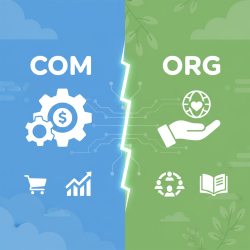
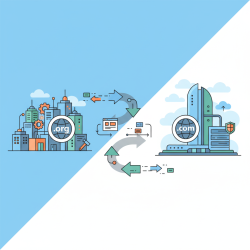
It's important to reiterate the difference. WordPress.com is a commercial service that uses the WordPress.org software. It's a hosted solution where Automattic (the company behind WordPress.com) manages all the technical aspects for you. It's easier to start but comes with limitations on customization, monetization, and plugin/theme choices, especially on free and lower-tier plans. WordPress.org, conversely, puts the full power and responsibility directly in your hands.
Who is WordPress.org For?
- Want complete control and ownership over their website.
- Need advanced customization and functionality beyond basic blogging.
- Plan to scale their website significantly over time.
- Are comfortable managing their own hosting and performing basic maintenance tasks (or willing to learn/hire help).
- Value the extensibility offered by thousands of themes and plugins.
Conclusion
WordPress.org stands as a powerful, flexible, and free open-source content management system that empowers users to build and control virtually any type of website. Its self-hosted nature grants unparalleled freedom in terms of design, functionality, and monetization, supported by a vast global community and an extensive ecosystem of themes and plugins. While it requires users to manage their own hosting and maintenance, the benefits of complete ownership and limitless customization make it the go-to choice for those seeking a professional and scalable online presence. Understanding its open-source foundation and self-hosted requirements is key to harnessing its full potential.
Comprehension questions
 What is the primary difference between WordPress.org and WordPress.com in terms of hosting and control?Name two key advantages of WordPress.org being an open-source software.What are themes and plugins in the WordPress ecosystem, and how do they extend a website's functionality?Beyond the free software, what are the two main necessary costs associated with running a WordPress.org website?
Community Poll
Next Lesson
Course Contents : WordPress.org vs. WordPress.com
- >> 1.
 Understanding the Self-Hosted WordPress.org