Plugins and Themes: Differences Between Platforms
- -->> 4. Plugins and Themes: Differences Between Platforms
What you'll learn
 Extending Functionality with PluginsShaping Aesthetics with ThemesDeveloper Freedoms and CapabilitiesPlatform Limitations and Constraints
Modern web development platforms, from content management systems to e-commerce solutions, owe much of their versatility and widespread adoption to the expansive ecosystems of plugins and themes. These foundational elements empower users and developers alike to customize, extend, and personalize digital experiences far beyond out-of-the-box capabilities. However, this power is not without its boundaries. Examining plugins and themes requires a closer look at the significant freedoms they provide in shaping a website, alongside the inherent limitations imposed by platform architecture, security protocols, and performance considerations. Understanding this delicate balance is crucial for anyone looking to leverage these tools effectively.
Understanding Plugins: Extending Functionality
Plugins, often referred to as extensions or add-ons, are software components that add specific features and functionalities to a larger application or system. For web platforms, they can transform a basic website into a powerful, feature-rich online presence. Whether it's integrating an e-commerce store, optimizing for search engines, adding advanced security measures, or enhancing social media sharing, plugins provide a modular approach to building complex functionalities without writing extensive custom code.
The beauty of plugins lies in their ability to provide specialized solutions. A developer can create a plugin that handles specific data processing, interacts with external APIs, or introduces new content types. This extensibility allows platforms to remain lean at their core while offering a seemingly endless array of options for niche requirements, fostering a vibrant community of innovation and collaboration among developers.
The Power of Themes: Shaping Aesthetics
Themes, in contrast to plugins, primarily govern the visual appearance and user interface of a website. They dictate the layout, colors, typography, header and footer designs, and overall aesthetic appeal. A theme is essentially the public face of a website, playing a critical role in branding, user experience, and conveying a professional image. While themes can sometimes include minor functional elements (like custom widgets or shortcodes), their core purpose revolves around presentation.
The flexibility offered by themes allows users to completely overhaul their website's look with minimal effort. Developers can craft highly customized themes, from simple, elegant designs to complex, interactive layouts, ensuring that a website not only functions well but also resonates visually with its target audience. This aesthetic control is paramount for establishing a unique online identity and engaging visitors.
Freedom in Development: What Developers Can Do
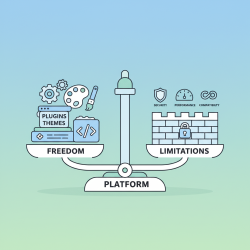
The architectural design of most robust platforms grants significant freedom to developers creating plugins and themes. This openness is a cornerstone of their popularity and adaptability:
- Deep System Integration: Plugins often have the ability to interact directly with the platform's core database, modify existing functionalities, and introduce entirely new data structures. This allows for profound changes and additions to the system's behavior.
- Custom APIs and Endpoints: Developers can build custom APIs within their plugins, enabling seamless integration with other services or allowing mobile applications to interact with the website's data.
- Extensive UI/UX Customization: Themes provide complete control over the presentation layer, allowing developers to craft unique user interfaces, implement responsive designs, and integrate advanced front-end technologies (JavaScript frameworks, CSS preprocessors).
- Content and Workflow Augmentation: Plugins can introduce custom post types, taxonomies, and new administrative interfaces, streamlining content management and enhancing specific workflows for site administrators.
- Code Overrides and Hooks: Many platforms offer extensive "hook" and "filter" systems, allowing plugins and themes to modify or extend specific pieces of code executed by the core system without directly altering core files.
Limitations and Constraints: Navigating the Boundaries
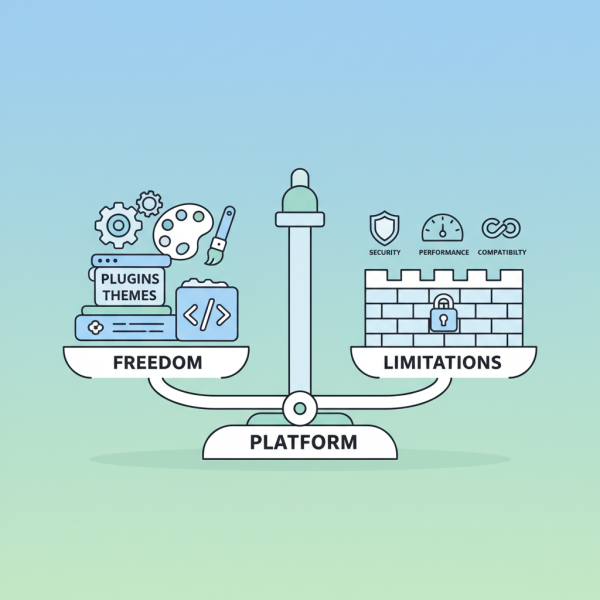
Despite the extensive freedoms, developers must operate within certain boundaries that ensure the platform's stability, security, and long-term viability. These limitations are crucial for maintaining a healthy ecosystem:
- Platform API Restrictions: While powerful, API access is often curated. Direct access to sensitive core files or functionalities may be restricted to prevent system instability or security breaches. Developers are encouraged to use documented APIs.
- Security Sandboxing: Some platforms implement sandboxing to isolate plugin or theme code, limiting its access to specific system resources or directories to mitigate the impact of malicious or buggy code.
- Coding Standards and Best Practices: Platforms often enforce coding standards, performance guidelines, and security best practices for extensions submitted to official marketplaces. This ensures a baseline quality, reduces conflicts, and improves user experience.
- Review and Approval Processes: For official marketplaces, plugins and themes undergo rigorous review processes. This can involve checks for security vulnerabilities, code quality, adherence to guidelines, and functionality, sometimes delaying release or requiring modifications.
- Compatibility and Backward Compatibility: Developers must contend with ensuring their creations remain compatible with future versions of the platform and with other extensions. Breaking changes in platform updates can necessitate significant reworks, highlighting a crucial limitation in design freedom.
- Performance Overhead: While not a strict coding limitation, poorly optimized plugins or themes can severely impact website performance, leading to slow load times and a degraded user experience. This self-imposed limitation often guides development choices.
User Perspective: Choice and Customization
From a user's standpoint, the combined ecosystem of plugins and themes offers an unparalleled level of choice and customization. Small business owners can launch sophisticated e-commerce sites without hiring a full development team, while bloggers can craft unique personal brands. The availability of both free and premium options democratizes access to powerful web tools. However, users also face the challenge of navigating this vast array, ensuring their chosen extensions are well-maintained, secure, and compatible with each other and their platform.
Balancing Act: Innovation vs. Control
The core platforms constantly engage in a balancing act: fostering an environment where innovation can flourish through powerful developer tools, while simultaneously imposing controls to safeguard the overall integrity, security, and performance of websites built upon them. This balance ensures that developers have the freedom to create impactful solutions, but not at the expense of user safety or system stability. Comprehensive documentation, developer communities, and clear guidelines are key components in maintaining this delicate equilibrium.
Summary
In essence, plugins and themes are the lifeblood of modern web platforms, offering immense freedom to extend functionality and refine aesthetics. Plugins empower websites with diverse capabilities, from advanced SEO to robust e-commerce, while themes provide complete control over visual presentation and user experience. Developers benefit from deep system integration and extensive customization options, allowing for significant innovation. However, this freedom operates within critical limitations enforced by platform APIs, security protocols, coding standards, and compatibility requirements. These boundaries are not arbitrary; they are essential for ensuring the stability, security, and long-term viability of the entire ecosystem. Both developers and users must understand these intrinsic freedoms and necessary constraints to effectively harness the power of web platforms.
Comprehension questions
 What is the primary difference in purpose between plugins and themes on web platforms?Name three significant freedoms developers typically have when creating plugins or themes.Identify three types of limitations or constraints that developers face when building for web platforms.Why are limitations imposed on plugin and theme development, and what is the benefit of this
 Review Quiz
Next Lesson
Course Contents : WordPress.org vs. WordPress.com
- >> 4.
 Plugins and Themes: Differences Between Platforms