Canonical URLs and 301 Redirects
- -->> 9. Canonical URLs and 301 Redirects
What you'll learn
 Duplicate Content PreventionCanonical Tag Implementation301 Redirect StrategiesSite Migration Best Practices
In the complex world of search engine optimization (SEO), managing how search engines crawl and index your website is paramount. Misusing or neglecting two critical tools, canonical URLs and 301 redirects, can lead to significant issues, including duplicate content penalties, diluted link equity, and poor user experiences. Understanding their proper implementation is essential for maintaining a healthy, discoverable website, especially during major changes like site migrations. This article will demystify these concepts, guiding you through best practices to ensure your site's SEO integrity.
Understanding Duplicate Content
Duplicate content occurs when identical or substantially similar content is accessible at multiple, distinct URLs. While not an explicit penalty, search engines dislike duplicate content because it makes it difficult for them to determine which version to rank, which version to show in search results, and how to consolidate link signals effectively. This can lead to your preferred page not ranking as highly as it should, or even worse, multiple versions competing against each other.
Common scenarios leading to duplicate content include:
- Accessing a page with and without "www" (e.g., example.com vs. www.example.com).
- Accessing a page via HTTP and HTTPS (e.g., http://example.com vs. https://example.com).
- Trailing slashes (e.g., example.com/page/ vs. example.com/page).
- URL parameters for tracking, sorting, or filtering (e.g., example.com/products?color=red vs. example.com/products).
- Printer-friendly versions of pages.
- Content syndication where your content appears on other sites.
The Role of Canonical Tags
A canonical tag (rel="canonical") is a powerful hint to search engines, indicating the preferred version of a set of duplicate or very similar pages. When a search engine encounters multiple URLs with identical content, the canonical tag tells it which URL should be treated as the original or definitive source. This consolidates all ranking signals, such as link equity, to the preferred URL, preventing dilution and improving the page's authority.
Think of it as pointing a spotlight on the single most important version of a page when many variations exist. It helps search engines save crawl budget by focusing on the designated canonical URL and ensures that your chosen page receives the full benefit of any inbound links or authority.
Implementing Canonical Tags Correctly
Correct implementation of canonical tags is crucial. The canonical tag should be placed within the section of your HTML document. It must always use an absolute URL, meaning it includes the full domain, scheme (http/https), and path.
Key rules for canonical tag implementation:
- Absolute URLs: Always use full URLs (e.g.,
https://www.example.com/page, not/page). - Self-Referencing: Even if a page has no duplicates, it's best practice to add a self-referencing canonical tag. This explicitly declares that the current page is the preferred version, which can protect against unexpected parameter-based duplicates.
- Consistency: Ensure your canonical URLs consistently use your preferred domain (www/non-www) and protocol (http/https).
- One Tag Per Page: Each page should only have one canonical tag. Multiple tags will likely be ignored.
- To Indexable Pages: The canonical URL should point to an indexable, non-404 page. Do not canonicalize to a page that is blocked by robots.txt or has a noindex tag.
- Cross-Domain Canonicalization: You can use canonical tags to point to a page on a different domain if you're syndicating content and want the original source to receive the SEO credit.
Common mistakes include pointing canonicals to irrelevant pages, broken pages, or pages that themselves redirect. These errors can confuse search engines and negate the tag's purpose.
Mastering 301 Redirects
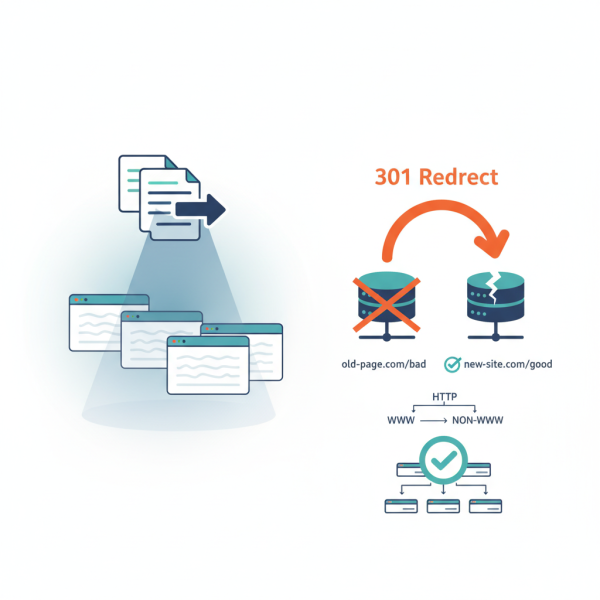
A 301 redirect is a permanent redirection from one URL to another. It signals to both users and search engines that a web page or entire website has permanently moved to a new location. The "301" status code indicates "Moved Permanently," and search engines understand this to mean that the old URL's SEO value, or "link equity," should be passed to the new URL, typically retaining 90-99% of its original authority.
Unlike canonical tags, which are a hint, 301 redirects are a directive. When a 301 is properly implemented, search engines update their index with the new URL and primarily consider the new URL for ranking purposes. This is critical for maintaining SEO performance when old URLs become obsolete.
In contrast, a 302 redirect signifies a "Found" or "Moved Temporarily" status. It suggests the move is not permanent, and search engines may not pass the same amount of link equity. For permanent changes, 301s are almost always the correct choice.
Common Redirect Scenarios
301 redirects are indispensable in numerous web management scenarios:
- URL Changes: When you change a page's URL, redesign a section of your site, or restructure your site architecture.
- Site Migrations: Moving from HTTP to HTTPS, or from one domain to another (e.g., example.com to newexample.com). This is perhaps the most critical use of 301s.
- Consolidating Duplicates: Directing non-preferred versions of a URL (e.g., non-www to www, trailing slash to non-trailing slash) to the canonical version.
- Merging Content: If you combine several old pages into a single, comprehensive new page, 301 redirects from the old URLs to the new one will consolidate their authority.
- Removing Old Pages: If a page is no longer relevant but has backlinks, redirecting it to a relevant category page or the homepage can salvage some of its SEO value.
Properly implementing redirects, usually via server configuration files like .htaccess for Apache servers or directly in Nginx configuration, is vital. Incorrectly configured redirects can lead to redirect chains (multiple redirects before reaching the final page), redirect loops, or even 404 errors, all of which negatively impact user experience and SEO.
Best Practices for Site Migrations
Site migrations, whether changing domains, switching to HTTPS, or overhauling site structure, represent a high-stakes scenario where 301 redirects are paramount. A well-executed migration ensures minimal disruption to search rankings and traffic.
Key best practices include:
Thorough Planning: Before any migration, conduct a comprehensive audit of all existing URLs. Create a meticulous URL mapping plan, identifying every old URL and its corresponding new URL. Account for all content, not just key pages.
Implement 301s Comprehensively: Every old URL that has a new equivalent must be redirected with a 301. Be exhaustive. Test these redirects rigorously before and immediately after launch. Tools like Google Search Console can help identify redirect errors.
Update Internal Links: After the migration, update all internal links within your site to point to the new, canonical URLs. While 301s will handle external links, internal links should ideally point directly to the final destination to avoid unnecessary redirect hops.
Monitor Performance: After the migration, closely monitor your site's performance in Google Search Console for crawl errors, indexed pages, and traffic trends. Pay attention to "Coverage" reports and any new 404s or redirect issues. Be prepared to quickly fix any problems that arise.
Communicate Changes: If moving domains, use the Change of Address tool in Google Search Console to inform Google of the move. While not strictly necessary for HTTPS migrations, it helps confirm the change for them.
Monitoring and Maintenance
The work doesn't stop after initial implementation. Regular monitoring and maintenance of your canonical tags and redirects are essential for ongoing SEO health. Over time, new content can create duplicate issues, or old pages might be removed, requiring new redirects.
Periodically audit your site for:
- Broken Canonical Tags: Ensure all canonical tags point to valid, accessible pages.
- Broken Redirects: Check for any 301 redirects leading to 404 errors.
- Redirect Chains: Identify instances where one URL redirects to another, which then redirects again. Aim for single-hop redirects.
- New Duplicate Content: Use site crawlers to identify newly emerging duplicate content issues that might need canonical tags or redirects.
Tools like Google Search Console, Screaming Frog SEO Spider, and various online redirect checkers can be invaluable in this continuous effort.
Summary
Managing canonical URLs and 301 redirects is fundamental to robust SEO and a smooth user experience. Canonical tags serve as crucial hints to search engines, preventing duplicate content issues and consolidating link equity by designating a preferred version of similar pages. Conversely, 301 redirects act as permanent directives, effectively passing authority from old URLs to new ones, making them indispensable for URL changes and critical for successful site migrations. By diligently implementing and monitoring these strategies, webmasters can protect their site's search rankings, enhance crawl efficiency, and ensure that valuable link equity is preserved and directed appropriately.
Comprehension questions
 What is duplicate content and why is it detrimental to SEO?How does a canonical tag function and where should it be placed on a web page?Explain the primary difference between a 301 redirect and a 302 redirect, and when to use each.List three key best practices for using 301 redirects during a site migration to preserve SEO value.
Review Quiz
Next Lesson

Course Contents : Mastering WordPress SEO for Developers
- >> 9.
 Canonical URLs and 301 Redirects