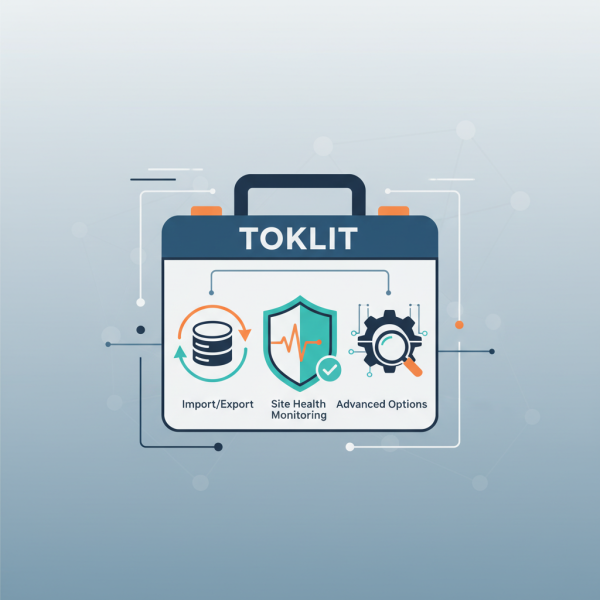
The Developer's Toolkit
- -->> 8. The Developer's Toolkit
What you'll learn
 The Foundation: Why Developer Tools MatterStreamlining Data Management: Import/Export FunctionalityEnsuring Robustness: Site Health MonitoringBeyond the Basics: Advanced Developer Options
Developers constantly seek tools and methodologies that streamline their workflows, ensure the stability of their projects, and empower them to tackle complex challenges with confidence. This article delves into three fundamental aspects of a robust developer toolkit: versatile import/export functionalities, comprehensive site health monitoring, and advanced developer options that elevate productivity and project quality.
The Foundation: Why Developer Tools Matter
Modern web development is intricate, involving numerous components, configurations, and data sets. Without a solid suite of developer tools, tasks like moving data, diagnosing issues, or optimizing performance can become time-consuming, error-prone, and frustrating. These tools are not merely conveniences; they are essential for maintaining productivity, debugging efficiently, and ensuring the long-term health and scalability of web applications. They transform complex problems into manageable steps, allowing developers to focus on innovation rather than remediation.
Streamlining Data Management: Import/Export Functionality
The ability to seamlessly move data between different environments—local development, staging, and production—is a cornerstone of efficient development. Robust import/export functionality ensures data integrity and consistency, preventing common pitfalls associated with manual data transfer.
Import/export capabilities are crucial for several scenarios:
- Environment Synchronization: Moving a database from production to a local machine for debugging, or deploying content updates from staging to live.
- Content Migration: Transferring specific content types, users, or settings between separate sites or applications.
- Backup and Restoration: Creating reliable backups that can be easily restored in case of data loss or system failure.
- Feature Development: Importing test data sets for rigorous feature testing without affecting live production data.
Various types of data can be managed through import/export processes. These include:
- Full database dumps (e.g., SQL files).
- Specific content exports (e.g., posts, pages, custom post types in XML or JSON format).
- User data, comments, and media libraries.
- Configuration settings and application options.
Effective import/export relies on understanding the tools available, from command-line interfaces (CLIs) that offer granular control to graphical user interface (GUI) options built into content management systems. Adhering to best practices, such as taking backups before any major import, testing imports on a staging environment, and using version control for configurations, is vital for successful data management.
Ensuring Robustness: Site Health Monitoring
Proactive monitoring of a site's health is critical for preventing performance bottlenecks, security vulnerabilities, and unexpected downtime. Site health tools provide developers with a diagnostic overview, highlighting potential issues before they escalate into major problems.
Key areas typically covered by site health checks include:
- Server Environment: PHP version, memory limit, database server version, required PHP extensions.
- Software Updates: Status of the core application, themes, and plugins/modules, indicating outdated components that could pose security risks or compatibility issues.
- Performance Checks: Object cache status, database efficiency, image optimization recommendations.
- Security Measures: File permissions, HTTPS status, presence of critical security headers.
- Critical Issues: Identification of configuration errors, missing dependencies, or other problems impacting site functionality.
The benefits of consistent site health monitoring are manifold. It allows developers to identify and address security vulnerabilities promptly, optimize performance for a better user experience, and troubleshoot issues more efficiently by pinpointing their root cause. Regular reviews of site health reports help maintain a stable, secure, and high-performing web application, contributing significantly to a positive user experience and reducing operational costs.
Beyond the Basics: Advanced Developer Options
Once the foundations of data management and site health are established, developers can leverage a suite of advanced options to further enhance their productivity and the quality of their code. These tools are designed for deeper analysis, more controlled environments, and automated workflows.
Important advanced options include:
- Debugging Tools: Integrated Development Environment (IDE) debuggers (like Xdebug for PHP), browser developer tools (console, network, elements tabs), and comprehensive error logging systems. These tools are indispensable for tracing code execution, inspecting variables, and identifying logical errors.
- Performance Profiling: Tools such as Blackfire, New Relic, or built-in profiling features help identify performance bottlenecks by analyzing code execution time, database queries, and memory usage. This allows for targeted optimizations rather than speculative changes.
- Staging and Development Environments: Setting up identical or near-identical copies of the production environment for testing new features, updates, or bug fixes without risking the live site. This ensures a smooth deployment process.
- Automation and CI/CD: Implementing Continuous Integration/Continuous Deployment (CI/CD) pipelines automates testing, building, and deployment processes. This reduces human error, speeds up delivery, and ensures code quality through automated checks.
Embracing these advanced options enables developers to build more robust, scalable, and maintainable applications. They provide the necessary visibility and control to manage complex projects effectively, leading to higher quality outputs and reduced development cycles.
Summary
The modern developer's toolkit is a comprehensive ecosystem designed for efficiency, stability, and control. This article explored the critical roles of import/export functionality for seamless data management and environmental synchronization, robust site health monitoring for proactive issue identification and performance optimization, and advanced developer options such as sophisticated debugging, performance profiling, and automation for elevated project quality and streamlined workflows. Mastering these tools empowers developers to build, maintain, and scale web applications with greater confidence and precision.
Comprehension questions
 What are the three fundamental aspects of a robust developer toolkit discussed in the article?List three scenarios where robust import/export functionality is crucial for efficient development.What key areas are typically covered by site health checks, according to the article?Name two types of advanced developer options mentioned and explain their significance.
Review Quiz
Next Lesson
Course Contents : Navigating the WordPress Dashboard
- >> 8.
 The Developer's Toolkit