File System Permissions and Securing Sensitive Files
- -->> 8. File System Permissions and Securing Sensitive Files
What you'll learn
 File System PermissionsWordPress Security Best Practices.htaccess ConfigurationRegular Security Audits
Often overlooked, properly configured file system permissions represent a fundamental layer of defense against unauthorized access, data breaches, and malicious activities. This article delves into the critical importance of setting correct file permissions, with a particular focus on securing highly sensitive files such as wp-config.php for WordPress installations and the omnipresent .htaccess file, which plays a pivotal role in web server configuration and security.
Understanding File System Permissions (chmod)
File system permissions dictate who can read, write, or execute files and directories on a server. These permissions are typically expressed using a three-digit octal number (e.g., 755, 644) or symbolic notation (e.g., rwx for owner, r-x for group, r-x for others). Each digit represents the permissions for the owner, the group, and others, respectively.
- Owner (User): The user account that owns the file or directory.
- Group: A group of users who share specific permissions to the file or directory.
- Others (Public): All other users on the system.
The numbers themselves correspond to specific actions: 4 for read (r), 2 for write (w), and 1 for execute (x). These are summed to form the permission digit for each category. For instance, 7 (4+2+1) grants read, write, and execute; 6 (4+2) grants read and write; 5 (4+1) grants read and execute; and 4 grants only read access.
Recommended Permissions for WordPress Installations
While general guidelines exist, specific content management systems like WordPress often have their own recommended permission structures. Adhering to these recommendations is crucial for both security and functionality. Overly permissive settings can expose your site to vulnerabilities, while overly restrictive ones can break core functionalities or prevent updates.
Commonly recommended permissions:
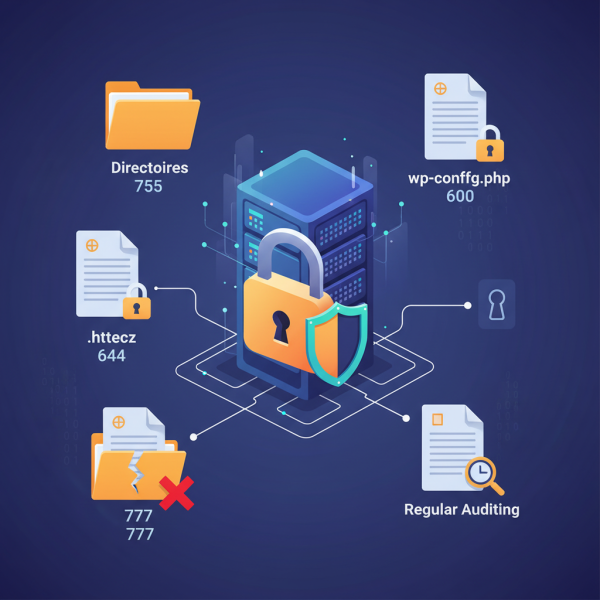
- Directories: Most directories should be set to
755. This allows the owner to read, write, and execute, while the group and others can only read and execute. This balances security with the need for the web server to navigate directories. - Files: Most files should be set to
644. This allows the owner to read and write, and the group and others to only read. This is generally sufficient for most static files, images, and PHP scripts.
It's important to understand that no file should typically have 777 permissions, as this grants full read, write, and execute access to everyone, making your site highly susceptible to compromise. If you encounter a situation requiring 777, it often indicates a deeper configuration issue that should be addressed.
Securing wp-config.php
The wp-config.php file is the heart of a WordPress installation, containing critical database connection details, unique security keys, and various configuration settings. Its compromise would grant an attacker full access to your database, potentially leading to a complete site takeover. Therefore, it demands the highest level of protection.
The recommended permission for wp-config.php is typically 640 or even 600. A permission of 640 allows the owner to read and write, the group to read, and blocks all access for others. A more restrictive 600 allows only the owner to read and write, effectively preventing even other users in the same group from accessing it. Given the sensitive nature of this file, 600 is often preferred as it minimizes exposure to the absolute necessary user, usually the web server process itself or the administrative user managing the site.
Protecting .htaccess
The .htaccess file is another extremely powerful and sensitive file. Used by Apache web servers, it allows per-directory configuration overrides, including URL rewriting, access controls, custom error pages, and MIME type handling. An attacker gaining control of your .htaccess file could redirect traffic, block legitimate users, inject malicious code, or even allow execution of arbitrary scripts.
Similar to wp-config.php, the .htaccess file should be secured with tight permissions. The recommended permission is typically 644 or 604. While 644 (owner read/write, group/others read) is common, a stricter 604 (owner read/write, others read only, no group access) or even 600 (owner read/write only) can be applied if direct access by the web server group isn't strictly necessary. Beyond permissions, the .htaccess file itself can be used to prevent direct access to it, adding another layer of defense by placing directives such as Order allow,denyDeny from all within it to prevent browsers from directly requesting it.
Regular Auditing and Best Practices
Setting initial permissions correctly is a great start, but it's not a one-time task. File system permissions can sometimes be inadvertently altered by themes, plugins, or even manual misconfigurations. Regular auditing of your file permissions is a crucial best practice to maintain ongoing security. Tools and scripts are available that can scan your file system and report any deviations from recommended settings.
Furthermore, ensure that only trusted users have FTP/SSH access to your server. Restrict SSH access using key-based authentication instead of passwords where possible, and always use strong, unique passwords. Regularly update your CMS, themes, and plugins to patch any vulnerabilities that might allow permission bypasses. Adopting a least privilege model, where users and processes only have the minimum permissions necessary to perform their functions, is always the most secure approach.
Summary
Properly configuring file system permissions is a cornerstone of robust website security, acting as a critical barrier against unauthorized access and potential exploits. By understanding the numerical values for read, write, and execute permissions, and applying the principle of least privilege, webmasters can significantly enhance their site's defenses. Special attention must be paid to highly sensitive files like wp-config.php and .htaccess, which require exceptionally restrictive permissions to safeguard critical configuration data and server directives. Regular audits and adherence to general security best practices ensure that these fundamental protections remain effective over time.
Comprehension questions
 What do the three digits in an octal permission number (e.g., 755) represent in terms of user categories?Why is a permission of 777 for any file or directory considered a major security risk?What specific permission is strongly recommended for the wp-config.php file, and why is this file so crucial to protect?Besides setting file permissions, what additional directive can be placed within the .htaccess file itself to enhance its security?
Review Quiz
Next Lesson

Course Contents : WordPress Security Essentials
- >> 8.
 File System Permissions and Securing Sensitive Files