File Permissions, Database Prefixes, and User Settings
- -->> 3. File Permissions, Database Prefixes, and User Settings
What you'll learn
 File Permission ManagementDatabase Security EnhancementsUser Account HardeningPrinciple of Least Privilege
As the world's most popular Content Management System, WordPress is a frequent target for malicious actors. While the platform itself is robust, many vulnerabilities arise from improper configurations and neglected security practices. Implementing foundational hardening techniques is crucial for safeguarding your site against common threats, protecting sensitive data, and ensuring continuous operation. This article will guide you through essential steps involving file permissions, database prefixes, and default user settings, laying a strong groundwork for your site's security.
Understanding WordPress Security Fundamentals
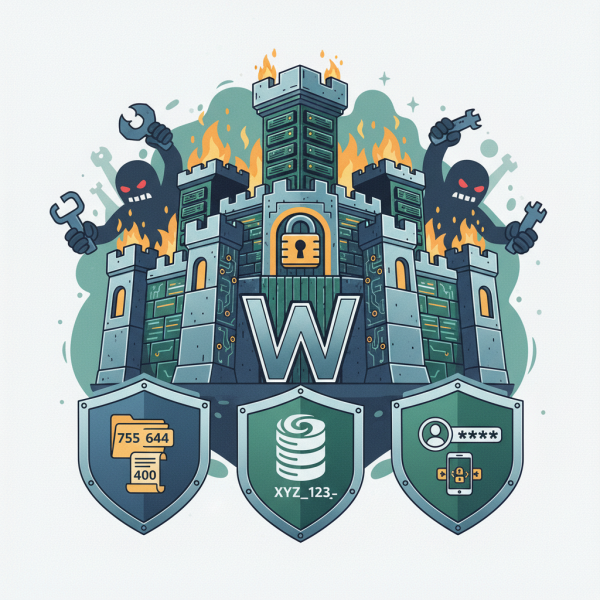
WordPress security operates on multiple layers, much like a fortress with various defenses. The core installation provides a basic level of protection, but extending this security requires proactive measures from the site administrator. Neglecting even seemingly minor details can open doors for attackers, leading to defacement, data breaches, or even complete loss of your site. A secure WordPress installation minimizes the attack surface, making it significantly harder for unauthorized individuals to gain access or exploit weaknesses.
These fundamental techniques aren't just about preventing attacks; they also contribute to the overall stability and performance of your website. A compromised site can suffer from poor SEO, blacklisting by search engines, and a loss of user trust. Therefore, understanding and applying these security principles is an ongoing commitment that pays dividends in peace of mind and site longevity.
Mastering File Permissions
File permissions are a cornerstone of server security and dictate who can read, write, or execute files and directories on your web server. Incorrect permissions can allow attackers to upload malicious scripts, modify core WordPress files, or even deface your website. Setting proper permissions is a critical step in preventing these types of exploits. WordPress generally requires a specific set of permissions for optimal functionality and security.
Permissions are typically represented by three-digit numbers (e.g., 755), where each digit corresponds to a user category: owner, group, and others. The numbers themselves are a sum of read (4), write (2), and execute (1) capabilities. It's vital to apply the principle of least privilege, meaning files and directories should only have the permissions absolutely necessary for them to function.
Here are the commonly recommended file permission settings for a WordPress installation:
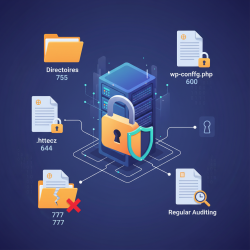
- Directories: All directories should generally be set to 755. This allows the owner to read, write, and execute, while the group and others can only read and execute. This prevents unauthorized users from adding or deleting files within your directories.
- Files: All files should typically be set to 644. This grants the owner read and write access, while the group and others have read-only access. This prevents unauthorized modification of your site's files.
- wp-config.php: This file contains your database credentials and is highly sensitive. It should be set to 444 or 400. This makes it read-only for everyone, significantly reducing the risk of an attacker gaining access to your database details. In some shared hosting environments, 440 or 640 might be necessary.
You can adjust file permissions using an FTP client or your hosting control panel's file manager. After making changes, always verify your site's functionality to ensure no critical processes were unintentionally restricted.
Securing Your Database Prefix
The WordPress database stores all your site's content, user information, settings, and more. By default, WordPress uses `wp_` as the prefix for all its database tables. This default prefix is well-known to attackers, making it an obvious target for SQL injection attacks. Changing this prefix from the default `wp_` to something unique and random adds a significant layer of obscurity, making it harder for automated scripts to target your database.
While changing the prefix after installation is possible, it's a more complex process involving database queries and modifications to your `wp-config.php` file. The safest and easiest approach is to change the prefix during the initial WordPress installation. During the installation wizard, you'll find an option to define your database table prefix. Choose a combination of letters, numbers, and underscores, for example, `xyz_123_`. Make it something that isn't easily guessable.
If you need to change it on an existing site, proceed with extreme caution and always create a full backup of your database and files beforehand. The process typically involves:
- Updating the `$table_prefix` variable in `wp-config.php`.
- Accessing your database via phpMyAdmin or a similar tool.
- Renaming all existing WordPress tables to reflect the new prefix.
- Updating any serialized options and user meta-data that might reference the old prefix.
This step, though seemingly minor, provides a robust defense against automated attacks specifically designed to exploit the default WordPress database structure.
Hardening Default User Settings
User accounts are often the weakest link in any security chain. WordPress, by default, creates an administrative user during installation. It's crucial to harden these user settings to prevent unauthorized access.
- Avoid the 'admin' Username: Never use `admin` or `administrator` as your primary administrative username. These are the first usernames attackers will try. Instead, choose a unique, non-obvious username for your administrator account. If your site already uses 'admin', create a new administrator user with a strong username, log in with the new user, and then delete the old 'admin' user, ensuring you attribute its content to the new user.
- Strong Passwords: Always use strong, complex passwords for all user accounts, especially administrative ones. A strong password includes a mix of uppercase and lowercase letters, numbers, and special characters, and should be at least 12-16 characters long. Password managers can greatly assist in generating and storing these complex passwords.
- Two-Factor Authentication (2FA): Implement 2FA for all administrative users. 2FA adds an extra layer of security by requiring a second verification method (like a code from a mobile app) in addition to the password. This makes it significantly harder for an attacker to gain access even if they manage to steal a password. Several plugins are available to easily add 2FA to your WordPress site.
- Limit Login Attempts: Install a plugin that limits the number of failed login attempts. This prevents brute-force attacks where attackers try thousands of password combinations.
Regularly review your user list, remove inactive accounts, and ensure all users have the appropriate roles and permissions. Granting users only the access they need (principle of least privilege) further strengthens your site's security posture.
Summary
Implementing fundamental WordPress hardening techniques is essential for maintaining a secure and resilient website. We've explored the critical importance of correctly configuring file permissions, where setting directories to 755, general files to 644, and the sensitive `wp-config.php` to 444 or 400 significantly limits unauthorized access and modifications. We also discussed securing your database by changing the default `wp_` table prefix to a unique alternative, preferably during installation, to thwart automated SQL injection attempts. Finally, we emphasized hardening default user settings, which includes avoiding common usernames like 'admin', utilizing strong, unique passwords, and implementing two-factor authentication to protect against brute-force attacks and unauthorized logins. By diligently applying these foundational practices, you can dramatically enhance your WordPress site's defense against common cyber threats and ensure its ongoing integrity and availability.
Comprehension questions
 What are the recommended file permissions for WordPress directories and general files, and why is the `wp-config.php` file handled differently?Why is it important to change the default `wp_` database prefix, and when is the ideal time to do so?What are three key recommendations for hardening default user settings in WordPress?
Review Quiz
Next Lesson

Course Contents : WordPress Security Essentials
- >> 3.
 File Permissions, Database Prefixes, and User Settings