Default User Roles and Permissions
- -->> 2. Default User Roles and Permissions
What you'll learn
 WordPress User RolesAdministrator CapabilitiesContent Management RolesUser Permission Management
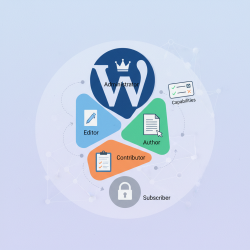
WordPress is a powerful content management system that allows multiple users to collaborate on a single website. To manage who can do what, WordPress employs a robust system of user roles, each with a predefined set of capabilities. Understanding these default roles is crucial for maintaining website security, streamlining content workflows, and ensuring efficient site management. This deep dive will explore the standard user roles provided by WordPress: Administrator, Editor, Author, Contributor, and Subscriber, elucidating their permissions and best use cases.
The Importance of User Roles in WordPress
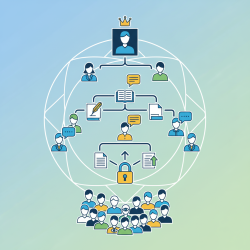
Properly assigning user roles is fundamental to the security and operational efficiency of any WordPress site. It prevents unauthorized actions, reduces the risk of accidental data loss, and ensures that each team member has access only to the tools and features necessary for their specific tasks. Without clear role distinctions, a website can quickly become disorganized, vulnerable to security breaches, or suffer from content management chaos. By understanding the distinct responsibilities of each role, site owners can delegate tasks effectively and maintain a well-structured online presence.
Administrator: The Ultimate Power
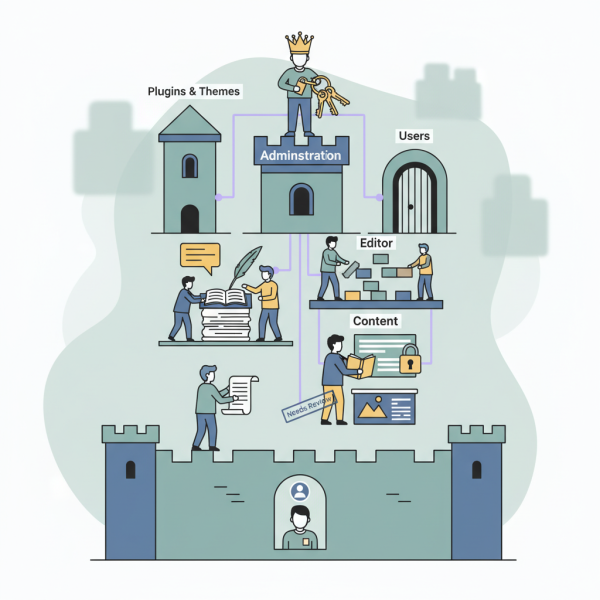
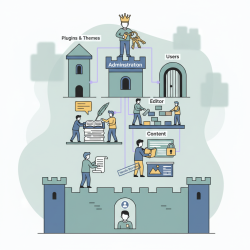
The Administrator role is the most powerful in WordPress, possessing full control over every aspect of the website. This role should be assigned sparingly and only to trusted individuals who are responsible for the overall health and management of the site. An Administrator can install and delete plugins and themes, manage all users, create and delete posts and pages, moderate comments, and modify all settings. Essentially, an Administrator can do anything and everything on a WordPress site. Because of this extensive power, it is common practice for a single site to have only one or very few Administrators to minimize potential risks.
- Install, update, and delete themes and plugins.
- Create, edit, publish, and delete all posts and pages.
- Manage all users, including creating new administrators.
- Moderate, edit, and delete all comments.
- Access and modify all WordPress settings.
- Import and export content.
Editor: Content Management Master
The Editor role is designed for individuals who are responsible for managing the content published on the site. An Editor has significant control over posts and pages but lacks the ability to make administrative changes that affect the site's core functionality or design elements like themes and plugins. They can create, edit, publish, and delete posts and pages, including those written by other users. Editors also have the power to moderate comments and manage categories and tags. This role is ideal for content managers, senior writers, or anyone overseeing the editorial calendar and content quality.
- Create, edit, publish, and delete all posts and pages.
- Moderate, edit, and delete all comments.
- Manage categories and tags.
- Upload media files.
- Cannot manage themes, plugins, or users (except their own profile).
Editors play a vital role in ensuring consistency and quality across all published materials. They can review submissions from Authors and Contributors, make necessary edits, and schedule content for publication. Their focus is purely on the content layer, making them indispensable for any multi-author blog or news site.
Author: The Dedicated Creator
The Author role is suitable for individuals who write and publish their own content. An Author can create, edit, and publish their own posts, as well as upload media files. However, they cannot publish posts written by other users, nor can they edit posts once they have been published by another role, such as an Editor or Administrator. Authors also have limited control over comments, only being able to edit comments made on their own posts. They cannot manage categories or tags, only assigning existing ones to their articles.
This role is perfect for regular contributors who are trusted to publish their own work directly without needing an additional layer of approval for every piece, though an Editor can always step in if needed. It balances independence with some necessary constraints to maintain site integrity.
Contributor: Budding Content Powerhouse
The Contributor role is the most restricted among the content-creating roles. A Contributor can write and edit their own posts, but they cannot publish them. Instead, their posts must be submitted for review by an Editor or Administrator. Once a post is submitted, a Contributor cannot publish it themselves. They also cannot upload media files directly. This role is excellent for new writers, guest bloggers, or anyone who needs to submit content for review before it goes live. It provides a valuable layer of editorial oversight, ensuring quality and adherence to site standards before publication.
The inability to upload media means that images or other files often need to be handled by an Editor or Administrator, or pre-uploaded for the Contributor's use. This limitation further emphasizes the review-first nature of this role.
Subscriber: The Basic User
The Subscriber role is the most basic and least privileged role in WordPress. Users with this role can only manage their own profile. They cannot create content, edit existing content, manage comments, or access any administrative areas of the site. Essentially, a Subscriber's main purpose is to log in, view restricted content if the site offers it, or participate in private forums if a plugin enables such functionality. This role is often used on membership sites, e-commerce platforms, or forums where users need to register an account to access specific areas or features.
While seemingly simple, the Subscriber role is crucial for sites that require user registration for community building or to unlock exclusive content. It allows for basic user authentication without granting any administrative or content creation capabilities.
Summary of WordPress User Roles
WordPress user roles are an indispensable mechanism for managing website access and capabilities. From the all-encompassing Administrator to the content-focused Editor, the independent Author, the review-dependent Contributor, and the basic Subscriber, each role serves a distinct purpose. Understanding these default roles enables site owners to delegate responsibilities effectively, enhance security, and streamline content workflows, ultimately leading to a more organized and efficient WordPress environment for all collaborators involved.
Comprehension questions
 What is the primary function of the Administrator role in WordPress?How does the Editor role differ from the Author role in terms of content management capabilities?What is the main limitation of the Contributor role regarding publishing content?For what primary purpose is the Subscriber role typically used on a WordPress site?
Review Quiz
Next Lesson

Course Contents : WordPress User Roles and Permission
- >> 2.
 Default User Roles and Permissions