Structuring User Roles for Collaborative Websites
- -->> 7. Structuring User Roles for Collaborative Websites
What you'll learn
 User Role ManagementCollaborative Website DesignContent Workflow OptimizationWebsite Security Practices
Building and managing a multi-author website requires more than just good content; it demands a robust strategy for collaboration, which inherently involves defining clear user roles. Effective role management is crucial for maintaining content quality, streamlining workflows, ensuring security, and fostering a productive environment for all contributors. Without a well-defined structure, a collaborative site can quickly descend into chaos, leading to inconsistent content, security vulnerabilities, and frustration among team members. This article will explore the fundamental aspects of structuring user roles to create a highly functional and secure multi-author platform.
Understanding the Need for User Roles
User roles dictate what actions different users can perform on a website. In a collaborative environment, not every user needs the same level of access or control. Granting excessive permissions can pose security risks and lead to unintended changes, while insufficient permissions can hinder productivity. A well-designed role strategy ensures that each team member has precisely the access required to fulfill their responsibilities, nothing more and nothing less.
This systematic approach prevents unauthorized modifications, streamlines the content creation and publishing process, and significantly improves the overall efficiency of the website’s operations. It establishes a clear chain of command and responsibility, essential for large teams or sites with sensitive information.
Common User Roles in Multi-Author Sites
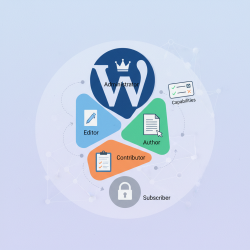
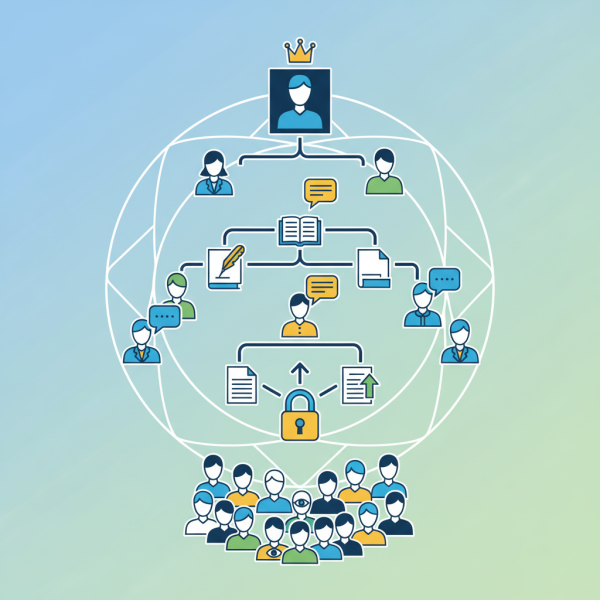
While specific platforms may use different terminology, most multi-author sites benefit from a hierarchy of roles, each with distinct capabilities. Understanding these common roles is the first step in designing your site's access structure.
Administrator
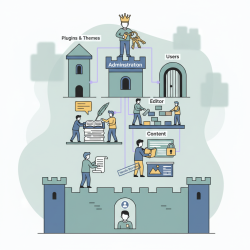
The Administrator holds the highest level of authority. This role has full control over all aspects of the website, including managing users, installing plugins, updating themes, modifying site settings, and publishing, editing, or deleting any content. Administrators are typically few in number, often limited to the site owner or core technical personnel, due to the extensive power they wield.
Editor
Editors typically manage the content lifecycle. They can publish, edit, and delete any posts or pages, including those written by other users. They also have the authority to moderate comments and manage categories and tags. Editors play a critical role in maintaining content quality and ensuring that all published material aligns with the site's editorial guidelines.
Author
Authors are primarily responsible for creating and managing their own content. They can write, edit, and publish their own posts. However, they generally cannot edit or publish posts by other users, nor do they have access to site-wide settings. This role is ideal for regular contributors who are trusted to publish their work independently after creation.
Contributor
Contributors can write and edit their own posts but cannot publish them. Their content typically goes into a pending review status, requiring an Editor or Administrator to approve and publish it. This role is excellent for new writers or guest bloggers who need supervision before their content goes live, ensuring quality control and adherence to site standards.
Subscriber/Reader
Subscribers or Readers have the most limited access. They can often only view content, leave comments (if allowed), and manage their own profile information. They cannot create or modify any site content. This role is common for community members who engage with the content but do not contribute actively to its creation.
Designing a Custom Role Hierarchy
While the standard roles provide a good starting point, many complex multi-author sites benefit from custom roles tailored to specific workflows. Platforms often provide tools to create or modify roles, allowing you to define precise capabilities for each. Consider your site's unique needs:
- Do you need a "Proofreader" role that can edit but not publish?
- Is there a "SEO Specialist" who needs access only to metadata and analytics?
- Perhaps a "Moderator" role specifically for comment management?
Mapping out your content workflow, from ideation to publication and promotion, will help identify granular permission needs and inform the design of your custom roles. This ensures efficiency and security without unnecessary access.
Best Practices for Role Management
Implementing a multi-author strategy effectively involves more than just assigning roles; it requires ongoing management and adherence to best practices.
- Principle of Least Privilege: Always grant users the minimum necessary permissions to perform their job functions. Avoid giving higher access levels "just in case."
- Regular Audits: Periodically review user roles and permissions. As team members change roles or leave the organization, ensure their access rights are updated accordingly.
- Clear Documentation: Document each role's responsibilities and corresponding permissions. This helps new team members understand the structure and serves as a reference for existing staff.
- Training: Ensure all users understand what their role entails and the boundaries of their access. Proper training can prevent accidental misuse of permissions.
- Strong Passwords and Two-Factor Authentication: Regardless of roles, basic security measures like strong, unique passwords and 2FA are paramount for all users to protect access credentials.
Tools and Platforms for Role Implementation
Most modern content management systems (CMS) offer robust tools for managing user roles and permissions. WordPress, for example, comes with a predefined set of roles and a vast ecosystem of plugins that allow for creating highly customized roles and capabilities. Drupal and Joomla also provide sophisticated permission systems out-of-the-box. For bespoke applications, developers can integrate role-based access control (RBAC) frameworks to programmatically define and enforce permissions, offering ultimate flexibility.
Leveraging these built-in functionalities and extensions is key to efficiently implementing your multi-author strategy without needing to build a complex system from scratch. Choose a platform that aligns with your technical capabilities and the complexity of your desired role hierarchy.
Summary
Structuring user roles is a cornerstone of a successful multi-author site strategy, enabling efficient collaboration, enhanced security, and consistent content delivery. By understanding common roles like Administrator, Editor, Author, and Contributor, and by potentially designing custom roles based on specific workflow needs, site owners can create a finely tuned access hierarchy. Adhering to best practices such as the principle of least privilege, conducting regular audits, and providing clear documentation ensures that the role management system remains effective and secure over time, supported by the robust features of modern CMS platforms.
Comprehension questions
 What is the primary benefit of defining clear user roles in a multi-author website?Describe the main responsibilities of an Editor role compared to an Author role.Why might a multi-author site need custom user roles beyond the standard Administrator, Editor, Author, and Contributor?
Review Quiz
Next Lesson

Course Contents : WordPress User Roles and Permission
- >> 7.
 Structuring User Roles for Collaborative Websites