Extending Roles and Permissions with Plugins
- -->> 9. Extending Roles and Permissions with Plugins
What you'll learn
 Extending User RolesGranular Permission ControlPlugin Selection CriteriaReal-World Application of Custom Roles
In the digital landscape, managing who can do what on a platform is paramount for security, functionality, and user experience. While most content management systems and applications offer a basic framework for user roles and permissions, these default settings often fall short for complex or specialized operational needs. This is where the strategic use of plugins becomes indispensable, transforming a generic access control system into a finely tuned instrument that grants advanced, granular control over every aspect of user interaction and content visibility.
Understanding User Roles and Permissions
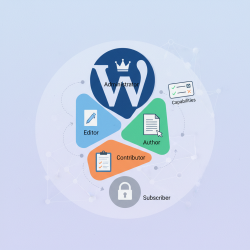
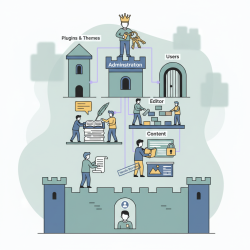
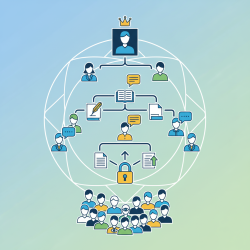
User roles define a collection of capabilities that dictate what actions a user can perform and what content they can access. Permissions, or capabilities, are the individual rights assigned to a role. For instance, an 'Administrator' role typically has capabilities like editing all posts, managing users, and installing plugins, while an 'Author' role might only have capabilities to write and publish their own posts.
This foundational structure ensures that users only interact with the parts of the system relevant to their responsibilities, reducing potential security risks and streamlining workflows. A well-defined role system is crucial for maintaining order and efficiency within any collaborative digital environment.
Why Default Systems Fall Short
Many platforms provide a limited set of predefined roles. These often include broad categories like Administrator, Editor, Author, Contributor, and Subscriber. While sufficient for simple blogs or websites, they quickly become inadequate for more intricate operations.
The main limitation is the lack of granularity. For example, you might need a user who can manage only specific types of content, or one who can publish but not delete posts. The default roles often do not allow for such fine distinctions, leading to either over-privileging users (a security risk) or under-privileging them (hindering productivity).
Leveraging Plugins for Enhanced Control
Plugins are powerful extensions that integrate seamlessly with your platform, providing functionalities not available in the core system. For user roles and permissions, these tools introduce a layer of sophisticated management, allowing administrators to move beyond the rigid constraints of default settings.
By installing a dedicated role management plugin, you gain the ability to completely customize user capabilities. This means you can create new roles from scratch, modify existing ones, and assign or revoke specific permissions with unprecedented precision. The flexibility offered by plugins is crucial for tailoring your platform to exact business or operational requirements.
- Create entirely new roles specific to your organization's hierarchy.
- Modify the capabilities of existing default roles without altering core code.
- Assign individual capabilities to users, overriding their role's default settings.
Key Features of Advanced Role Management Plugins
When selecting a plugin to extend user roles and permissions, look for a comprehensive set of features that provide maximum control and flexibility.
- Custom Role Creation: The ability to define unlimited custom roles with unique names and descriptions.
- Granular Capability Management: Tools to assign or revoke specific permissions (e.g., 'edit_products', 'manage_subscriptions', 'view_reports') for each role. This often includes custom capabilities introduced by other plugins.
- Role-Based Content Restrictions: Options to restrict access to specific pages, posts, custom post types, or categories based on a user's role.
- User-Specific Permissions: The flexibility to grant or deny specific capabilities to individual users, independent of their assigned role(s). This allows for highly personalized access control.
- Multiple Roles per User: Some advanced plugins allow a single user to be assigned multiple roles, inheriting capabilities from all assigned roles.
- Permission Reports and Audits: Features that display a clear overview of who has access to what, and logs of changes made to roles and permissions, aiding in security and compliance.
Real-World Applications of Custom Roles
The applications for extended user roles and permissions are vast and impactful across various digital ecosystems.
In a membership site, you could create 'Gold Member', 'Silver Member', and 'Bronze Member' roles, each with access to different levels of premium content or features. An e-commerce platform might benefit from 'Vendor Manager' roles that can only edit their own products, 'Order Processor' roles that can view but not modify customer details, and 'Customer Service' roles with limited refund capabilities.
For multi-author blogs or news sites, you can define roles like 'Section Editor' for specific categories, or 'Proofreader' who can only review and suggest edits, but not publish. In an intranet or corporate portal, departmental roles can be established, allowing users to access only information and tools relevant to their team, enhancing data security and organizational efficiency.
Selecting the Ideal Plugin
Choosing the right plugin involves careful consideration. First, ensure compatibility with your platform's version and any other critical plugins you are using. Look for plugins with a strong reputation, regular updates, and responsive support, as role management is a critical security function.
Evaluate the plugin's interface for ease of use. A complex interface can lead to configuration errors. Prioritize plugins that offer clear documentation and provide the specific granular control features your project requires. Always test new role configurations in a staging environment before deploying them to a live site to prevent unintended access issues.
Conclusion: Empowering Your Platform with Granular Control
Extending and customizing user roles and permissions through plugins is an essential strategy for any digital platform seeking advanced control, enhanced security, and optimized workflows. By moving beyond the limitations of default systems, administrators can precisely define who has access to what, ensuring that every user's interaction aligns perfectly with their designated responsibilities. This granular control not only fortifies the platform's security posture but also significantly improves operational efficiency and allows for the creation of truly bespoke user experiences, ultimately leading to a more robust and adaptable digital environment.
Comprehension questions
 What are the primary limitations of default user role and permission systems in many platforms?List three key features that a comprehensive role management plugin should offer.Describe two practical scenarios where custom user roles and granular permissions are essential.What important factors should be considered when choosing a plugin for extending user roles and permissions?
Community Poll
Next Lesson
Course Contents : WordPress User Roles and Permission
- >> 9.
 Extending Roles and Permissions with Plugins