Backups via Plugin or via Server
- -->> 6. Backups via Plugin or via Server
What you'll learn
 The Importance of a Robust Backup StrategyPlugin-Based Backup SolutionsServer-Level Backup MethodsChoosing the Right Solution and Hybrid Approach
The potential for data loss due to hardware failure, cyberattacks, human error, or natural disasters underscores the absolute necessity of a robust backup strategy. Without reliable backups, the loss of important information can lead to significant financial setbacks, reputational damage, and operational downtime. Therefore, evaluating and selecting the most appropriate backup solution is not merely a technical task but a fundamental aspect of risk management and business continuity.
A well-implemented backup solution ensures that you can quickly restore your data and operations to a previous state, minimizing disruption and safeguarding your digital assets. The choice between various backup methods often boils down to a balance of ease of use, comprehensive coverage, performance, and cost. Understanding the nuances of popular backup plugins versus more encompassing server-level methods is crucial for making an informed decision that aligns with specific needs and technical capabilities.
Plugin-Based Backup Solutions
Plugin-based backup solutions are typically installed directly within an application or content management system (CMS), such as WordPress, Joomla, or Magento. These solutions are designed to simplify the backup process for specific platforms, often providing a user-friendly interface within the application's dashboard. They are popular among website owners who may not possess extensive technical knowledge of server administration.
Advantages of Plugin Backups
- Ease of Use: Plugins offer a highly intuitive interface, allowing users to schedule, perform, and restore backups with minimal technical expertise directly from their application's administrative panel.
- Granular Control: Many plugins provide options for selective backups, enabling users to choose specific databases, themes, plugins, or media files to include or exclude, which can save storage space and time.
- Application Awareness: Since they operate within the application, plugins are inherently aware of the application's structure and database, often resulting in more consistent and complete backups for that specific application.
- Portability: Some plugins facilitate easy migration of an application to a new hosting environment by packaging the entire site into a single, restorable file.
Disadvantages of Plugin Backups
- Resource Overhead: Running backup processes via a plugin can consume significant server resources (CPU, RAM, I/O), potentially slowing down the website or even crashing it during backup operations, especially on shared hosting environments.
- Potential for Incompleteness: While application-aware, plugins might miss files or configurations stored outside the application's standard directory, or fail to capture server-level settings that are critical for a full restore.
- Dependency on Application Health: If the application itself becomes corrupted or inaccessible, the backup plugin may also be unreachable, rendering it useless for restoration.
- Security Risks: Like any plugin, backup plugins can introduce potential security vulnerabilities if not regularly updated or if they are from untrusted sources.
Plugin backups are often ideal for individual website owners, small businesses with a single CMS-driven site, or those who prioritize ease of management within their application dashboard and have limited server access or technical skills.
Server-Level Backup Methods
Server-level backup methods involve backing up the entire server environment, including all websites, databases, configurations, and operating system files. These are typically managed through hosting control panels like cPanel/WHM, Plesk, or direct command-line tools on a Virtual Private Server (VPS) or dedicated server. Server-level backups offer a comprehensive snapshot of the entire hosting environment.
Advantages of Server-Level Backups
- Comprehensive Coverage: These backups capture everything on the server, ensuring that all files, databases, system configurations, and hidden files are included, providing a complete disaster recovery solution.
- Performance and Efficiency: Server-level backups often utilize efficient system-level tools and run independently of any specific application, leading to faster backup times and less impact on website performance during the process.
- Independent Restoration: In the event of a catastrophic server failure, server-level backups allow for a complete restoration of the entire server environment, often independent of any specific application's operational status.
- Greater Security: Managed by the hosting provider or server administrator, these backups are often stored in isolated, secure locations, adding an extra layer of protection.
Disadvantages of Server-Level Backups
- Technical Expertise Required: Managing server-level backups typically requires a deeper understanding of server administration, command-line tools, or control panel functionalities, which can be challenging for non-technical users.
- Less Granular Application Control: While comprehensive, server-level backups might not offer the same level of granular control over individual application components as plugins do. Restoring a single file or database often requires restoring a larger chunk of the server or manually extracting components.
- Potential for Larger Restore Times: Restoring an entire server can be a time-consuming process, especially if only a small part of a specific application needs recovery.
- Storage Management: Full server backups tend to be much larger, requiring more storage space and careful management of retention policies.
Server-level backups are generally preferred by system administrators, larger businesses with multiple websites or complex server setups, and users who require the highest level of data integrity and disaster recovery capabilities.
Choosing the Right Solution: Key Considerations
The selection of an appropriate backup solution is not a one-size-fits-all decision. It hinges on several critical factors that need careful evaluation. Understanding your specific requirements will guide you toward the most effective strategy.
- Recovery Point Objective (RPO): How much data loss can you tolerate? If near-zero data loss is essential, more frequent backups are needed.
- Recovery Time Objective (RTO): How quickly do you need to recover your data and resume operations after an incident? Faster recovery may require more robust or specialized solutions.
- Budget and Resources: Evaluate the cost of storage, software licenses, and the time or expertise required to manage the backup process.
- Technical Proficiency: Assess the technical skills available to manage and restore backups. Simpler solutions are better for less technical users.
- Scalability: Consider how your data and operations might grow in the future and whether the chosen solution can scale with those needs.
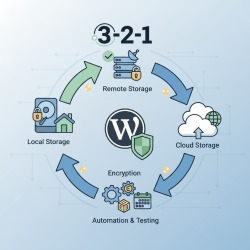
- Location and Redundancy: Ensure backups are stored securely off-site and in multiple locations to protect against localized disasters.
The Hybrid Approach: Best of Both Worlds
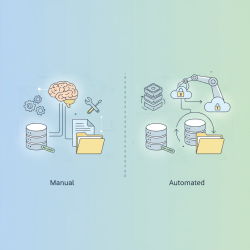
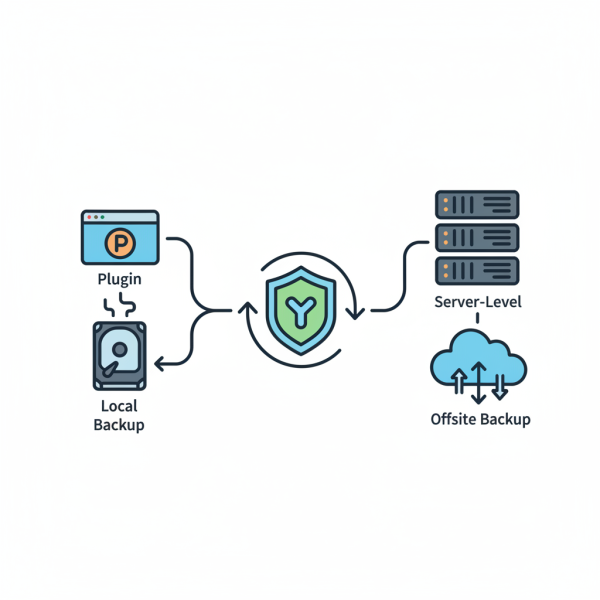
For many, the most effective strategy involves a hybrid approach, combining the strengths of both plugin-based and server-level backup methods. This layered strategy provides redundancy and flexibility, mitigating the weaknesses of relying on a single method.
For instance, a website owner might use a plugin for daily or weekly granular backups of their CMS and database, allowing for quick and easy recovery of specific application components. Concurrently, their hosting provider or a separate server-level tool could perform full weekly or monthly server backups, offering a complete safety net for catastrophic failures. This combination ensures both rapid, specific application recovery and a comprehensive disaster recovery plan for the entire server environment.
Summary
Evaluating and selecting the right backup solution is a cornerstone of effective data protection. Plugin-based backups offer ease of use and granular control within specific applications but can incur resource overhead and depend on application health. Server-level backups provide comprehensive coverage and efficiency across the entire server, though they typically demand greater technical expertise. Ultimately, the optimal choice depends on factors like RPO, RTO, budget, and technical skills. Often, a hybrid approach combining the strengths of both methods provides the most resilient and flexible data protection strategy, ensuring peace of mind in an unpredictable digital world.
Comprehension questions
 What are the main advantages of using plugin-based backup solutions?What are the key disadvantages associated with server-level backup methods?Which critical factors should be considered when selecting an appropriate backup solution?How does a hybrid backup approach combine the strengths of both plugin-based and server-level methods?
Community Poll
Next Lesson
Course Contents : Mastering WordPress Site Maintenance
- >> 6.
 Backups via Plugin or via Server