Implementing a Multi-Layered Backup Routine
- -->> 7. Implementing a Multi-Layered Backup Routine
What you'll learn
 Local Backup StrategiesOffsite Data ProtectionDatabase Backup TechniquesBackup Testing Importance
Implementing a robust, comprehensive, and multi-layered backup routine isn't just a best practice; it's a fundamental necessity for business continuity and peace of mind. A single point of failure in your backup strategy is a disaster waiting to happen. This article will guide you through constructing a resilient backup plan that safeguards your data across multiple vectors, ensuring recoverability no matter the challenge.
Understanding Backup Fundamentals
Before diving into specific layers, it's essential to grasp the core concepts of backup types. Each offers distinct advantages and disadvantages, making a combination the most effective approach.
- Full Backup: This is a complete copy of all data at a specific point in time. It's the most straightforward but also the most resource-intensive in terms of storage and time.
- Incremental Backup: An incremental backup only copies data that has changed since the last backup (of any type). It's very efficient in terms of storage and speed but requires the full backup and all subsequent incrementals for restoration.
- Differential Backup: A differential backup copies all data that has changed since the *last full backup*. It's faster to restore than an incremental backup (only needing the full and the latest differential) but can grow in size over time.
Layer 1: Local, On-Site Backups for Immediate Recovery
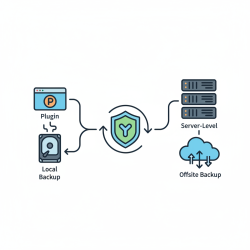
The first line of defense is a local backup. This layer prioritizes speed of recovery for common issues like accidental deletion, data corruption, or minor hardware failures. Keeping a recent copy of your data physically close dramatically reduces downtime.
For files, this often involves external hard drives, Network Attached Storage (NAS) devices, or a dedicated local server. Automated scripts or commercial backup software can schedule daily or even hourly snapshots of critical file directories. The frequency depends on how much data loss you can tolerate. For instance, a developer might back up their code repositories every few hours.
Database backups at this layer typically involve native database dump tools (e.g., mysqldump for MySQL, pg_dump for PostgreSQL, SQL Server's built-in backup features). These generate a snapshot of your database schema and data into a file. Transaction logs should also be backed up frequently to enable point-in-time recovery, especially for active production databases.
Layer 2: Offsite or Cloud Backups for Disaster Recovery
While local backups are fast, they are vulnerable to site-wide disasters such as fire, flood, theft, or major hardware failures affecting the entire premises. This is where offsite or cloud backups become indispensable, providing geographic separation for your data.
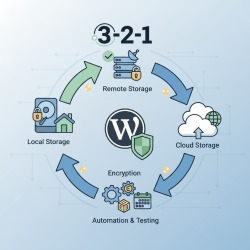
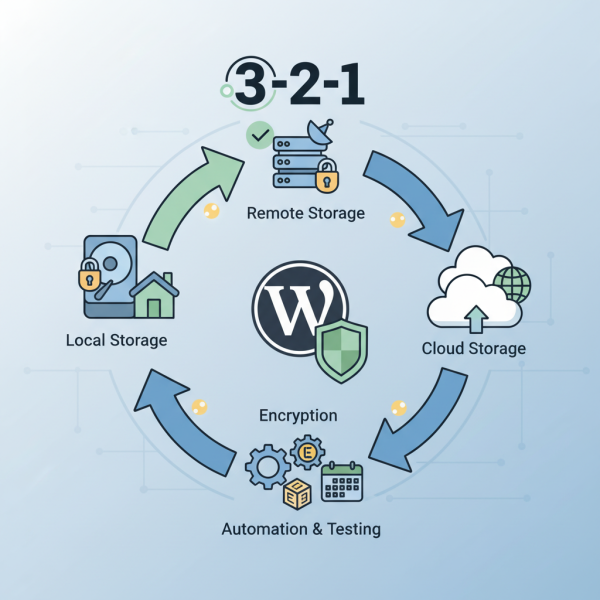
Cloud backup services (like AWS S3, Google Cloud Storage, Azure Blob Storage, or specialized backup providers) offer scalable, secure, and often highly available storage. Alternatively, you can use a separate physical location to store backup media or sync data to a remote server. The '3-2-1 rule' is highly relevant here: three copies of your data, on two different media types, with one copy offsite.
For files, synchronization tools or dedicated backup agents can push updated files to your chosen offsite location on a daily or weekly basis. Database dumps generated in Layer 1 should be securely transferred to the offsite repository. Consider encrypting these backups before transfer and at rest in the cloud to protect sensitive information.
Layer 3: Archival Backups for Long-Term Retention and Compliance
The third layer focuses on long-term data retention, often driven by compliance requirements, historical data analysis, or deep disaster recovery needs. These backups are typically less about rapid recovery and more about ensuring data availability over extended periods, sometimes years or decades.
Traditional media like tape drives or optical discs (Blu-ray M-DISC) are still used for true offline archival, offering protection against cyber threats like ransomware that might propagate through connected systems. Cloud providers also offer "deep archive" storage tiers (e.g., AWS Glacier, Google Coldline) designed for extremely low-cost, long-term storage where retrieval times can be hours rather than minutes.
Archival backups are performed less frequently, perhaps quarterly or annually, capturing a comprehensive snapshot of your entire system. This layer is crucial for meeting regulatory obligations and providing an ultimate fallback in extreme data loss scenarios.
Database Backup Specifics
Databases require particular attention due to their dynamic nature and the importance of data consistency. Simply copying database files without proper shutdown or using native tools can result in corrupt or inconsistent backups.
- Consistency: Ensure backups capture a consistent state. This often means using native tools that handle open transactions or placing the database in a read-only state briefly.
- Transaction Logs: For many relational databases, backing up transaction logs allows for point-in-time recovery, meaning you can restore the database to a state just before an incident occurred.
- Validation: Always validate database backups. Attempting to restore a corrupt backup is a common pitfall.
File System Backup Specifics
File systems, while seemingly simpler, also have nuances.
- Open Files: Ensure your backup solution can handle files that are actively in use without corrupting them. Volume Shadow Copy Service (VSS) on Windows or similar technologies on Linux are essential.
- Permissions and Metadata: Backups should preserve file permissions, ownership, and other critical metadata, especially in multi-user or networked environments.
- Version Control: For frequently updated files, versioning within your backup system can be invaluable for reverting to earlier states.
The Non-Negotiable Step: Testing Your Backups
A backup is only as good as its restorability. Many organizations discover too late that their backups are corrupt, incomplete, or simply cannot be restored. Regular, scheduled restoration drills are not optional; they are a critical part of your backup strategy. Periodically attempt to restore data from each layer of your backup routine to a separate test environment. This validates the integrity of your backup data, confirms your recovery procedures, and helps identify potential bottlenecks or missing components in your strategy.
Automation and Monitoring
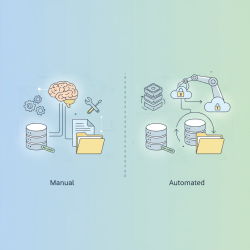
Manual backups are prone to human error and inconsistency. Automate your backup routines using scripts, cron jobs, or dedicated backup software. Once automated, establish robust monitoring. Receive alerts for successful backups, failed backups, or backups that exceed their expected size or duration. Proactive monitoring ensures that your safety net is always in place and functioning correctly.
Security and Encryption of Backup Data
Your backup data is as sensitive, if not more sensitive, than your live data. Implement strong security measures:
- Encryption: Encrypt data at rest (on storage media) and in transit (during transfer to offsite locations).
- Access Control: Restrict who can access backup data and backup systems. Use strong, unique credentials and multi-factor authentication.
- Immutable Backups: Where possible, use storage that supports immutability (write-once, read-many) to protect against ransomware and accidental deletion.
Summary
Implementing a comprehensive, multi-layered backup routine is a critical component of any robust IT strategy. By combining local backups for rapid recovery, offsite or cloud backups for disaster preparedness, and archival backups for long-term retention, organizations can build a resilient defense against data loss. Remember to consider the specifics of file and database backups, rigorously test your restoration capabilities, automate and monitor your processes, and secure your backup data with encryption and strict access controls. A well-executed backup strategy ensures that when the inevitable data incident occurs, recovery is not a question of if, but how quickly and completely.
Comprehension questions
 What are the three main types of backups discussed, and what is a key characteristic of each?Explain the '3-2-1 rule' for backups and why it is important for disaster recovery.Why is regular testing of your backup restoration process considered a non-negotiable step?What are some key security measures recommended for protecting your backup data, both at rest and in transit?
Review Quiz
Next Lesson
Course Contents : Mastering WordPress Site Maintenance
- >> 7.
 Implementing a Multi-Layered Backup Routine