Database Health: Issues, Performance, and Optimization
- -->> 3. Database Health: Issues, Performance, and Optimization
What you'll learn
 WordPress Database FundamentalsIdentifying Common Database ProblemsPerformance Consequences of Poor Database HealthEssential Database Optimization Practices
The heart of every WordPress website beats within its database. It's the central repository for nearly all your site's information, from posts and pages to comments, user data, and plugin settings. A healthy, well-maintained database is fundamental to a fast, responsive, and reliable website. Conversely, a neglected or bloated database can severely degrade performance, lead to errors, and frustrate users, directly impacting your site's success. Grasping the key concepts of WordPress database health, understanding common issues, and recognizing their profound impact on performance is therefore not just good practice, but a necessity for any WordPress site owner or developer aiming for optimal website operation.
Understanding the WordPress Database
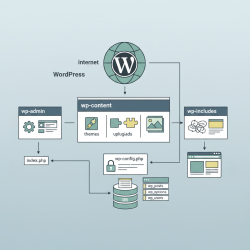
At its core, WordPress utilizes MySQL (or MariaDB), a relational database management system, to store and organize data. When you create a post, upload an image, or even change a setting, that information is written to specific tables within this database. A standard WordPress installation comes with a predefined set of tables, each serving a distinct purpose.
Core Database Tables
-
wp_posts: Stores all post types, including posts, pages, attachments, and custom post types. -
wp_postmeta: Contains custom fields for posts. -
wp_comments: Houses all comments made on your site. -
wp_commentmeta: Stores metadata for comments. -
wp_users: Contains information about all registered users. -
wp_usermeta: Stores metadata for users, like first name, last name, etc. -
wp_options: Stores all site-wide settings, themes, and plugin options. -
wp_terms,wp_term_taxonomy,wp_term_relationships: Manage categories, tags, and custom taxonomies.
Understanding these tables helps in diagnosing issues and appreciating the complexity of the data storage system. When data is constantly added, updated, and deleted, the database can become fragmented or accumulate unnecessary information, leading to various health issues.
Common WordPress Database Issues
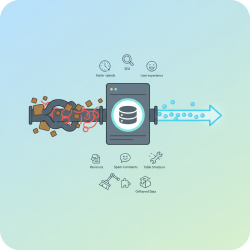
Several factors can contribute to a WordPress database becoming unhealthy or inefficient. These issues often stem from the natural operation of a dynamic website combined with plugin and theme behaviors.
-
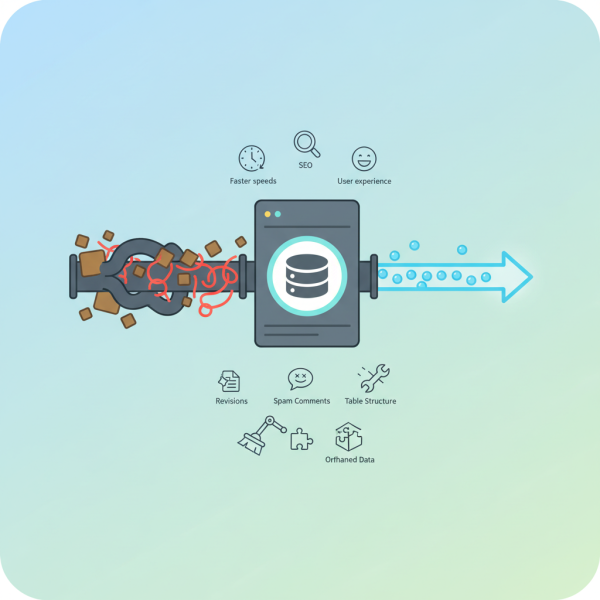
Database Overhead and Fragmentation: As data is added, deleted, and updated, the database tables can become fragmented. This is similar to how a hard drive gets fragmented over time. Fragmentation means that data is not stored contiguously, requiring the database system to work harder and take longer to retrieve information. Overhead refers to the unused space within a table, a byproduct of operations that modify or delete data without reclaiming space efficiently.
-
Unused and Orphaned Data: Over time, your database can accumulate data that is no longer needed. This includes old plugin and theme data after they've been uninstalled, orphaned post meta (metadata that no longer has an associated post), or unapproved comments. This data consumes space and adds unnecessary rows that the database has to sift through.
-
Excessive Post Revisions: WordPress automatically saves revisions for posts and pages. While useful for recovery, an unlimited number of revisions can quickly bloat your
wp_postsandwp_postmetatables. Every small edit generates a new revision, which can add significant overhead, especially on sites with many content updates. -
Spam Comments and Transients: Spam comments fill up your
wp_commentstable, consuming valuable database space and processing power. Similarly, transient options, which are temporary cached data often used by plugins, can sometimes accumulate excessively if not properly managed by the plugins themselves. -
Plugin and Theme Bloat: Some plugins and themes are not optimized for database performance. They might create numerous custom tables, store excessive amounts of data, or make inefficient database queries, all of which contribute to performance degradation.
-
Corrupted Tables: While less common, database tables can become corrupted due to server crashes, disk errors, or faulty plugins. A corrupted table can lead to data loss and make your website completely inaccessible or throw critical errors.
The Impact on Website Performance
The health of your WordPress database directly correlates with your website's overall performance. A database plagued by the issues mentioned above can lead to a cascade of negative effects.
Slow Load Times: This is perhaps the most noticeable impact. When a browser requests a page, WordPress queries the database to retrieve all the necessary content. A bloated or fragmented database means these queries take longer to execute, delaying the time it takes for your page to render. Users are notoriously impatient, and even a few extra seconds of load time can lead to increased bounce rates.
Increased Server Resource Usage: Inefficient database queries require more CPU and RAM on your server. This can lead to your hosting provider throttling your resources, or even suspending your account if you consistently exceed limits. It also means you might need to upgrade to a more expensive hosting plan unnecessarily.
Database Errors and Downtime: A severely unhealthy database, especially one with corrupted tables, can lead to critical database errors ("Error establishing a database connection") that render your site completely unavailable. Frequent errors can also make the site appear unreliable to search engines, negatively impacting SEO.
Poor User Experience: Beyond just slow loading, a struggling database can cause timeouts, incomplete page loads, or even prevent certain functionalities from working correctly. This creates a frustrating experience for visitors, leading to reduced engagement, lower conversions, and a damaged brand reputation.
Strategies for Database Health and Optimization
Maintaining a healthy WordPress database is an ongoing process that involves regular monitoring and proactive measures. Implementing the following strategies can significantly improve your site's performance and reliability.
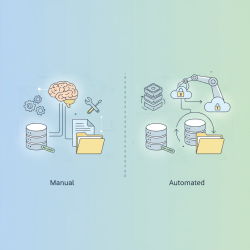
Regular Database Optimization: This involves "repairing" and "optimizing" tables to defragment them and reclaim unused space. Many hosting providers offer database optimization tools, or you can use WordPress plugins specifically designed for this purpose.
Deleting Unused Data: Regularly clean out old plugin and theme data, orphaned post meta, unapproved comments, and any other junk data that has accumulated. Be cautious and always back up your database before performing such operations.
Limiting Post Revisions: You can limit the number of post revisions WordPress stores by adding a line of code to your wp-config.php file (e.g., define('WP_POST_REVISIONS', 5);). Alternatively, plugins can manage this for you.
Effective Spam Management: Utilize anti-spam plugins like Akismet to filter out unwanted comments before they ever hit your database. Regularly review and delete legitimate spam comments from your database to keep it clean.
Choose Plugins and Themes Wisely: Before installing, research plugins and themes for their performance impact and whether they are known to be database-friendly. Opt for well-coded solutions that don't create unnecessary database entries or make inefficient queries.
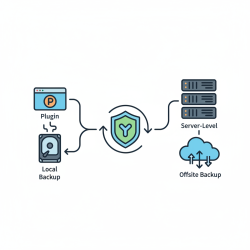
Implement a Solid Backup Strategy: Regular database backups are non-negotiable. In case of corruption or accidental data deletion during optimization, a recent backup is your lifeline. Ensure your backups are stored securely and can be easily restored.
Utilize Database Management Tools:
-
phpMyAdmin: Often provided by hosting companies, phpMyAdmin allows direct access to your database for manual optimization, repair, and deletion of tables or rows. Use with extreme caution.
-
WordPress Optimization Plugins: Plugins like WP-Optimize, Advanced Database Cleaner, or WP-Sweep offer user-friendly interfaces to clean, optimize, and repair your database without direct phpMyAdmin access. They often include features for managing revisions, transients, and orphaned data.
Summary
A healthy WordPress database is the backbone of a high-performing website. We've explored the fundamental structure of the WordPress database, identified common issues such as fragmentation, bloat from unused data, and excessive revisions, and detailed their direct impact on website speed, server resources, and user experience. Crucially, we also outlined practical strategies, including regular optimization, diligent data cleanup, wise plugin choices, and robust backup practices, all essential for maintaining an efficient and responsive WordPress site. Prioritizing database health is an investment in your website's stability and overall success.
Comprehension questions
 What are some of the core tables found in a standard WordPress database installation?List three common issues that can lead to WordPress database bloat or poor health.How does a fragmented or bloated database directly impact a WordPress website's loading speed and server resource usage?What are at least two recommended strategies for regularly optimizing and maintaining a healthy WordPress database?
Community Poll
Next Lesson
Course Contents : Mastering WordPress Site Maintenance
- >> 3.
 Database Health: Issues, Performance, and Optimization