Core Components, File Structure, and Database Schema
- -->> 2. Core Components, File Structure, and Database Schema
What you'll learn
 WordPress ArchitectureFile SystemDatabase ManagementConfiguration Settings
WordPress, the world's most popular Content Management System (CMS), powers over 40% of all websites on the internet. While its user-friendly interface makes it accessible to beginners, understanding its underlying architecture is crucial for effective development, troubleshooting, and optimization. This article will delve into the core components that make a WordPress installation tick, exploring its essential file structure and the critical database schema that stores all your site's dynamic content and settings.
The WordPress File Structure: A Detailed Look
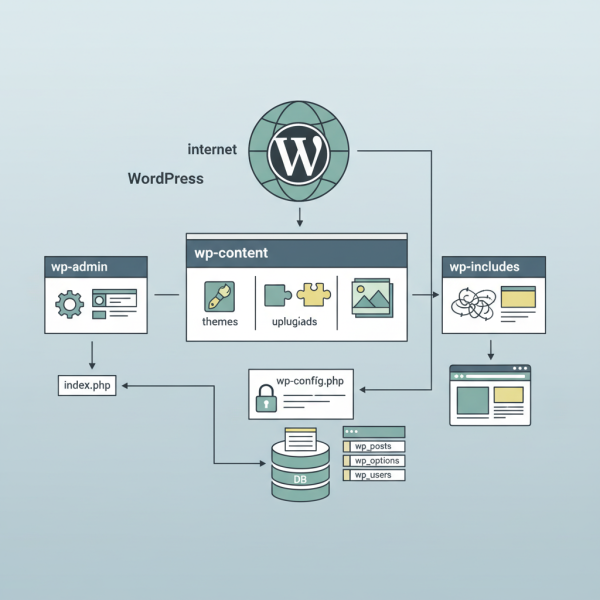
A standard WordPress installation organizes its files into a logical directory structure, each serving a distinct purpose. Familiarity with these directories is fundamental to navigating your site's backend and understanding where specific functionalities reside.
The Root Directory
The root directory is the top-most level of your WordPress installation. It contains crucial files that initiate WordPress, handle requests, and define global settings. Key files here include:
index.php: The main entry point for all website requests. It loads the WordPress core and ultimately displays your site.wp-config.php: A vital configuration file that holds database connection details, unique security keys, and various setup options..htaccess: A server configuration file, primarily used by Apache servers, that handles permalinks, redirects, and security rules.wp-load.php,wp-blog-header.php: Core files that handle the initial loading of WordPress and theme functions.
The wp-admin Directory
This directory houses all the files necessary for the WordPress administration dashboard. When you log in to manage your site, you are interacting with scripts and templates located within wp-admin. It contains files for post editing, user management, plugin and theme installation, and various backend functionalities.
The wp-includes Directory
The wp-includes directory is the backbone of WordPress, containing the core code, functions, and libraries that power the entire system. You should rarely modify files within this directory, as any changes can break your site and will be overwritten during future WordPress updates. It includes essential components like:
- Database abstraction layer.
- HTTP request handlers.
- Script and style enqueueing functions.
- Various helper functions and core classes.
The wp-content Directory
This is arguably the most important directory for customization, as it's where all your unique site assets and extensions are stored. Unlike wp-admin and wp-includes, you will frequently interact with and modify files within wp-content. It contains three primary subdirectories:
themes: Holds all installed themes, whether active or inactive. Each theme resides in its own subdirectory, containing templates, stylesheets, and JavaScript files that define your site's appearance.plugins: Stores all installed plugins. Each plugin has its own subdirectory, containing PHP files, scripts, and assets that extend WordPress's functionality, from SEO tools to e-commerce features.uploads: This directory stores all media files you upload to your WordPress site, such as images, videos, and documents. These are typically organized into year and month subdirectories for better management.
The WordPress Database Schema: How Data is Stored
Beyond the files on your server, WordPress relies heavily on a MySQL or MariaDB database to store virtually all of your site's dynamic content and settings. This includes posts, pages, comments, user information, plugin settings, and much more. Understanding its structure is key to advanced troubleshooting, migrations, and custom development.
Database Tables and Prefixes
By default, WordPress tables are prefixed with wp_ (e.g., wp_posts, wp_options). This prefix can be customized during installation, which is a good security practice to make it harder for attackers to guess table names. While the exact number of tables can vary based on plugins, a fresh installation typically includes around 12 core tables.
Key Core Database Tables
Here are some of the most critical tables in a standard WordPress database:
wp_posts: Stores all content types, including posts, pages, custom post types, and media attachments. Each row represents an individual piece of content.wp_postmeta: Contains metadata (custom fields) associated with entries in thewp_poststable. This is highly utilized by themes and plugins for storing extra information related to posts or pages.wp_comments: Stores all comments submitted on your posts and pages.wp_commentmeta: Holds metadata for comments, similar towp_postmetabut for comments.wp_users: Contains information about all registered users on your site, including usernames, passwords (hashed), and email addresses.wp_usermeta: Stores metadata for users, such as first name, last name, and specific settings or roles defined by plugins.wp_options: A crucial table that stores all site-wide settings, including the site title, tagline, active theme, permalink structure, and many plugin settings.wp_terms: Stores categories, tags, and custom taxonomies (like product categories for an e-commerce site).wp_term_taxonomy: Defines the taxonomy (category, tag, etc.) for each term and links it to a description.wp_term_relationships: Links objects (like posts or pages) to terms in thewp_termstable, establishing relationships between content and their categories/tags.
The wp-config.php File: The Heart of Your Setup
The wp-config.php file is a foundational component of every WordPress site. It's not part of the core distribution initially but is generated during the installation process or manually created from wp-config-sample.php. This file acts as a bridge between your WordPress files and your database, and also defines critical security and performance settings.
Key configurations found in wp-config.php include:
- Database Settings: Defines the database name (DB_NAME), username (DB_USER), password (DB_PASSWORD), and host (DB_HOST) that WordPress uses to connect to your database.
- Authentication Unique Keys and Salts: These are security keys that make your site more secure by making it harder to crack passwords and hijack sessions. They should be unique strings generated randomly.
- Table Prefix: The
$table_prefixvariable specifies the prefix for your database tables, enhancing security and allowing multiple WordPress installations in one database. - Debug Mode: The
WP_DEBUGconstant can be set totrueto display errors and warnings, invaluable for development and troubleshooting, but should befalseon live sites. - Memory Limit: Defines the maximum amount of memory a script can consume, often adjusted to prevent "out of memory" errors.
How It All Works Together: A Brief Workflow
When a visitor accesses your WordPress site, a series of interactions between these components takes place:
- The web server receives the request and directs it to the
index.phpfile in your WordPress root directory. index.phpthen loadswp-load.php, which in turn loadswp-config.php.wp-config.phpprovides the necessary database credentials, allowing WordPress to connect to your MySQL/MariaDB database.- The core WordPress files from
wp-includesare loaded, initializing essential functions and features. - WordPress queries the database (via tables like
wp_posts,wp_options) to retrieve content, settings, and other dynamic data based on the request. - The active theme (from
wp-content/themes) and any active plugins (fromwp-content/plugins) are loaded, applying their styling, functionality, and template logic. - Finally, all this information is compiled and rendered as an HTML page, which is then sent back to the visitor's browser.
Summary
Understanding the internal workings of a WordPress installation, from its file organization to its database schema and critical configuration file, is immensely beneficial. It empowers users to troubleshoot issues more effectively, customize their sites with greater confidence, perform migrations smoothly, and develop robust solutions. By grasping the roles of wp-admin, wp-includes, wp-content, the various database tables, and the pivotal wp-config.php file, you gain a deeper appreciation for the architecture that supports millions of websites worldwide.
Comprehension questions
 What are the primary purposes of the <code>wp-admin</code> and <code>wp-includes</code> directories in a WordPress installation?Name three crucial database tables in WordPress and briefly describe the type of content each stores.Explain the significance of the <code>wp-config.php</code> file, listing at least three key configurations it defines.Describe the basic workflow from a visitor requesting a WordPress page to the final HTML rendering, highlighting the interaction between files and the database.
Community Poll
Next Lesson

Course Contents : Mastering WordPress Site Maintenance
- >> 2.
 Core Components, File Structure, and Database Schema