Introduction to Web Server Stacks
- -->> 2. Introduction to Web Server Stacks
What you'll learn
 Web Server ComponentsDatabase Management SystemsServer-Side ScriptingLocal Development Environments
Introduction to Web Server Stacks
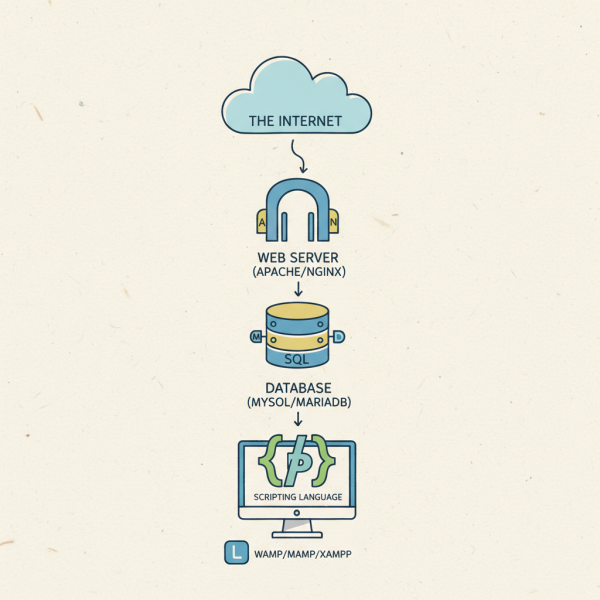
Whether you're building a simple static site or a complex dynamic application, your project relies on a stack of technologies working in harmony. This article will demystify these core components, focusing on the essential elements that comprise a local web server setup: the web server itself (Apache or Nginx), the database system (MySQL or MariaDB), and the server-side scripting language (PHP). Grasping these concepts provides a solid foundation for aspiring and experienced developers alike.
Understanding Web Server Stacks
A web server stack refers to the collection of software components required to host and run a website or web application. These components are designed to work together to deliver web pages to users, process data, and execute server-side logic. For local development, setting up such a stack on your personal computer allows you to test and develop applications without needing to deploy them to a live server, providing an isolated and efficient working environment.
The primary advantage of a local development environment is the ability to iterate quickly. Changes can be made and tested instantly, without concerns about affecting a live production site or incurring hosting costs during the development phase. It also offers a safe sandbox to experiment with new features and configurations.
The Web Server: Apache and Nginx
The web server is the backbone of any web application, responsible for accepting HTTP requests from clients (web browsers) and serving back HTTP responses, typically HTML pages, images, and other files. The two most prominent choices for web servers are Apache and Nginx, each with distinct strengths.
Apache HTTP Server
Apache has been the most widely used web server for decades, known for its robustness, flexibility, and extensive module ecosystem. It's an open-source project maintained by the Apache Software Foundation. Apache handles requests by creating a new process or thread for each connection, which can be resource-intensive under very high traffic but offers great stability and configurability.
Key features of Apache include support for a wide range of operating systems, powerful `.htaccess` files for directory-level configuration, and strong community support. Its mature module system allows developers to extend its functionality easily, from security enhancements to content compression and URL rewriting.
Nginx (Engine-X)
Nginx, pronounced "engine-x," emerged as a high-performance alternative to Apache, particularly excelling at handling concurrent connections. Unlike Apache's process-per-request model, Nginx uses an asynchronous, event-driven architecture, making it highly efficient with system resources. This design allows Nginx to manage a large number of simultaneous connections with a smaller memory footprint.
Nginx is frequently used for:
- Serving static content quickly and efficiently.
- Acting as a reverse proxy, distributing incoming traffic to multiple backend servers.
- Load balancing to improve application performance and reliability.
- SSL termination to offload encryption tasks from backend servers.
While Apache is often praised for its ease of configuration and `.htaccess` flexibility, Nginx is favored in high-traffic environments and microservices architectures due to its speed and efficiency in handling concurrent connections.
The Database Management System: MySQL and MariaDB
For dynamic web applications, a database is indispensable for storing and retrieving structured data. This data can include user profiles, product inventories, article content, and much more. MySQL and MariaDB are the leading open-source relational database management systems (RDBMS) commonly used in web server stacks.
MySQL
MySQL is the world's most popular open-source relational database. It is renowned for its speed, reliability, and ease of use. Owned by Oracle Corporation, MySQL powers a vast number of websites and applications, from small personal blogs to large-scale enterprise systems. It organizes data into tables with rows and columns, allowing for efficient querying and data manipulation using Structured Query Language (SQL).
Its widespread adoption means extensive documentation, a large community, and compatibility with numerous programming languages and tools, making it a go-to choice for many developers and businesses.
MariaDB
MariaDB is a community-developed, commercially supported fork of the MySQL relational database management system. It was created by the original developers of MySQL after its acquisition by Oracle, aiming to keep it free and open-source. MariaDB maintains high compatibility with MySQL, meaning applications designed for MySQL can often run on MariaDB without significant modifications.
Key motivations behind MariaDB's development included ensuring its continued open-source nature and offering performance improvements and new features that might not be available in MySQL. It provides several new storage engines and enhanced performance features, making it a strong competitor and a popular choice in modern web development stacks.
The Scripting Language: PHP
PHP (Hypertext Preprocessor) is a widely-used open-source general-purpose scripting language especially suited for web development. It is embedded directly into HTML, allowing developers to generate dynamic content and interact with databases. When a web server receives a request for a PHP file, the PHP interpreter processes the script, generates HTML, and sends it back to the browser.
PHP's primary role in a web server stack is to add dynamic functionality to websites. Instead of serving static HTML files, PHP scripts can:
- Connect to databases (like MySQL or MariaDB) to fetch or store data.
- Process form data submitted by users.
- Generate custom web pages based on user input or stored data.
- Manage user sessions and authentication.
- Interact with file systems on the server.
Its ease of learning, extensive documentation, and vast ecosystem of frameworks (like Laravel, Symfony, and CodeIgniter) have contributed to its enduring popularity. PHP forms a critical link between the web server and the database, translating requests into actions and data into presentable web content.
Putting It All Together: LAMP/LEMP Stacks
These components often come bundled together in popular configurations known by acronyms. The most famous are LAMP and LEMP.
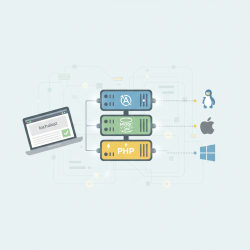
- LAMP: Stands for Linux, Apache, MySQL, and PHP. This traditional stack runs on a Linux operating system, uses Apache as the web server, MySQL for the database, and PHP for server-side scripting. It's a widely adopted and battle-tested combination.
- LEMP: Stands for Linux, Nginx (Engine-X), MySQL/MariaDB, and PHP. This stack replaces Apache with Nginx, leveraging Nginx's efficiency, especially for high-traffic or static content serving, while retaining the power of MySQL/MariaDB and PHP.
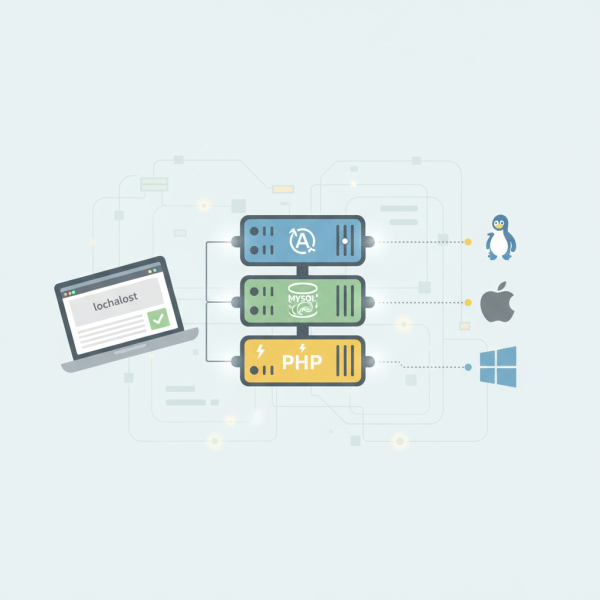
The "L" for Linux signifies that these stacks are typically deployed on Linux-based operating systems, though Apache, MySQL, and PHP can also run on Windows (WAMP) or macOS (MAMP).
Setting Up a Local Environment
For developers, setting up these components individually can be time-consuming. Fortunately, integrated development environments like XAMPP (cross-platform, Apache, MySQL, PHP, Perl), WAMP (Windows, Apache, MySQL, PHP), and MAMP (macOS, Apache, MySQL, PHP) bundle all the necessary software into a single, easy-to-install package. These tools provide a convenient way to get a local web server environment up and running quickly, allowing developers to focus on building their applications.
Conclusion
Understanding the core components of a web server stack – the web server (Apache/Nginx), the database (MySQL/MariaDB), and the scripting language (PHP) – is fundamental to modern web development. Each component plays a vital and distinct role, working synergistically to serve dynamic web content efficiently. Mastering these technologies provides developers with the knowledge to build, maintain, and troubleshoot web applications effectively, whether on a local machine or a production server.
Comprehension questions
 What are the primary functions of a web server like Apache or Nginx in a web server stack?How do MySQL and MariaDB differ, and what is their shared purpose within a web environment?Explain how PHP facilitates dynamic content generation and interacts with other stack components.What do the acronyms LAMP and LEMP stand for, and what do they represent?
Community Poll
Next Lesson
Course Contents : WordPress Local Development Environments
- >> 2.
 Introduction to Web Server Stacks