File Structure and Template Hierarchy
- -->> 2. File Structure and Template Hierarchy
What you'll learn
 WordPress Theme ArchitectureTemplate File FunctionsWordPress Template HierarchyTheme Customization and Development
Understanding the internal architecture of a WordPress theme is a foundational skill for any developer aiming to customize, extend, or build themes from scratch. Far from being a monolithic block of code, a WordPress theme is a collection of interconnected files, each serving a specific purpose in rendering the various parts of your website. Deconstructing this typical file structure reveals a logical organization designed to efficiently display different content types and provide flexibility for developers. This deep dive will illuminate the roles of key template files and the underlying principles that govern their use, empowering you with the knowledge to navigate and manipulate themes effectively.
The Core Theme Files
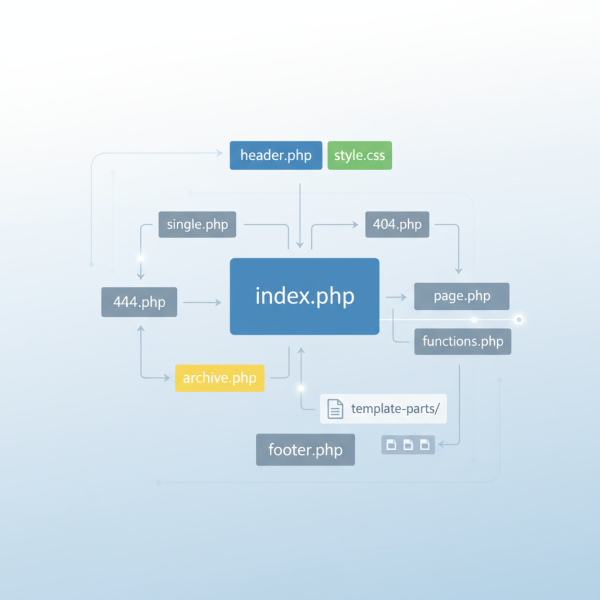
At its most basic, every WordPress theme requires just two files to function: style.css and index.php. The style.css file is not only responsible for the theme's visual styling but also contains a critical header section with metadata that WordPress uses to identify the theme. The index.php serves as the primary fallback template, meaning if WordPress cannot find a more specific template file for a particular page, it will always revert to index.php to display content.
While these two files are sufficient for a minimal theme, any practical and feature-rich WordPress theme will incorporate a much broader array of template files. These additional files allow for granular control over the display of different content types, such as single posts, pages, archives, search results, and more.
Understanding Template Hierarchy
The concept of the WordPress Template Hierarchy is paramount to comprehending theme file structure. It dictates the order in which WordPress searches for and selects template files to generate a page. When a user requests a URL, WordPress evaluates the type of content being requested (e.g., a single post, a category archive, a static page) and then follows a predefined hierarchy to find the most specific template file available in the theme. If a more specific file exists, it will be used; otherwise, WordPress moves down the hierarchy until it finds a suitable, more general template, eventually falling back to index.php.
This hierarchy allows developers to create highly customized layouts for specific content types without needing to rewrite entire sections of the theme. For example, you can have a general archive.php for all archives, but also a more specific category.php to style category archives differently, or even category-slug.php for a particular category.
Key Template Files and Their Purposes
Most WordPress themes share a common set of template files, each with a designated role:
index.php: As mentioned, this is the main fallback template. It often contains the primary loop that displays posts and is used when no more specific template file is found.header.php: This file typically contains the opening HTML structure, including thedeclaration, the,, and openingtags. It also holds elements like the site title, navigation menu, and often incorporates thewp_head()function, which is vital for plugins and theme features.footer.php: Conversely, this file contains the closing HTML tags for theandelements. It usually includes the site footer content, copyright information, and thewp_footer()function, which is essential for scripts and other elements that need to be loaded at the end of the page.sidebar.php: This template file is used to display widgetized areas, commonly referred to as sidebars. Themes can include multiplesidebar.phpfiles (e.g.,sidebar-left.php,sidebar-footer.php) to define different widget areas.front-page.php: This template is specifically for the site's static front page (if configured in Settings > Reading). It overrideshome.phpandindex.phpfor the front page.home.php: If the front page is set to display your latest posts, thenhome.phpwill be used for that blog posts index page. Iffront-page.phpexists,home.phpserves the blog page if it's not the front page.single.php: This template is responsible for displaying a single post. When you click on an individual blog post, this is the file that WordPress will typically use to render its content.page.php: Similar tosingle.php, but specifically for displaying individual static pages. It allows for different layouts for pages compared to posts.archive.php: This is a general template for displaying archives of posts, such as category archives, tag archives, date-based archives, and author archives.category.php,tag.php,author.php,date.php: These are more specific archive templates that overridearchive.phpfor their respective content types. For instance,category.phpis used for category archives, andtag.phpfor tag archives.search.php: This template is used to display the results of a search query on your WordPress site. It typically contains a loop to list relevant posts or pages.404.php: This template is displayed when WordPress cannot find the requested content, resulting in a "Page Not Found" error. It's an opportunity to guide users back to relevant parts of the site.comments.php: This file is typically included insingle.phporpage.phpto display the comments section for posts and pages, allowing users to read and submit comments.
Functions and Styles
Beyond the structural templates, two other files are critical for theme functionality and appearance:
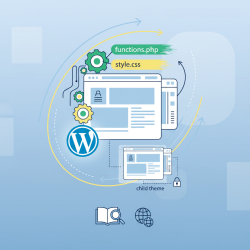
functions.php: Often referred to as the "theme functions file," this is where developers add custom features, theme-specific functions, enable theme support for various WordPress features (like post thumbnails, custom menus), register navigation menus, widget areas, enqueue scripts and styles, and integrate with WordPress hooks and filters. It behaves like a plugin for your theme, executing code on every page load.style.css: While mentioned for its metadata, its primary role is to define the visual styling of the theme using CSS rules. This file dictates colors, fonts, layouts, responsiveness, and all other aesthetic aspects of your website.
Template Parts and Organization
Modern WordPress theme development encourages breaking down large template files into smaller, reusable "template parts." This is achieved using functions like get_template_part(), get_header(), get_footer(), and get_sidebar(). For example, instead of writing the post meta information in every template that displays a post, you can create a file like template-parts/content-meta.php and call it with get_template_part('template-parts/content', 'meta');. This approach promotes modularity, reduces redundancy, and makes themes easier to maintain and understand.
Many themes use a dedicated directory, often named template-parts, to store these smaller, reusable snippets of code. This organizational strategy helps keep the theme root directory clean and provides a clear separation of concerns for different content blocks.
Conclusion
Deconstructing the typical WordPress theme file structure reveals a sophisticated yet logical system designed for flexibility and extensibility. By understanding the purpose of files like index.php, header.php, footer.php, and the various content-specific templates, along with the powerful functions.php and the crucial Template Hierarchy, developers gain complete control over their WordPress sites. This knowledge is indispensable for effective theme customization, debugging, and for building robust, maintainable WordPress themes that precisely meet design and functionality requirements, ensuring a solid foundation for any web project.
Comprehension questions
 What are the two essential files required for every WordPress theme to function, and what is the primary role of each?Explain the concept of the WordPress Template Hierarchy and why it is crucial for theme developers.Name at least three different template files and describe their specific purposes in displaying website content.What is the primary function of the `functions.php` file, and how does it contribute to theme functionality?
Community Poll
Next Lesson
Course Contents : WordPress Themes and Site Customization
- >> 2.
 File Structure and Template Hierarchy