The Essential Guide to Reusable Blocks and Patterns
- -->> 19. The Essential Guide to Reusable Blocks and Patterns
What you'll learn
 Content ConsistencyWorkflow EfficiencySimplified Website MaintenanceStrategic Content Reusability
Whether you're managing a blog, an e-commerce site, or a corporate portal, the need to maintain a cohesive brand identity while rapidly publishing new content is constant. This is where the power of reusable blocks and patterns comes into play, offering a revolutionary approach to designing and deploying content sections across your entire digital landscape.
Understanding Reusable Blocks and Patterns
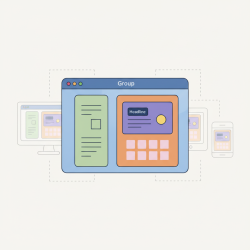
At their core, reusable blocks and patterns are pre-designed content sections that you can save and insert into multiple pages or posts. Think of them as templates for specific content elements. Instead of rebuilding a custom call-to-action, a team member profile, or a complex layout from scratch every time, you simply create it once, save it, and then reuse it whenever needed. This concept dramatically reduces repetitive work and ensures a uniform design.
A reusable block is typically a single block or a small group of blocks that you've customized and saved. When you update a reusable block, those changes are reflected everywhere that block is used. A block pattern, on the other hand, is a collection of pre-arranged blocks designed to create a specific layout or section. Patterns can be provided by themes, plugins, or created by users, often serving as starting points for more complex designs.
The Cornerstone of Consistency
One of the most significant advantages of employing reusable blocks and patterns is their ability to enforce design consistency across your website. Branding guidelines often dictate specific fonts, colors, spacing, and element arrangements. Manually ensuring these are met on every new page or post is not only time-consuming but also prone to human error. Reusable sections eliminate this risk.
By saving key design elements as reusable blocks, you guarantee that every instance of that element adheres to your brand's visual identity. This leads to a more professional, trustworthy, and visually appealing user experience, reinforcing your brand's presence with every piece of content.
Supercharging Your Workflow Efficiency
Time is a valuable commodity in content creation. Building complex layouts, adding consistent calls-to-action, or showcasing similar content structures can consume hours. Reusable blocks and patterns drastically cut down on this development time.
- Rapid Deployment: Once a section is designed and saved, it can be inserted into any page or post with just a few clicks, accelerating the content publishing process.
- Reduced Manual Labor: Eliminates the need to repeatedly configure settings, styles, and content for common elements.
- Focus on Content: Content creators can spend more time on crafting compelling narratives and less time on intricate design adjustments.
This efficiency gain is particularly noticeable for teams, as it standardizes the creation process and allows multiple contributors to produce consistent content without extensive design training.
Streamlining Updates and Maintenance
Imagine you have a custom call-to-action section that appears on fifty different product pages. If your marketing strategy shifts and you need to update the button text or link, making those changes manually on each of the fifty pages would be a daunting task. With a reusable block, this scenario transforms into a simple, single edit.
When you modify a reusable block, those modifications automatically propagate to every location where that block has been inserted. This central control point for widespread elements is invaluable for website maintenance, ensuring that your content remains current and accurate across your entire site with minimal effort.
Practical Applications and Use Cases
The versatility of reusable blocks and patterns makes them suitable for a wide array of content elements. Here are some common and highly effective applications:
- Call-to-Action Sections: Buttons, forms, and persuasive text designed to prompt user action.
- Team Member Profiles: Consistent display of photos, names, titles, and social links for staff.
- Testimonials or Quotes: Uniform presentation of customer feedback or impactful statements.
- Pricing Tables: Standardized layouts for presenting different service tiers or product plans.
- Service Feature Blocks: Icons, headings, and descriptions for various services offered.
- Custom Layouts: Complex column arrangements, hero sections, or multi-block components that are frequently used.
- Author Bios: A consistent way to display author information at the end of blog posts.
By identifying elements that frequently recur on your site, you can strategically convert them into reusable assets, maximizing their utility and impact.
Creating and Managing Reusable Blocks
The process of creating and managing reusable blocks is straightforward:
- Design Your Section: Build the desired content section using individual blocks (e.g., an image block, a heading block, a paragraph block, and a button block).
- Select and Save: Select all the blocks that form your custom section. In most block editors, you'll find an option to "Add to Reusable blocks" or "Create reusable block."
- Name Your Block: Give it a descriptive name that makes it easy to identify later.
- Insert Anywhere: When creating new content, simply search for your named reusable block in the block inserter and add it to your page or post.
- Edit Globally: To update the block across your site, insert it into any page, make your edits, and save the reusable block. All instances will update.
- Manage Your Library: Most platforms provide a dedicated interface to view, edit, or delete your saved reusable blocks.
Block patterns are often managed differently, typically being imported or enabled through themes and plugins, though modern editors allow users to create and register custom patterns as well.
Best Practices for Effective Implementation
To get the most out of reusable blocks and patterns, consider these best practices:
- Clear Naming Conventions: Use descriptive names (e.g., "CTA - Primary Product," "Team Member Card," "Testimonial Block") to easily find and understand their purpose.
- Keep Blocks Focused: Design blocks for specific purposes rather than trying to make one block do too much. Simpler blocks are often more versatile.
- Regular Audits: Periodically review your library of reusable blocks and patterns. Remove outdated ones and update those that need refinement.
- Educate Your Team: Ensure all content creators understand how to use and manage these powerful tools to maintain consistency and efficiency.
- Consider Permissions: If working with a team, define who has permission to create, edit, or delete reusable blocks to prevent unintended changes.
Summary
Reusable blocks and patterns are indispensable tools for modern content creators, fundamentally transforming how websites are built and maintained. By enabling the saving and consistent deployment of custom-designed sections, they dramatically enhance design uniformity, accelerate content production workflows, and simplify site-wide updates. Embracing these features not only saves valuable time and resources but also contributes significantly to a polished, professional, and consistent brand presentation across all digital touchpoints.
Comprehension questions
 What is the primary benefit of using reusable blocks and patterns in content creation?How do reusable blocks contribute to website consistency and brand identity?Describe a practical use case for a reusable block that could significantly save time.What is the key difference between a reusable block and a block pattern, particularly in their origin and purpose?
Community Poll
Next Lesson
Course Contents : Website Speed Performance Optimization
- >> 19.
 The Essential Guide to Reusable Blocks and Patterns