Effective Browser Caching Strategies
- -->> 3. Effective Browser Caching Strategies
What you'll learn
 HTTP Caching HeadersStatic Asset CachingCache InvalidationWeb Performance Optimization
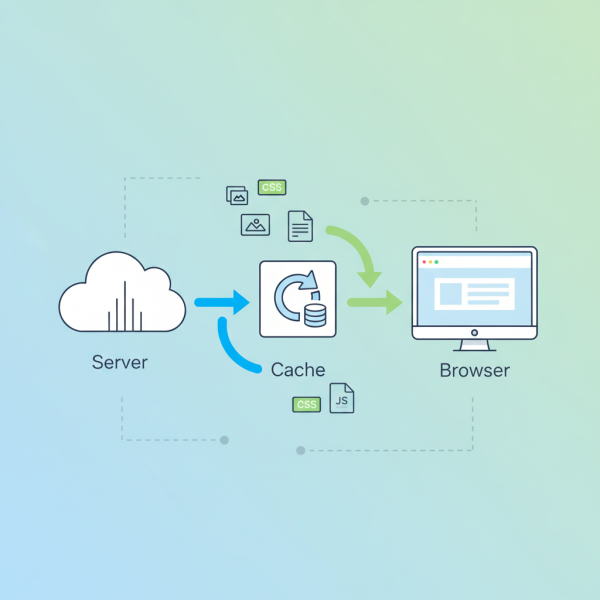
Browser caching is a fundamental technique for optimizing web performance, allowing web browsers to store copies of static assets like images, stylesheets, and JavaScript files locally. By minimizing redundant data transfers between the client and server, caching significantly reduces page load times, conserves bandwidth, and improves the overall user experience. This strategy is crucial for modern web applications that often rely on numerous static resources, making efficient caching an indispensable part of frontend and backend optimization efforts.
Understanding Browser Caching Fundamentals
At its core, browser caching works by instructing the client's browser to save certain resources for future use. When a user revisits a page or navigates to another page that uses the same cached resource, the browser can retrieve it from its local cache instead of requesting it again from the server. This process bypasses the network latency and server processing overhead, leading to faster content delivery.
The effectiveness of caching largely depends on correctly configuring HTTP response headers. These headers communicate to the browser how long a resource can be considered fresh and whether it needs to be revalidated with the server before use. Without proper caching headers, browsers will typically re-request resources more frequently than necessary, negating potential performance gains.
Key HTTP Caching Headers Explained
Several HTTP headers play a critical role in controlling browser caching behavior. Understanding how each works is essential for implementing robust caching strategies:
- Cache-Control: This is the most powerful and widely used caching header. It provides fine-grained control over caching directives for both public caches (proxies) and private caches (browsers). Key directives include:
max-age=[seconds]: Specifies the maximum amount of time a resource is considered fresh.no-cache: Forces revalidation with the server before using the cached resource. The resource is still cached, but a conditional request is always made.no-store: Prohibits caching of the resource by any cache.public: Allows the resource to be cached by any cache.private: Allows the resource to be cached only by a private browser cache.immutable: Indicates that the resource will not change during its freshness lifetime.
- Expires: An older header that specifies an absolute expiration date and time after which the resource is considered stale. While still supported,
Cache-Control'smax-ageis generally preferred for its relative timing and greater flexibility. - Last-Modified / If-Modified-Since: The server sends
Last-Modifiedwith the date and time the resource was last altered. The browser can then send anIf-Modified-Sinceheader in subsequent requests. If the resource hasn't changed, the server responds with a 304 Not Modified status, saving bandwidth. - ETag / If-None-Match: An
ETag(entity tag) is a unique identifier generated by the server for a specific version of a resource. The browser stores thisETagand sends it back in anIf-None-Matchheader. If theETagmatches the server's current version, a 304 Not Modified response is sent.ETagis generally more precise thanLast-Modified.
Effective Browser-Side Caching Strategies
Implementing effective caching involves a combination of these headers and thoughtful resource management:
Long-Lived Caches for Static Assets: For resources that rarely change, such as CSS files, JavaScript bundles, images, and fonts, set very long max-age values (e.g., one year) along with the immutable directive. This ensures browsers cache these files aggressively. To handle updates, employ "cache busting" by appending a version number or hash to the filename (e.g., style.v123.css). When the file changes, its URL changes, forcing the browser to download the new version.
Revalidation for Dynamic or Frequently Updated Content: For resources that change more often but don't need real-time freshness, use Cache-Control: no-cache in conjunction with Last-Modified and/or ETag. This strategy always revalidates with the server, but if the resource hasn't changed, a lightweight 304 response is returned.
No Caching for Sensitive or Real-Time Data: For highly sensitive data or information that must always be current, use Cache-Control: no-store. This prevents the browser and any intermediate caches from storing the resource at all, ensuring maximum freshness and security.
Public vs. Private Caching: Use public for resources that can be shared across multiple users (e.g., static assets served from a CDN) and private for user-specific content that should only be cached by the individual user's browser.
Cache Invalidation Techniques
While long cache durations are desirable for performance, effective cache invalidation is equally important to ensure users receive updated content when necessary. Cache busting, as mentioned, is the primary technique for static assets. This involves changing the URL of a resource when its content changes. This might be done by:
- Appending a query string (e.g.,
?v=1.0.1) - Embedding a content hash in the filename (e.g.,
app.b8f7d.js)
For revalidated content, the server simply ensures that the Last-Modified date or ETag accurately reflects the current state of the resource. When the resource genuinely changes, the server sends a new `ETag` or `Last-Modified` date, causing the browser to download the new version.
Tools and Best Practices for Implementation
When implementing caching strategies, leverage browser developer tools to inspect network requests and verify caching headers. Tools like Chrome DevTools allow you to see if a resource was served from disk cache, memory cache, or the network, and to examine its response headers. Regularly review your caching policies as application requirements evolve.
Consider using Content Delivery Networks (CDNs) for static assets. CDNs inherently leverage aggressive caching strategies and distribute your content globally, further reducing latency. Server-side configurations, whether in web servers like Nginx or Apache, or within application frameworks, provide the means to set these crucial HTTP caching headers effectively.
Conclusion
Browser caching is a powerful optimization technique that significantly enhances web application performance and user experience. By diligently configuring HTTP caching headers like Cache-Control, Expires, Last-Modified, and ETag, developers can control how browsers store and retrieve resources. Strategies range from long-lived caches for immutable assets to strict revalidation for dynamic content, all supported by effective cache invalidation techniques like cache busting. Implementing these rules minimizes redundant data transfers, conserves bandwidth, and ultimately leads to faster, more responsive web applications.
Comprehension questions
 What is the primary benefit of implementing browser caching strategies?Which HTTP header is considered the most powerful for controlling caching directives and what are its key components?When would you use the `no-store` directive in the `Cache-Control` header, and what does it achieve?
Community Poll
Next Lesson

Course Contents : Website Speed Performance Optimization
- >> 3.
 Effective Browser Caching Strategies