WordPress File Hierarchy: wp-admin, wp-content, and wp-includes
- -->> 26. WordPress File Hierarchy: wp-admin, wp-content, and wp-includes
What you'll learn
 WordPress File Structurewp-admin Directorywp-content Directorywp-includes Directory
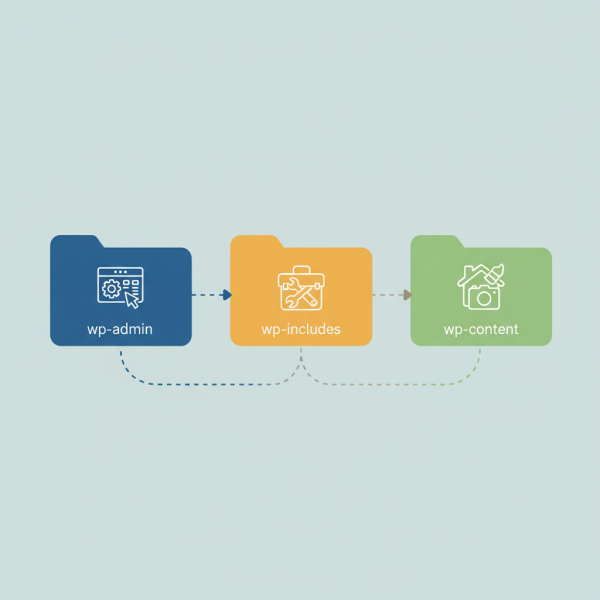
Understanding the foundational structure of any content management system is paramount for effective management, customization, and troubleshooting. For WordPress, this means getting intimately familiar with its file hierarchy. At the heart of every WordPress installation are three crucial directories: wp-admin, wp-content, and wp-includes. Each plays a distinct yet interconnected role in the functionality and appearance of your website. A clear grasp of what each directory contains and its purpose is not just for developers; it empowers site owners to better understand how their site operates and how to maintain it efficiently.
The Core of WordPress: An Overview
When you install WordPress, these three directories form the backbone of your site alongside a few core files like wp-config.php and index.php. Together, they manage everything from the user interface of your dashboard to the display of your website's front end, and handle all the behind-the-scenes processes that make WordPress so powerful and flexible. While WordPress abstracts much of this complexity, knowing where to find specific components is invaluable.
wp-admin: The Control Center
The wp-admin directory is arguably the most frequently interacted-with part of the WordPress file system for site administrators. It houses all the files responsible for powering the WordPress administration area, commonly known as the dashboard. This is where you write posts, manage pages, upload media, moderate comments, customize themes, install plugins, and configure various site settings.
Inside wp-admin, you'll find numerous PHP files and subdirectories that collectively render the administrative interface. For instance, admin.php is a primary loader for the admin panel, while other files like post.php, edit.php, and options.php handle the specific functionalities of creating posts, listing content, and managing general settings, respectively. It also contains JavaScript and CSS files specifically for styling and adding interactivity to the backend.
Modifying files within wp-admin is almost never recommended, as changes can lead to dashboard malfunctions and will be overwritten during WordPress core updates. All administrative interactions, from user management to plugin activation, are orchestrated through the scripts found here, making it the true operational hub for your website's backend.
wp-includes: The Essential Toolkit
The wp-includes directory is the workhorse of your WordPress site. It contains all the core files, functions, and libraries that WordPress needs to run. These are the fundamental components that power everything from database interactions to user authentication, template loading, and plugin API integration. Essentially, if wp-admin is the control panel, wp-includes is the engine room.
You'll find a vast collection of PHP files here, many of which contain essential functions. For example, functions.php (not to be confused with a theme's functions.php file) provides many core utilities, plugin.php manages plugin loading, and template.php handles template-related functions. This directory also stores various third-party libraries that WordPress leverages, such as jQuery, TinyMCE editor, and various classes for handling media, HTTP requests, and more.
It is critical to understand that the files within wp-includes are core WordPress files. **You should never directly edit any file within this directory.** Any changes made here will be lost during core updates and could potentially break your entire site. Customizations and new functionalities should always be implemented via themes or plugins, leveraging WordPress's extensive API.
wp-content: Where Customization Resides
The wp-content directory is where all your unique website content, themes, and plugins are stored. This is the most frequently modified directory by users, as it’s the home for everything that makes your WordPress site distinct from others. Unlike wp-admin and wp-includes, which contain WordPress core files that should remain untouched, wp-content is designed for user-generated and extended content.
Within wp-content, you will find several important subdirectories:
themes: This directory contains all the themes installed on your WordPress site, whether active or inactive. Each theme resides in its own subdirectory here. Best practice dictates using child themes for customizations to preserve original theme files during updates.plugins: Similarly, this directory houses all your installed plugins, with each plugin in its dedicated folder. Plugins extend WordPress functionality, adding features like SEO tools, contact forms, or e-commerce capabilities.uploads: This is where all your media files (images, documents, videos, etc.) are stored after being uploaded through the WordPress media library. Files are typically organized into year and month subdirectories for easy management.
Comprehension questions
 What is the primary function of the wp-admin directory in a WordPress installation?Why is it strongly advised never to modify files directly within the wp-includes directory?Which three main subdirectories are typically found within wp-content, and what is their purpose?How does understanding the WordPress file hierarchy contribute to better troubleshooting and security practices?
Community Poll
Next Lesson

Course Contents : Website Speed Performance Optimization
- >> 26.
 WordPress File Hierarchy: wp-admin, wp-content, and wp-includes