The Anatomy of a WordPress Post
- -->> 15. The Anatomy of a WordPress Post
What you'll learn
 WordPress Post StructureDate and Time ManagementAuthor AttributionFeatured Images Optimization
Understanding the fundamental components of a WordPress post is crucial for anyone looking to effectively manage a website or blog. Beyond the primary text content, elements such as the post date, author information, and the featured image play vital roles in how your content is perceived, discovered, and engaged with by your audience. These seemingly simple details work in concert to establish credibility, improve search engine optimization, and enhance the overall user experience, transforming a mere block of text into a rich, informative, and visually appealing piece of online communication. Delving into the anatomy of these elements provides a clearer picture of their individual significance and their collective impact on your digital presence.
The Significance of the Post Date
The post date is more than just a timestamp; it's a critical piece of metadata that informs readers about the timeliness and relevance of your content. For news sites, an up-to-date publication date is paramount. For evergreen content, a date might indicate when the information was last reviewed or updated, assuring readers of its continued accuracy.
WordPress automatically assigns the current date and time upon publication, but this can be easily modified. In the block editor, you can access the post settings panel to adjust the "Publish" date. This flexibility is particularly useful for scheduling posts in advance or backdating content to fit an editorial calendar. Strategically managing post dates can influence how your content appears in archives and search results.
Impact on SEO and User Perception:
- Freshness Factor: Search engines often prioritize newer content for certain queries, influencing your search ranking.
- Reader Trust: A recent date suggests current and reliable information, especially for rapidly evolving topics.
- Archival Organization: Dates are fundamental to how WordPress organizes content into monthly and yearly archives, helping users navigate older posts.
The Role of the Author
Every piece of content has an originator, and in WordPress, this is the author. Displaying author information adds a layer of professionalism and transparency to your website. It attributes work to individuals, which is particularly important for multi-author blogs, news portals, or expert-driven content sites.
The author's name is typically displayed alongside the post date and often links to an author archive page. This page lists all posts written by that specific author, creating a mini-portfolio and enhancing their online presence. For readers, knowing who wrote an article can build trust and allow them to follow content from specific contributors they admire or trust.
Credibility and Branding:
- Expert Authority: Highlighting authors with expertise in their field boosts the perceived authority of your content.
- Personal Branding: For individual bloggers or guest writers, the author box and archive page serve as valuable personal branding tools.
- Editorial Responsibility: Clearly defined authors demonstrate editorial accountability and a commitment to quality content.
WordPress user roles are inherently linked to author capabilities. Users with "Author" or "Editor" roles can create and manage their own posts, while "Administrator" has full control over all content and authors. Understanding these roles is crucial for managing content contributions effectively and securely.
The Power of the Featured Image
A featured image, also known as a post thumbnail, is the visual hero of your content. It’s the main image associated with a post and serves multiple critical functions across your website and beyond. From a user experience perspective, it's often the first visual element that captures attention, drawing readers into the article.
Featured images are prominently displayed in various locations: on your blog's homepage, category archives, search results within your site, and often at the top of the single post view itself. Crucially, they are also what social media platforms like Facebook, Twitter, and LinkedIn pull when your post is shared, making them essential for social media engagement and driving traffic back to your site.
Optimizing Featured Images:
Selecting and optimizing featured images is an art and a science. The image should be relevant to the content, visually appealing, and high-quality without being excessively large in file size. Proper optimization involves:
- Appropriate Dimensions: Use recommended dimensions for your theme to avoid cropping or distortion.
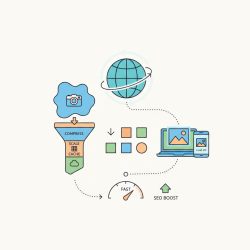
- Image Compression: Compress images to reduce file size, improving page load speed, which is a key SEO factor.
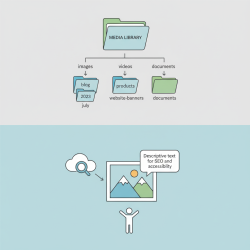
- Alt Text: Always add descriptive alt text. This is vital for accessibility (screen readers) and helps search engines understand the image content, contributing to image SEO.
- Branding: Incorporate your brand's style or logo subtly to reinforce recognition.
A compelling featured image can significantly increase click-through rates from social media and internal links, directly impacting reader engagement and website traffic.
Bringing it All Together: Cohesion and User Experience
Individually, dates, authors, and featured images are important. Collectively, they form a cohesive narrative that significantly enhances the user experience and bolsters your site’s search engine performance. A well-dated article with a recognized author and an engaging featured image projects professionalism and trust, inviting users to delve deeper.
From an SEO standpoint, these elements provide valuable signals to search engine algorithms. Dates help determine content freshness. Author profiles can contribute to E-E-A-T (Experience, Expertise, Authoritativeness, Trustworthiness) signals, especially important for YMYL (Your Money Your Life) topics. Optimized featured images contribute to overall page speed and provide additional content for image search results.
The synergy between these components ensures that content is not just published, but presented in a way that maximizes its potential reach and impact. Consistency in how these elements are managed across your entire site contributes to a polished, professional brand image.
Summary
In conclusion, the anatomy of a WordPress post extends far beyond its textual content, encompassing crucial elements like the post date, author information, and the featured image. The post date provides context for timeliness and aids in content organization and SEO. The author information establishes credibility and builds trust, contributing to both personal and brand authority. Meanwhile, the featured image acts as a powerful visual hook, enhancing engagement, improving social shares, and supporting search engine visibility through proper optimization. When these components are thoughtfully managed and integrated, they collectively contribute to a superior user experience, stronger content appeal, and optimized performance in search engine rankings, ultimately maximizing the effectiveness of every WordPress post.
Comprehension questions
 What is the primary function of a post date in WordPress, beyond simply showing when content was published?How does author information contribute to the credibility and branding of a WordPress website?Where are featured images typically displayed on a WordPress site, and why are they crucial for user engagement?Explain how the combination of dates, authors, and featured images collectively enhances both user experience and search engine optimization.
Community Poll
Next Lesson

Course Contents : Website Speed Performance Optimization
- >> 15.
 The Anatomy of a WordPress Post